


Question

Receiving "Task Type is Not Valid" error for Admin, but lower-level permissions can proceed as normal.

  • April 28, 2025
  • 4 replies
  • 82 views

Forum|alt.badge.img

Early last week, we started receiving the following error message when adding revenue lines to a new project. 
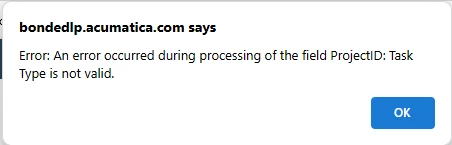
Here’s where it gets weird. We have a lower-level permissions set for the majority of the users that create new projects and enter the revenue lines, they are still able to do this without receiving the error. The error is only being received on the higher-level roles, including Admin., and it is only happening when creating the first line. If we have someone with the lower-level permissions go in and create the first line, the higher-level role can then go in and add any remaining revenue lines. Any ideas what could be causing this and how to fix? We have already cleared our browser history/cache, and tried utilizing several different browsers, each providing the same result. We are on 24R2.

4 replies

iqraharrison
Captain II
Forum|alt.badge.img+8
  • Captain II
  • April 28, 2025

@mnecaise hi! when the higher level users are creating a new task, are they specifying a different type on the task tab?


Forum|alt.badge.img
  • Author
  • Varsity I
  • April 28, 2025

@iqraharrison Hi Iqra! No ma’am, they are selecting Revenue Task on the task tab, then when going to the revenue tab as soon as the + is clicked the error is received. 


Chris Hackett
Community Manager
Forum|alt.badge.img
  • Acumatica Community Manager
  • July 2, 2025

Hi ​@mnecaise were you able to find a solution? Thank you!


Forum|alt.badge.img
  • Author
  • Varsity I
  • July 2, 2025

​@Chris Hackett Not really. Based on our findings it has to do with having delete rights for Projects. After troubleshooting, we determined that this issue started after the April 16th Acumatica Business Cloud Scheduled Maintenance was performed.  We had been live with 24R2 for a couple weeks prior to the maintenance and everything worked fine until the maintenance was performed. Based on Acumatica’s response this is a known issue, AC-329711, and it’s resolved in 25R1. The workaround provided by Acumatica, will not work for us. Based on the information we were provided on AC-329711, the error can be reproduced on all tenants, and this is not a settings issue for any access/roles. For us, this is only happening in our live tenant and only affects users with Project delete rights. I’m not 100% sure what we are experiencing is the same issue. Is there a place I can find full detailed information on issue AC-329711? 

For now, we have our own workaround based on what our employee’s permissions allow (they can’t add revenue lines if they have delete rights). We have permissions set where certain employees that can delete and others that can’t, and we work as a team to make sure that we are able to keep things moving until a long-term solution can be found. Any additional information you can provide would be appreciated. Thanks!


