Answer

Purchase Order with multiple AP Bills per line

  • May 2, 2025
  • 4 replies
  • 91 views

Forum|alt.badge.img

I’m trying to figure out why we can enter only one AP bill per line on Purchase Orders. Is that how they’re supposed to work? Is there a setting we can change? 

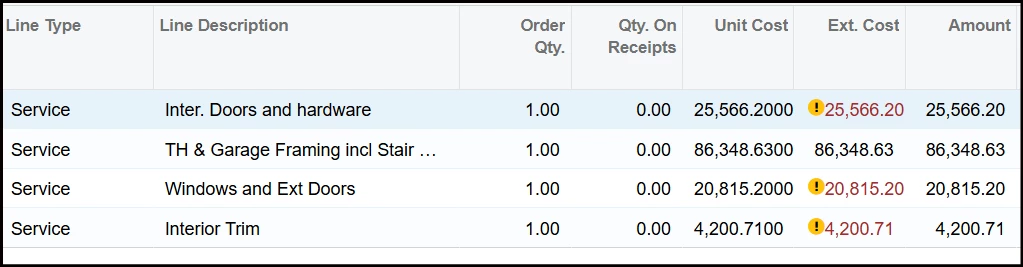
The scenario is this. A materials quote for a construction project has been entered with lump sum totals in each of 4 different cost codes. A single PO with 4 lines. But the amounts in each line will not be billed all at once. Several AP bills will be entered and eventually consume the total amount of that line. Our problem is I can enter only 1 AP bill applied to line #2. When I try to enter a 2nd AP bill, the system locks out line #2. I can’t apply any more bills on line #2. Why is that? 

I realize that using a subcontract instead of a PO would circumvent the issue. But since this is for materials only, isn’t the PO option more appropriate? 


Things to know that might impact replies…

Our line type is Service, and the Inventory ID is a non-stock item.

The self help training guides hint towards a “Purchase Receipt” screen, but It’s not available to me. Links to it are dead ends and I’ve even tried to manually point our URL to it (PO302000). All attempts just circle back to the launch screen I see every day when I first log in. 


Thank You in Advance!


Best answer by ricoybanez

@cgndm 

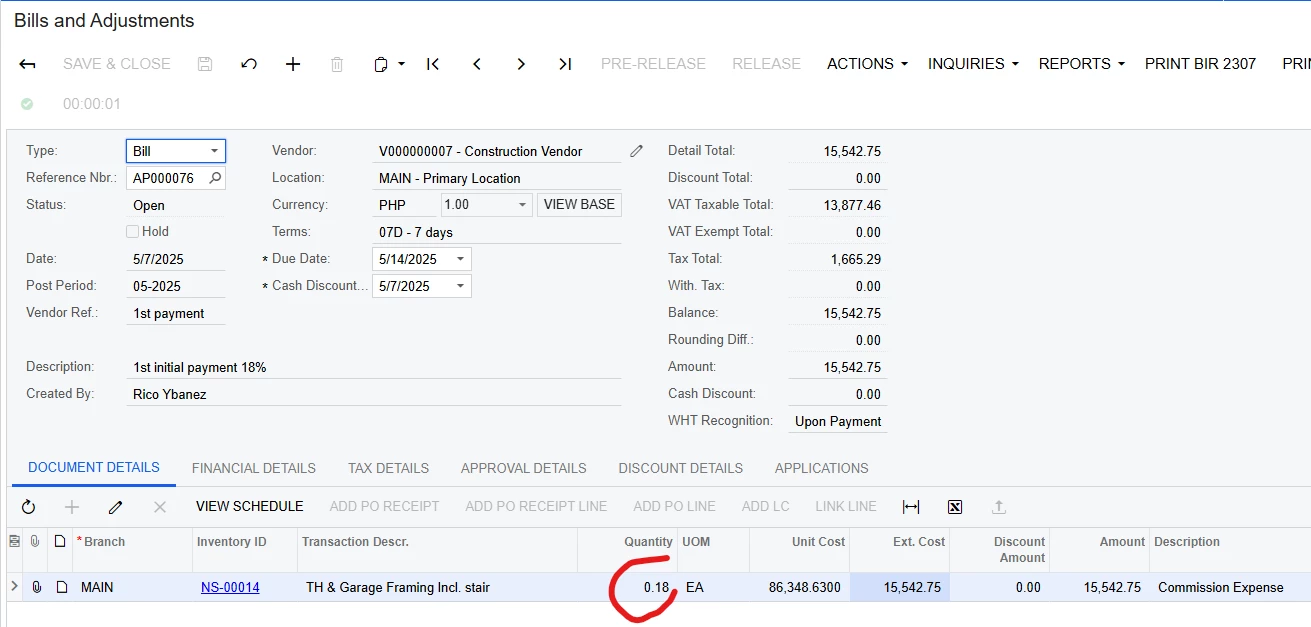
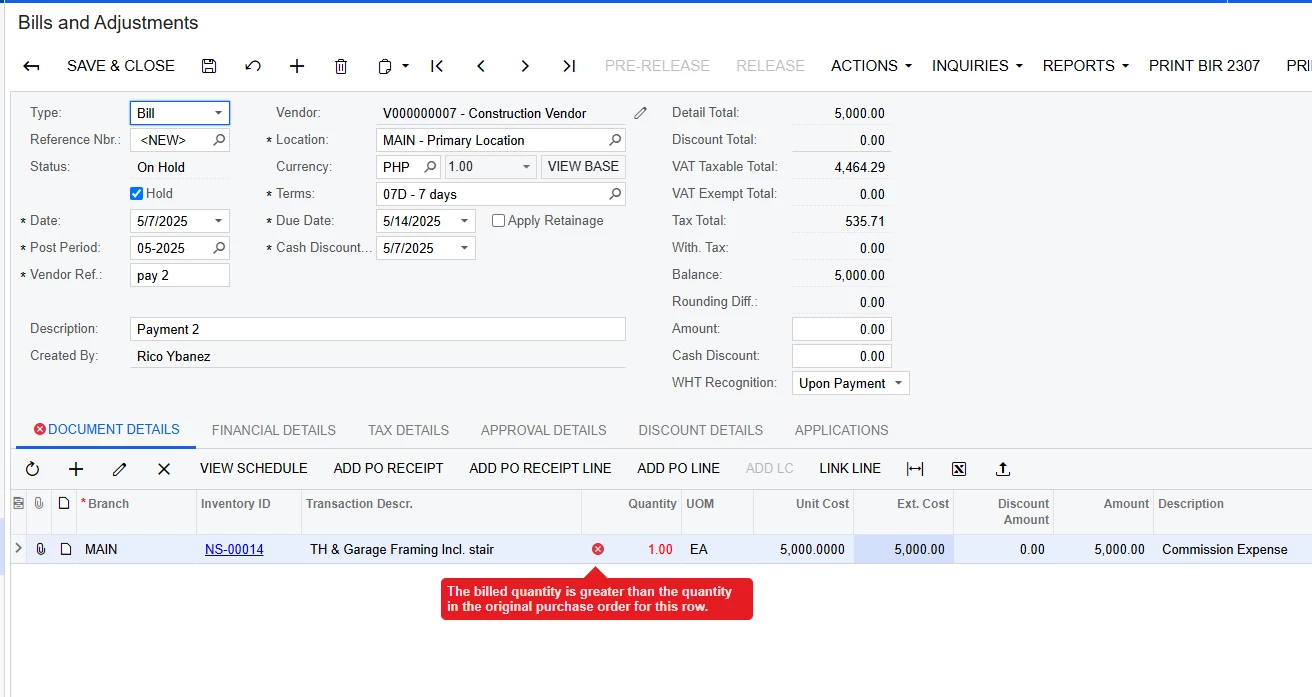
The system checks the quantity, when you pay it initially in the AP use quantity = 1 but the amount you pay is around 15K, I presumed so when you make a 2nd payment you use quantity again = 1 and the amount let’s say 5K then the system prompts an error. (Print screen below)


To resolve this, this is the process:
1. First initial Bill the quantity should be a percentage that will equal to the amount to be initially paid 
 
2. Then for the 2nd initial payment same process applies quantity should be in percentage or equal to decimal, let’s say another 10% paid
3. Same process applies all throughout until full 100% is paid or equal to decimal 1.00

Hope this helps. 

​​​​​


4 replies

iqraharrison
Captain II
Forum|alt.badge.img+8

@cgndm if you are trying to bill more, is there anything left open on the po line? for example on the PO, line one is for $50,000.  fast forward to the AP bill, is it a bill for the full amount or a portion of it? 

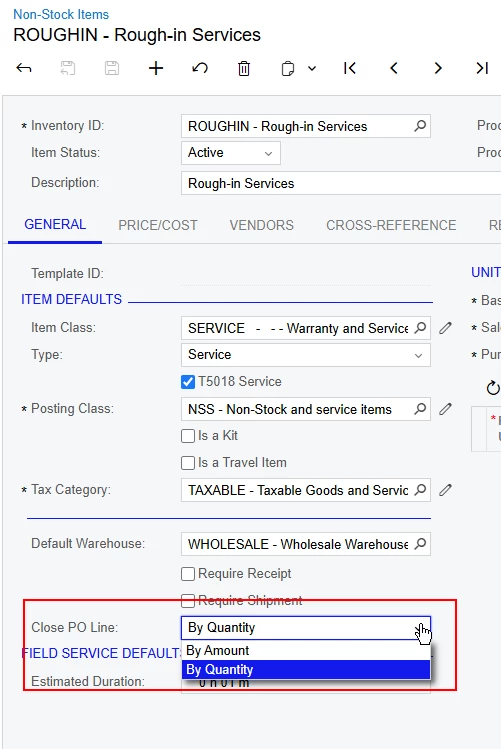
i would also take a look at the inventory item on the PO to see what the close PO line by is, if it’s set to quantity, that might be why you aren’t able to bill additional amounts even if the full amount hasn’t been billed.  you could try to change it to amount and see if that leaves the PO line open for additional billing


Forum|alt.badge.img
  • Author
  • Freshman I
  • May 2, 2025

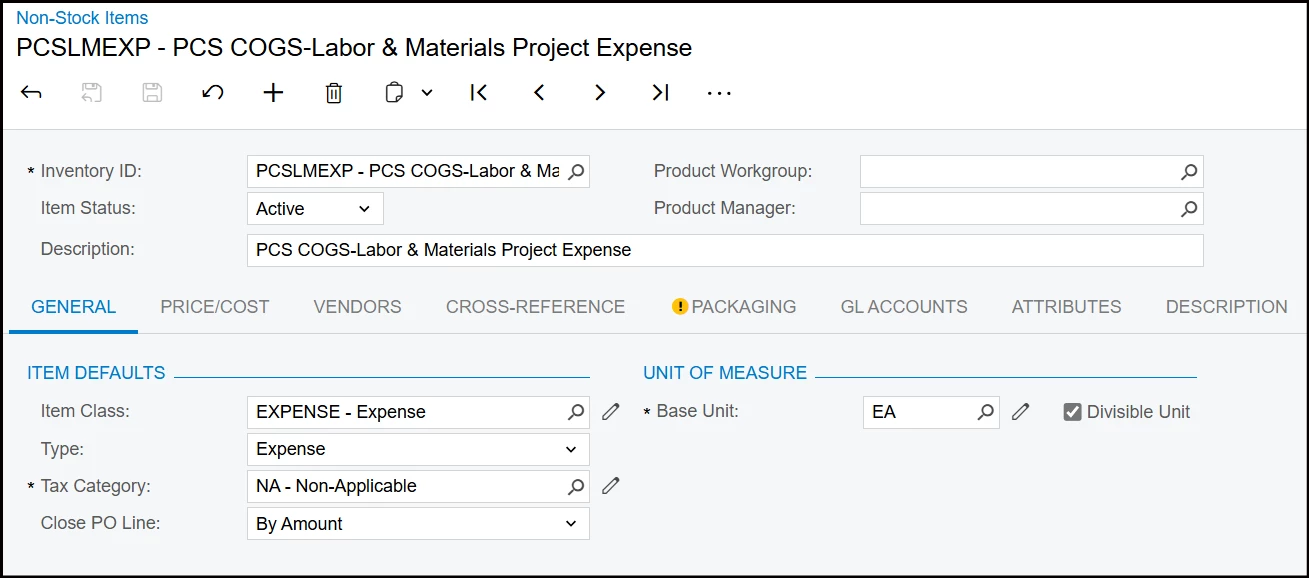
These are the current settings. The close PO line is already set to “By Amount”. 


And yes, you understood my question correctly. I have entered an AP bill for roughly $15k, and applied it to line 2 of this PO. It won’t let me enter any more AP bills applied to line 2 even though more than $70k remains open. I assume we’re using the Qty and Cost categories wrong. How should this be set up to work in the manner I’ve described?


rfairchild58
Varsity I
Forum|alt.badge.img+1

We enter lump sum POs using the unit price of $1.00 and the quantity equal to the value of the line item (a $25,000 lump sum items is entered as Qty of 25,000 @ $1.00/ea or $1.00/LS


ricoybanez
Jr Varsity III
Forum|alt.badge.img+3
  • Jr Varsity III
  • Answer
  • May 7, 2025

@cgndm 

The system checks the quantity, when you pay it initially in the AP use quantity = 1 but the amount you pay is around 15K, I presumed so when you make a 2nd payment you use quantity again = 1 and the amount let’s say 5K then the system prompts an error. (Print screen below)


To resolve this, this is the process:
1. First initial Bill the quantity should be a percentage that will equal to the amount to be initially paid 
 
2. Then for the 2nd initial payment same process applies quantity should be in percentage or equal to decimal, let’s say another 10% paid
3. Same process applies all throughout until full 100% is paid or equal to decimal 1.00

Hope this helps. 

​​​​​