

Question

project set up cost code error

  • September 16, 2026
  • 2 replies
  • 45 views

Forum|alt.badge.img

Hi Everyone,

I’m having an issue while setting up a project budget in Acumatica and would appreciate any guidance.

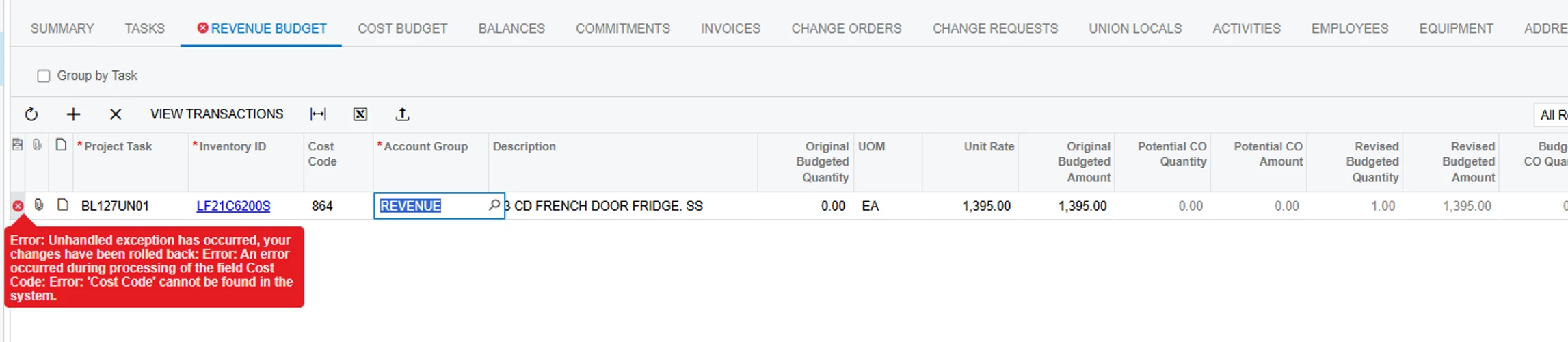
I tried to upload the Revenue Budget under the project, but the system did not upload all of the data from my file. In addition, one of the cost centers was uploaded incorrectly. Acumatica assigned a cost code/number that was not included in my upload file.

The issue is that this cost code is not set up in the Cost Code list. I tried to select the correct cost code from the available list, but Acumatica does not accept the change and automatically repopulates the incorrect/non-existing cost code.

I am now receiving the following error:

Error: Unhandled exception has occurred, your changes have been rolled back: Error: An error occurred during processing of the field Cost Code: Error: 'Cost Code' cannot be found in the system.

I also cannot delete the affected budget line because of this error.

Has anyone encountered a similar issue with Project Budget setup or budget uploads in Acumatica?

Specifically, I would appreciate advice on:

  • How can I correct or remove the incorrect cost code?

  • Why would Acumatica populate a cost code that was not included in my upload file?

Any suggestions or guidance would be greatly appreciated.

Thank you!


2 replies

Forum|alt.badge.img+6
  • Jr Varsity II
  • September 17, 2026

Hi ​@epan ,

Can you verify below-

  1. Does not exist in the Cost Codes (PM209500) master table, or
  2. Has formatting/segmentation mismatches (e.g., trailing spaces, leading zeros, or segment masking), or
  3. Was defaulted or substituted during the upload process due to project settings or template mapping.

Because the system triggers a DAC field-verifying validation on row events (including row deletion), Acumatica throws an exception ('Cost Code' cannot be found in the system) before it can process your change or delete the row.

Hope above helps!!


Steve Milner
Varsity III
Forum|alt.badge.img+2
  • Varsity III
  • September 17, 2026

@epan That 864 isn't a cost code. It's the internal record ID the budget line is pointing at, and no cost code with that ID exists. When the Revenue Budget tab can't find the record, it shows the raw ID in the Cost Code column. I reproduced your exact error on a 2026 R1 test instance by pointing a saved budget line at a cost code ID that doesn't exist.

Cost Code is part of the budget line's key. Every edit, delete or save sends that key back, the lookup fails, and the whole request is rejected. That's why picking a valid code snaps back and Delete Row doesn't take. As Rakshanda said, it fails before your change is processed. I also tried switching the Revenue Budget Level so the column is hidden. Same result.

So there's no fix from the screen. The cost code ID on that one budget record (PMBudget) has to be corrected in the database. Open a support case, or have your partner do it if you're on a private instance, and have them run it on a snapshot copy first. In my test, once the record pointed at a valid cost code, the line edited and deleted normally.

I couldn't get 2026 R1 to create this from an upload. There, a cost code in the file that doesn't match anything falls back to the default cost code and saves cleanly. Put your version and the upload file in the support case. If you're willing to share them here too, I'll run the same import on my test instance. If you'd rather not make them public, send me a DM.

