Answer

Proforma Invoice - filter cost to appear in T&M

  • June 28, 2023
  • 12 replies
  • 192 views

Forum|alt.badge.img+1

Hi,

There is a way to filter things who appear in T&M Proforma.

If by example we dont want to bill item ABC to the customer (and don’t want to appear on the invoice)?

Could I manage this via Project/Cost budget? Billing rule? Configuration?

Now I delete ABC rows manually.

Thanks

Best answer by iqraharrison

@raphrf are you making sure the non billable transactions do not have the “billable” checkbox checked? that should prevent items from showing up on the list.  

12 replies

Heidi Dempsey
Community Manager
Forum|alt.badge.img+3
  • Community Manager
  • June 28, 2023

@raphrf What is it you are not wanting to bill?  Are these consistent costs you do not want to bill?


Forum|alt.badge.img+1
  • Author
  • Captain I
  • June 28, 2023

It’s some InventoryID


Heidi Dempsey
Community Manager
Forum|alt.badge.img+3
  • Community Manager
  • June 28, 2023

When entering AP invoice, you can mark line items as non-billable.  On the billing rule you could make a more complicated formula to include and If then statement  IF Inventory Id = x then $0, but that would be all the time.  You can also put the non-billable inventory id’s to a different account group so they will not go through the billing rule.


Forum|alt.badge.img+1
  • Author
  • Captain I
  • June 28, 2023

Yes I had the same idea to set a selling price(Sales Prices) of 0$ for some Inventory item for this customer, it’s working , but i want to remove the 0$ item at the generation of proforma(and not at the report)


Heidi Dempsey
Community Manager
Forum|alt.badge.img+3
  • Community Manager
  • June 28, 2023

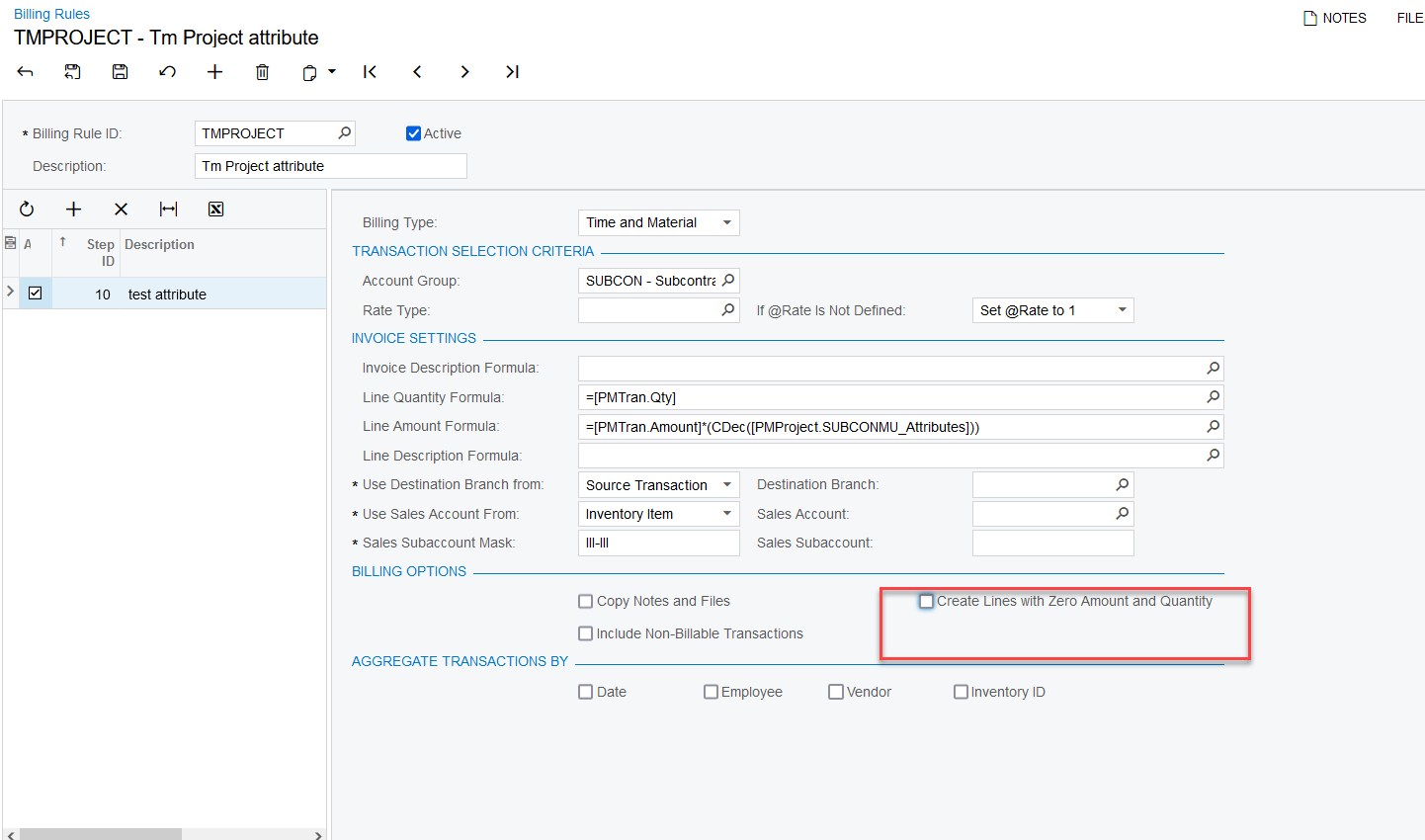
@raphrf  Since you are doing T & M Billing, you can uncheck this box

Be careful doing this on a Progress Billing type as it will affect the AIA.


Forum|alt.badge.img+1
  • Author
  • Captain I
  • June 28, 2023

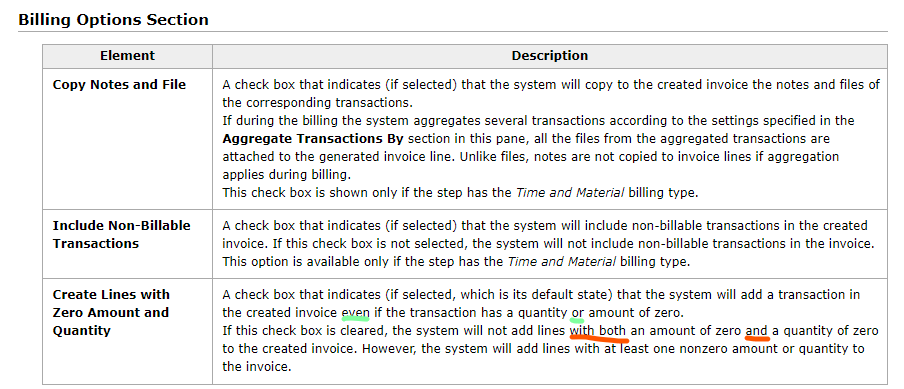
Hi, I tried to uncheck “Create Lines with Zero Amount and Quantity    “ in billing rule without success. I saw that the Help said two different logic, the first one correspond to my need (or) the second seem to be implemented in the code(and),

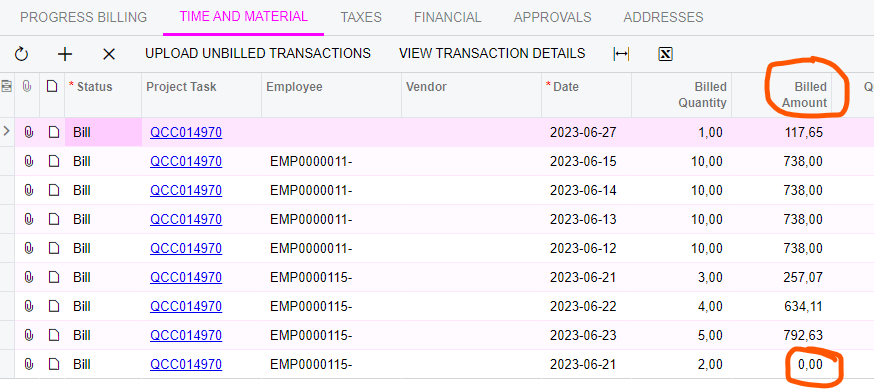
My amount is 0$ and appear in proforma


Heidi Dempsey
Community Manager
Forum|alt.badge.img+3
  • Community Manager
  • June 28, 2023

@raphrf  Do you have quanitity on the transactions? If not, then you will need to enter a case to see why this is not working for you


Forum|alt.badge.img+1
  • Author
  • Captain I
  • June 28, 2023

Ticket created 

The billing rule
the proforma row at zero amount


iqraharrison
Captain II
Forum|alt.badge.img+8
  • Captain II
  • July 11, 2023

@raphrf i recently started exploring with rate tables.  i know you can specify projects and inventory IDs which can be set at specific rates (I.E. 0.00) i haven’t tested this out but it could be worth a shot.


my other question is, does the inventory ID have a price associated with it?


Forum|alt.badge.img+1
  • Author
  • Captain I
  • July 11, 2023

@raphrf i recently started exploring with rate tables.  i know you can specify projects and inventory IDs which can be set at specific rates (I.E. 0.00) i haven’t tested this out but it could be worth a shot.


my other question is, does the inventory ID have a price associated with it?

Interesting, i never tryed with rates, let me know !


Heidi Dempsey
Community Manager
Forum|alt.badge.img+3
  • Community Manager
  • July 11, 2023

@raphrf  Since you have billable quantity on the transaction(s) so the line will show up on the Invoice.  


iqraharrison
Captain II
Forum|alt.badge.img+8
  • Captain II
  • Answer
  • July 14, 2023

@raphrf are you making sure the non billable transactions do not have the “billable” checkbox checked? that should prevent items from showing up on the list.