

Question

Print Change Order Cost Budget

  • November 10, 2023
  • 3 replies
  • 34 views

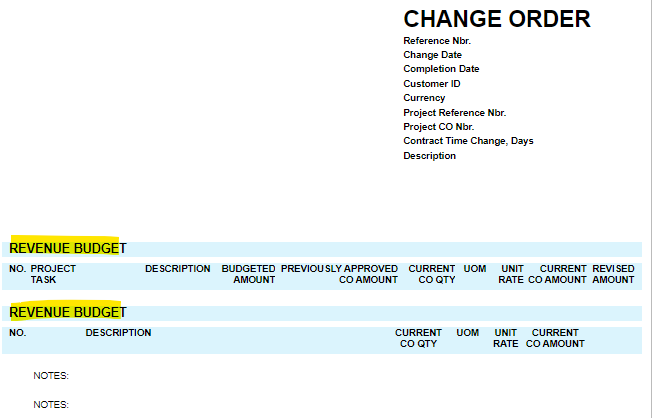
Currently, when we go to print the Change Order Form, it prints the revenue budget of the change order. Is there a way to set up a separate form to print the Cost Budget portion of the change order?


3 replies

  • Freshman II
  • December 17, 2025

Currently, when we go to print the Change Order Form, it prints the revenue budget of the change order. Is there a way to set up a separate form to print the Cost Budget portion of the change order?


Hi Jennifer, did you ever find out how to do this? I’m having the same issue.

Thanks!


nickcerri32
Varsity I
Forum|alt.badge.img+2
  • Varsity I
  • December 17, 2025

@jenniferyaholnitsky , ​@AP13 - Generally speaking, the Change Order form is issued to the Customer, so you might not want them to know your costs.  The Change Order printed form (PM643000) only displays values from the Revenue Budget, as you’ve noticed.  

Would something like a GI suffice here?  I’ve created a GI specifically for Cost Budget updates to Projects for a client on 25R1 that you can play around with.


  • Freshman II
  • December 17, 2025

@jenniferyaholnitsky , ​@AP13 - Generally speaking, the Change Order form is issued to the Customer, so you might not want them to know your costs.  The Change Order printed form (PM643000) only displays values from the Revenue Budget, as you’ve noticed.  

Would something like a GI suffice here?  I’ve created a GI specifically for Cost Budget updates to Projects for a client on 25R1 that you can play around with.

Hello Nick, thank you for the reply. 

I just found the “Change Order Commitments” form, which is an already existing form. This is exactly what I was looking for on my end.


Thanks!

