Question

PMtran doesn't equal GL entry

  • January 22, 2025
  • 20 replies
  • 136 views

Forum|alt.badge.img

I posted a journal entry to a project ID and the resulting PMTRAN does NOT agree to the journal entry.

The journal entry hit two accounts, but both lines were to the same ProjectID - only the CostCODEID were different.

The journal entry, obviously, balanced but the resulting PMTRAN has two debits.

I have no idea what I could have done to get Acumatica to do this.  I know I can post a PMTran to correct this but I’m concerned that this happened.  Up to this point I have not posted ANY PMTrans (accumatica has generated all of my PM activity) and I have been able to fully reconcile all of my GL activity to my PM activity.

Does anyone have any suggestions?  

20 replies

Forum|alt.badge.img
  • Varsity I
  • January 22, 2025

Hi ​@RHarrison

The issue you’re encountering, where the PMTran does not reconcile correctly with the journal entry and shows two debits instead of a balanced entry, suggests a potential issue with either configuration or how the Project Accounting module interprets the journal transaction. Here are some steps and suggestions to investigate and resolve.

1. Verify the GL and PM Mapping

Check the Project Account Groups and GL Account Mapping configuration:

  • Navigate to Project Accounting > Setup > Account Groups.
  • Confirm that the GL accounts used in your journal entry are mapped to the correct Account Groups.
  • Verify that the system knows how to handle transactions with different Cost Codes but the same ProjectID.

2. Check the Batch Posting Process

  • Open the Journal Transactions batch in the GL module and verify the details of the transaction.
    • Ensure both lines in the journal entry have:
      • The correct ProjectID.
      • The correct TaskID.
      • The appropriate Cost Code.
    • Confirm that the journal batch is fully balanced.
  • Compare the GL Batch with the corresponding PM Transaction records (found in Project Accounting > Transactions).

3. Review the PMTran Generation

The PMTran records are generated automatically when a GL journal entry is posted to a project. If you notice discrepancies:

  • Open the Project Transactions screen (Project Accounting > Transactions > Transaction Details) and look at the specific PMTran records for the project.
  • Look for unusual behaviors:
    • Duplicate PMTrans.
    • Incorrect debit/credit assignments.
    • Missing Cost Code mappings.

4. Check Cost Code Configuration

If your journal entry has the same ProjectID but different CostCodeIDs, verify the configuration:

  • Navigate to Project Accounting > Setup > Cost Codes.
  • Confirm that both Cost Codes are properly configured and mapped to the correct Account Groups.
  • If Cost Codes are not set up correctly, the system may not distribute costs as expected.

5. Investigate Customizations or Integrations

If your system has customizations or integrations that interact with the Project Accounting module, ensure they aren’t causing issues:

  • Check for custom code that modifies how PMTrans are created.
  • Verify if any third-party integrations are impacting journal entries or project transactions.

6. Test the Scenario in a Sandbox

Reproduce the issue in a sandbox environment to rule out system glitches or incorrect configurations:

  • Create a test journal entry with the same ProjectID and Cost Codes.
  • Post the entry and verify the resulting PMTran records.
  • If the issue persists, it could be a bug or configuration problem.

7. Apply a PM Transaction Correction

To fix the current issue, post a correcting PMTran to adjust the incorrect records:

  • Navigate to Project Accounting > Transactions > Transaction Entry.
  • Enter a manual PM Transaction to balance the debits and credits.

8. Check for Known Issues or Updates

  • Review the Acumatica Release Notes or Community Forums for any known bugs related to journal entries and PMTrans in your current version.
  • Ensure your Acumatica instance is up to date with the latest patches or hotfixes.

9. Escalate to Acumatica Support

If the issue persists after following the above steps:

  • Contact Acumatica Support and provide:
    • Screenshots of the journal entry and resulting PMTrans.
    • Details of your configurations (Account Groups, Cost Codes, etc.).
    • Logs or audit trails, if available.
  • This will help identify if it’s a system bug or a configuration issue.

iqraharrison
Captain II
Forum|alt.badge.img+8
  • Captain II
  • January 22, 2025

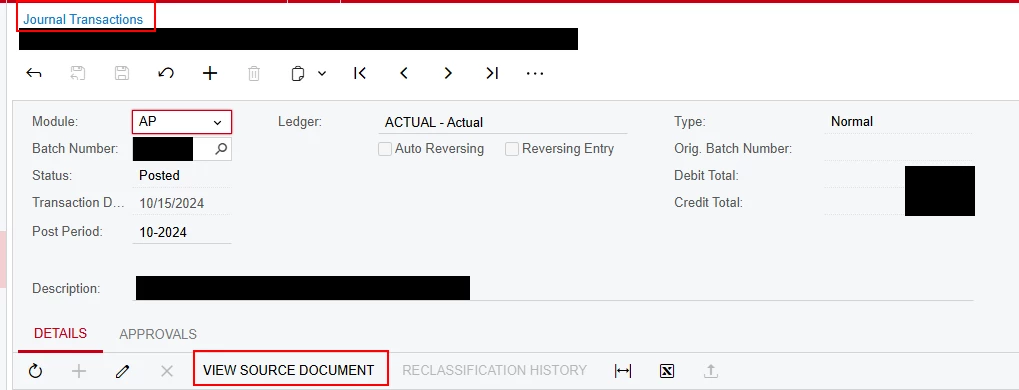
@RHarrison on the journal transaction, can you see what the source transaction is? it could help narrow down where the issue is: 


iqraharrison
Captain II
Forum|alt.badge.img+8
  • Captain II
  • January 22, 2025

also, can you tell us what version and build you are on


Thanks

Iqra


Heidi Dempsey
Community Manager
Forum|alt.badge.img+3
  • Community Manager
  • January 22, 2025

@RHarrison  What were the accounts that were on the journal entry and what type of account group are they tied to?  Were either of the debit entries negative in the PM Tran?


mclarke88
Jr Varsity III
Forum|alt.badge.img
  • Jr Varsity III
  • January 22, 2025

It’s difficult to tie the journal transaction to the project transaction; I believe we made a customization once to solve for this.


Forum|alt.badge.img
  • Varsity I
  • January 22, 2025

@mclarke88 please check my earlier explanation


Forum|alt.badge.img
  • Author
  • Freshman II
  • January 22, 2025

@RHarrison on the journal transaction, can you see what the source transaction is? it could help narrow down where the issue is: 


In this case, the source is a journal entry.  


Forum|alt.badge.img
  • Author
  • Freshman II
  • January 22, 2025

also, can you tell us what version and build you are on


Thanks

Iqra

Acumatica 2024 R1
Build 24.114.0020


Forum|alt.badge.img
  • Author
  • Freshman II
  • January 22, 2025

@RHarrison  What were the accounts that were on the journal entry and what type of account group are they tied to?  Were either of the debit entries negative in the PM Tran?

Both accounts are in the same account group.

The journal entry has a debit & a credit and the PMtran has two positive amounts.


Heidi Dempsey
Community Manager
Forum|alt.badge.img+3
  • Community Manager
  • January 22, 2025

@RHarrison We did do some changes in 24R1.  Could you be more specific as to accounts and account groups?  Are the accounts Asset, Liability, Expense or Income?  Which one is debited and which one is credited in GL?  Also, what type is the account group they are included in?  


Forum|alt.badge.img
  • Author
  • Freshman II
  • January 22, 2025

Hi ​@RHarrison

The issue you’re encountering, where the PMTran does not reconcile correctly with the journal entry and shows two debits instead of a balanced entry, suggests a potential issue with either configuration or how the Project Accounting module interprets the journal transaction. Here are some steps and suggestions to investigate and resolve.

1. Verify the GL and PM Mapping

Check the Project Account Groups and GL Account Mapping configuration:

  • Navigate to Project Accounting > Setup > Account Groups.
  • Confirm that the GL accounts used in your journal entry are mapped to the correct Account Groups.
  • Verify that the system knows how to handle transactions with different Cost Codes but the same ProjectID.

2. Check the Batch Posting Process

  • Open the Journal Transactions batch in the GL module and verify the details of the transaction.
    • Ensure both lines in the journal entry have:
      • The correct ProjectID.
      • The correct TaskID.
      • The appropriate Cost Code.
    • Confirm that the journal batch is fully balanced.
  • Compare the GL Batch with the corresponding PM Transaction records (found in Project Accounting > Transactions).

3. Review the PMTran Generation

The PMTran records are generated automatically when a GL journal entry is posted to a project. If you notice discrepancies:

  • Open the Project Transactions screen (Project Accounting > Transactions > Transaction Details) and look at the specific PMTran records for the project.
  • Look for unusual behaviors:
    • Duplicate PMTrans.
    • Incorrect debit/credit assignments.
    • Missing Cost Code mappings.

4. Check Cost Code Configuration

If your journal entry has the same ProjectID but different CostCodeIDs, verify the configuration:

  • Navigate to Project Accounting > Setup > Cost Codes.
  • Confirm that both Cost Codes are properly configured and mapped to the correct Account Groups.
  • If Cost Codes are not set up correctly, the system may not distribute costs as expected.

5. Investigate Customizations or Integrations

If your system has customizations or integrations that interact with the Project Accounting module, ensure they aren’t causing issues:

  • Check for custom code that modifies how PMTrans are created.
  • Verify if any third-party integrations are impacting journal entries or project transactions.

6. Test the Scenario in a Sandbox

Reproduce the issue in a sandbox environment to rule out system glitches or incorrect configurations:

  • Create a test journal entry with the same ProjectID and Cost Codes.
  • Post the entry and verify the resulting PMTran records.
  • If the issue persists, it could be a bug or configuration problem.

7. Apply a PM Transaction Correction

To fix the current issue, post a correcting PMTran to adjust the incorrect records:

  • Navigate to Project Accounting > Transactions > Transaction Entry.
  • Enter a manual PM Transaction to balance the debits and credits.

8. Check for Known Issues or Updates

  • Review the Acumatica Release Notes or Community Forums for any known bugs related to journal entries and PMTrans in your current version.
  • Ensure your Acumatica instance is up to date with the latest patches or hotfixes.

9. Escalate to Acumatica Support

If the issue persists after following the above steps:

  • Contact Acumatica Support and provide:
    • Screenshots of the journal entry and resulting PMTrans.
    • Details of your configurations (Account Groups, Cost Codes, etc.).
    • Logs or audit trails, if available.
  • This will help identify if it’s a system bug or a configuration issue.
  1. a. my account groups are set up correctly.  Both accounts are in the same account group.  b.  I’m not sure how to “Verify that the system knows how to handle transactions with different Cost Codes but the same ProjectID.”  But all other PMTrans have been generated correctly.
  2. Done.  This is how i determined that the PMTran was incorrect.
  3. No other discrepancies have been noted.
  4. My costcode setup has NO mapping to accountgroups.  It is simply a list of costcodes & their descriptions
  5. We have no customizations or integrations
  6. I reproduced this in a test environment and the result was the same.
  7. That is what I have done to get my PMtrans to agree to the GLTrans
  8. Nothing in the release notes
  9. pending

Thanks for the suggestions.


Forum|alt.badge.img
  • Author
  • Freshman II
  • January 22, 2025

The only additional info I can add is that the line that is incorrect in PMTran is the only “liability” account in the related AccountGroup.  But I can’t see how this impacts how PMTran is generated.


Forum|alt.badge.img
  • Author
  • Freshman II
  • January 22, 2025

@RHarrison We did do some changes in 24R1.  Could you be more specific as to accounts and account groups?  Are the accounts Asset, Liability, Expense or Income?  Which one is debited and which one is credited in GL?  Also, what type is the account group they are included in?  

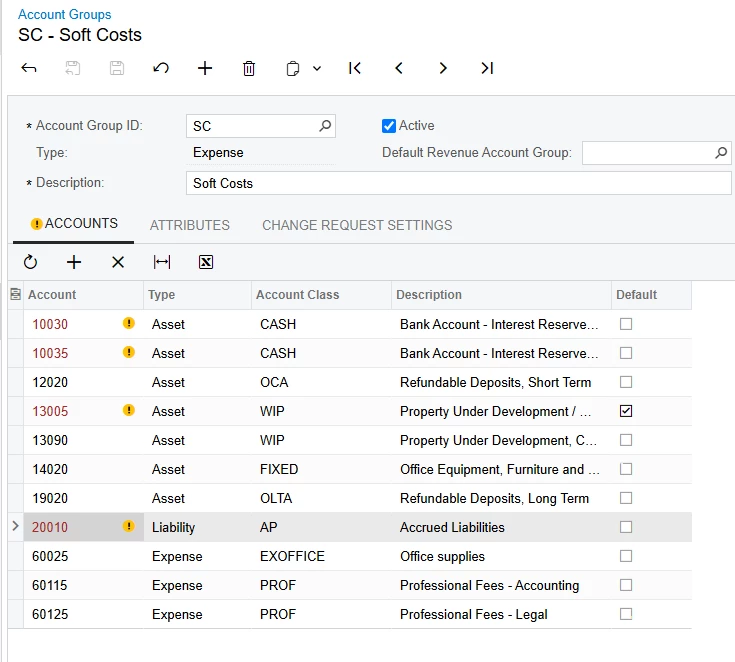
Both accounts are in the same account group.  But the account that is incorrect in the PMTran is a liability account.  
Here is a screen shot of the account group.  Account 20010 is the account that was credited in the GLTran but ended up with a positive amount in the PMTran.


Forum|alt.badge.img
  • Author
  • Freshman II
  • January 22, 2025

So it appears that PMTrans are generated based on the account type in addition to the account group.  Credits to a liability are recorded as a positive number.  This means that you can’t simply add up the amounts in the PMTran table.  

This is the first time we’ve included anything other than assets & expenses in our PMtran activity so everything has been positive for debits & negative for credits.

I think this accrual is a one time event so I’m going to adjust it with a one sided PMTran and move on.

Curious thing to note though is that the delivered project cost reports don’t reflect this logic.  They ignore the GL account and simply pick up project, task, & cost code and add up the amounts.  

I sure feels like a bug to me.


Heidi Dempsey
Community Manager
Forum|alt.badge.img+3
  • Community Manager
  • January 22, 2025

@RHarrison   My question would be - why do you have liability and asset accounts in an expense account group?  What purpose does it serve when tracking expenses?  Wouldn’t it be more effective to track them separately as assets and liabilities?   The liability account was increased and so was the expense account group.   Please enter a case and let us know the business need for having this kind of configuration and we could escalate.


Forum|alt.badge.img
  • Author
  • Freshman II
  • January 22, 2025

@RHarrison   My question would be - why do you have liability and asset accounts in an expense account group?  What purpose does it serve when tracking expenses?  Wouldn’t it be more effective to track them separately as assets and liabilities?   The liability account was increased and so was the expense account group.   Please enter a case and let us know the business need for having this kind of configuration and we could escalate.

Because for accounting purposes it was an accrued liability but for project purposes it was a cost when incurred.  In the following month the accrual will reverse and the actual bill will be processed and paid.  

As I said, this is a one off event (I hope) and I plan to remove the liability account from the account group so that if it happens again we’ll be reminded to think through the entire process.

I’m still not sure how the project cost reports would work if this happens.  And, if they don’t it seems like there should be some warnings to stop you from adding a liability account to an account group that is then used in a project.


Forum|alt.badge.img
  • Author
  • Freshman II
  • January 23, 2025

@RHarrison   My question would be - why do you have liability and asset accounts in an expense account group?  What purpose does it serve when tracking expenses?  Wouldn’t it be more effective to track them separately as assets and liabilities?   The liability account was increased and so was the expense account group.   Please enter a case and let us know the business need for having this kind of configuration and we could escalate.

Heidi, another way to look at this is that if project costs are only supposed to have assets & expenses (by acumatica’s design) then why allow liabilities & revenues to be added?  It feels like it was super easy to “break” the system. 


Heidi Dempsey
Community Manager
Forum|alt.badge.img+3
  • Community Manager
  • January 23, 2025

@RHarrison I understand what you are saying, however, in trying to understand how the system should work, I would still like the business need for mixing accounts on the project.  You would not put an asset or liability account in the account class of expense in the GL so I am wondering why you would need this on the project side and the expectation and how you reconcile the GL to projects.  Was your expectation that a credit to a liability should decrease your expense on the project?


Forum|alt.badge.img
  • Author
  • Freshman II
  • January 30, 2025

...You would not put an asset or liability account in the account class of expense in the GL ...

Really?  In our set up the entire purpose of the construction reporting it to track our Work In Process during construction.  Almost EVERYTHING in our PM transactions go to an assets account.

About 1/3 of our costs are paid for by our project companies and go directly to their balance (mostly consultants) as Work in Process.  The remaining costs are mostly construction costs which start in our construction company COGS but are then billed to our project companies and end up in Work in Process.

Additionally we track other balance sheet items like refundable deposits.  These sit as a receivable on the balance sheet of the project company but also need to appear on the Project Cost Reports.

The item in question was like this.


Heidi Dempsey
Community Manager
Forum|alt.badge.img+3
  • Community Manager
  • January 30, 2025

@RHarrison Yes, I totally understand.  Many of our customers put their WIP account in an Asset account group and track it on the balances tab, not on the expenses.  Assets and Liability account groups can be budgeted as well using the Project Budget screen PM309000.