

Solved

Pass quantity with zero cost from PO to Project when received

  • April 28, 2025
  • 6 replies
  • 92 views

Hi, we are in the situation where we often have 1 quoted amount for multiple items. We are not provided per item pricing and some items are not in our inventory.

Items are typically shipped over time, so we are receiving incrementally.

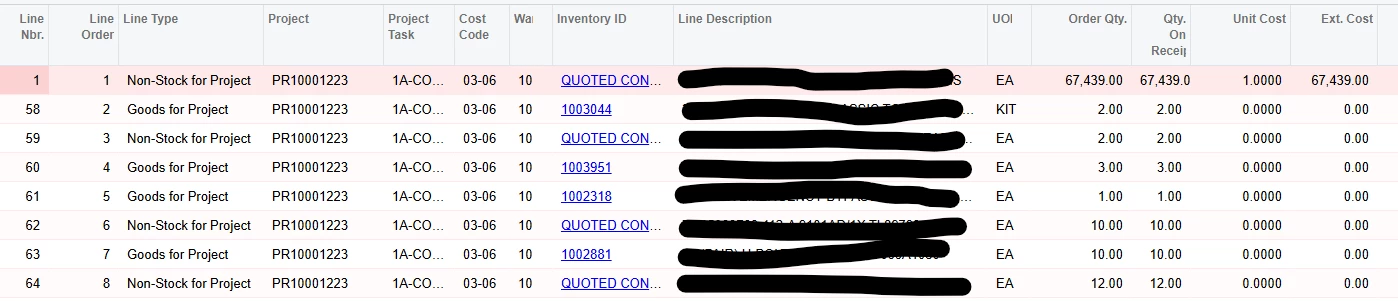
We have need to track the quantities with descriptions, so we’ve set up non-stock “quoted lot” for items not currently in inventory, and use stock part numbers if existing. These are on the PO at zero cost. 

We have found that when received, the line items with $0 cost are not flowing into the project cost code transactions. How do we pass this info to the project without requiring a cost to be received on the PO?

 

Best answer by Heidi Dempsey

@ssternke The only way the quantity updates on the Cost Budget in any column is if the UOM matches on the original document, or if there is a UOM conversion.  Add a UOM on the budget and you can Recalculate Project Balances and you should see the quantity.

6 replies

Heidi Dempsey
Community Manager
Forum|alt.badge.img+3
  • Community Manager
  • April 28, 2025

@ssternke As long as the UOM on the PO matches the Cost Budget, Original Committed Quantity will update on the cost budget  and upon receipt, the Committed Received Quantity will update on the cost budget.  What transaction are you expecting to be created?


  • Author
  • Freshman I
  • April 28, 2025

Thank you, Heidi. I’d expect the committed received quantity to update on the cost budget no matter what the cost. We don’t have a UOM on the cost budget, that’s on the Task, is this what you mean? Our UOM is typically EA, although we might occasionally have different UOM on the PO (kit, doz, spool).

Regardless, whether the PO line item UOM matches the COG task UOM or not, we see no detail on our cost budget for any of these items when there is no cost on the PO line.


Heidi Dempsey
Community Manager
Forum|alt.badge.img+3
  • Community Manager
  • Answer
  • April 28, 2025

@ssternke The only way the quantity updates on the Cost Budget in any column is if the UOM matches on the original document, or if there is a UOM conversion.  Add a UOM on the budget and you can Recalculate Project Balances and you should see the quantity.


  • Author
  • Freshman I
  • July 3, 2025

@Heidi Dempsey - Hello, just seeing this response. Thank you - will do some experimenting in test mode. 


Heidi Dempsey
Community Manager
Forum|alt.badge.img+3
  • Community Manager
  • July 3, 2025

@ssternke Great! Let us know your results.


  • Author
  • Freshman I
  • July 3, 2025

@Heidi Dempsey - No joy there. We do not budget individual inventory items in the project, (we have one line item for each task/cost code/account group that all expenses flow into) but I don’t believe that is the problem anyway.

Items issued to project from the sales order module do show up in project transactions, even when they have zero cost in inventory. But items ordered via purchase order do not show in project transactions unless they have a cost on the PO.

Almost all items are EA, and the cost budget uses EA as UOM for most budget lines.