Solved

Need to book cost of non stick items to a project when a SAles order is processed (that does not) invoice

  • February 29, 2024
  • 5 replies
  • 257 views

I am working on an implementation that involves Non stock items on Sales Orders.
There are two workflows involved Counter sales and Project Sales.
We have 2 different order types setup; one with Invoicing for Counter sales and one WITHOUT  Invoicing for Project sales (material issue only).
The system is set to assign the cost on sales.
It appears that the cost side of the transaction gets generated when the Invoice is processed, si this works for the Contract Sales.
For Project Sales order no cost transaction are ever created.

How do I get the cost of the nonstock item to hit the project without Invoicing?.

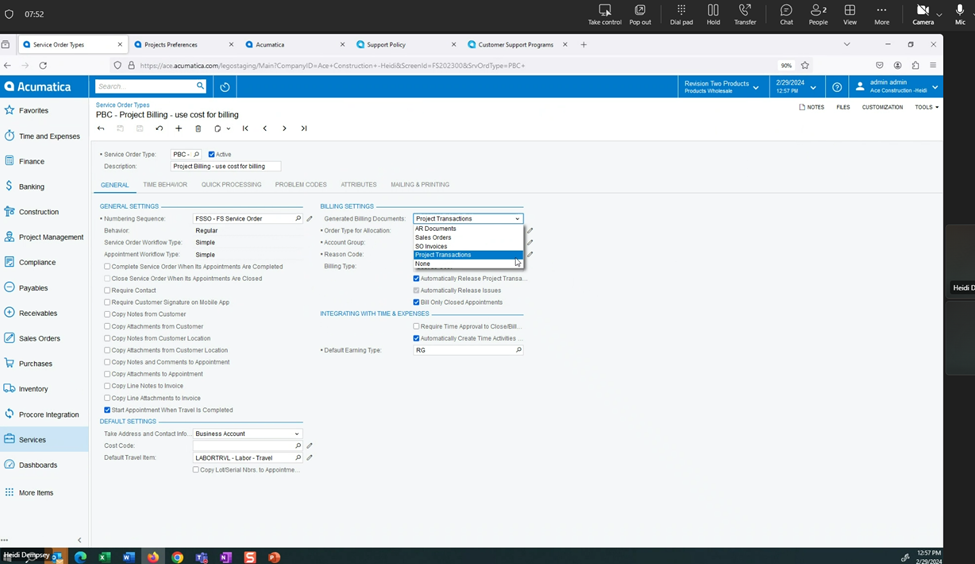
There was a change in the Service module that seems to have address this process for a service Order and this functionality seems to be missing from the Sales Order workflow


Best answer by tkapuenene36

Hi @dcarl51, I had a similar scenario and here's the work around I've used. You can process the project transaction (Module=PM) with the correct combination (Project, Project Task, Cost Codes, (Based on the cost budget level settings) and Account group). Quick question do you want to update the GL once the transaction is released? if yes please specify the debit and credit account on the line. if you do not want to update the GL you can leave them empty. Hope this helps.

5 replies

  • Jr Varsity I
  • Answer
  • February 29, 2024

Hi @dcarl51, I had a similar scenario and here's the work around I've used. You can process the project transaction (Module=PM) with the correct combination (Project, Project Task, Cost Codes, (Based on the cost budget level settings) and Account group). Quick question do you want to update the GL once the transaction is released? if yes please specify the debit and credit account on the line. if you do not want to update the GL you can leave them empty. Hope this helps.


  • Freshman I
  • May 29, 2025

@dcarl51 Did you ever find a better solution for this that doesnt require manually creating a project transaction? I have the exact same issue. 


  • Author
  • Freshman I
  • June 18, 2025

@BRatliff 
Kind of…

The client decided to split the “Project” sales order into multiple Sales Orders.  Non stock items are put on a SO type that generates invoices and then process a credit memo to “reverse” the invoice, then bill the project through progress billing.


  • Freshman I
  • June 18, 2025

@dcarl51 Thanks for the update, far from a clean solution but better than nothing. 


CherryStreet
Jr Varsity I
Forum|alt.badge.img
  • Jr Varsity I
  • June 19, 2025

Ran your scenario through our AI Assistant we’re doing some final testing on, let me know if this helps:
 

You're correct in your assessment: by default in Acumatica, Non-Stock Items used on Sales Orders without invoicing do not generate cost transactions, and this affects project cost tracking in workflows like Project Sales. This is a well-known limitation in the Sales Orders module versus the Field Service module, which had a targeted update to address it.

Let’s walk through what is happening, why, and what your documented options are based on Acumatica’s architecture (per your documentation and known behavior as of builds like 24.1+).


🎯 Goal:

  • ✅ Use Non-Stock Items on Sales Orders tied to Projects
  • Without Invoicing
  • ✅ Still have costs posted to the Project
 

🚫 Default Behavior (Why It's Failing)

  1. In Sales Orders, cost posting for non-stock items happens only at invoicing.
  2. If you use an order type that does not require or allow invoicing (as is your case with Project Sales), no cost is triggered.
  3. This differs from Service Orders, which as of recent builds, allow cost to post at Appointment completion or Service Order posting, even for non-stock items.
 

Supported Solutions

1. Use Project Transactions Instead of Sales Orders (Best fit if no customer invoice is required)

  • Use Project Transactions (PM304000) directly to post non-stock costs to a project.
  • Define the non-stock items with proper Account Groups to allow posting.
  • Enter the transaction as a Material type line, and assign:
    • Project
    • Task
    • Account Group
    • UOM/Qty/Cost

🔹 This creates the required PMTran record, posts the cost, and requires no invoice or sales order.


2. Custom Automation to Trigger Cost Posting on Shipment (via Customization)

This is what some users implement when they want to continue using Sales Orders:

  • Customize the Sales Order processing screen (SOOrderEntry) to trigger a PMTran creation when the Sales Order is completed, even without invoicing.
  • This mimics the behavior of the Service Module, where posting of cost happens at Appointment Finalization.

❗Requires development via Graph Extension or Workflow customization to trigger cost recognition manually.


3. Service Management Workaround (if module is installed)

Since you mentioned the Service module has addressed this, you could:

  • Route your non-invoicing project sales through Service Orders, even if not traditional field service work.
  • Mark the Service Order as non-billable
  • Use the Non-Stock Item with a Project and Task
  • Cost will post to the Project at Appointment Posting, no invoice required
 

⚙️ Configuration Checkpoints

Regardless of method, make sure:

  • Non-stock items have:
    • Cogs Account / Expense Account
    • Account Group Mapping
  • The Order Type (or Service Order Type) allows project assignment
  • The Project is configured to allow Material type cost transactions
 

🧠 ERP Pro Tips 💡

💡 Tip for Controllers: If you must stay in the Sales Order module, consider adding a validation warning if a non-stock item is added to a non-invoicing order without triggering cost — so it’s not missed.

💡 Tip for Developers: Extend SOOrderEntry to mimic the Appointment_Post logic for PMTran creation, using PMTransactionEntry.


Summary Recommendation:

If you cannot invoice, and still want costs to post to projects for non-stock items:

Best No-Code Solution:

Use Project Transactions (PM304000) directly for Project Sales.

Best Workaround via Existing Modules:

Route through Service Orders and rely on Appointment Posting to push costs.

Advanced/Custom:

Develop a trigger in SOOrderEntry to create PMTrans without invoicing — mirroring the logic of the Service module.