Question

Link Open Demand from Sales Order and Service Order to existing Purchase Order

  • March 25, 2026
  • 2 replies
  • 35 views

Forum|alt.badge.img+1

Does anyone know if this functionality has been improved?

This is an operational situation we see, both planned an unplanned, where we want to be able to link demand from an existing Service Order to an existing Purchase Order.

This is in order to account for changes/mistakes after the original purchase order was created from the demand and also we need to be able to take advantage of purchase requirements for vendors such as minimum order qty, total order amount, free shipping, etc.

Our purchasing is not centralized and many people do their own purchasing as needed.

There should be a way to link to demand from transactions that haven’t been purchased yet to existing purchase orders.

One way would be to identify an Existing Purchase Order on the Create Purchase Orders screen before the processing happens.

Another option is to have the ability to set the PO Detail Line Line Type to Goods for SO or Goods for FS and be able to lookup and set the Sales Order or Service Order detail line.

Another is to have a button that would allow for Linking an Open Line Detail from an SO or FS Order and select an Open PO from the Vendor that would create the PO Detail Line the same way that the “Create Purchase Orders” function does.

 

2 replies

alexx
Jr Varsity III
Forum|alt.badge.img
  • Jr Varsity III
  • July 21, 2026

I’m not sure about the improvement on the functionality of it. If I’m understanding your question right, you are asking if lines on a sales order (SO, SV, etc type) can be added to a PO that’s already created to a vendor without creating a new PO.

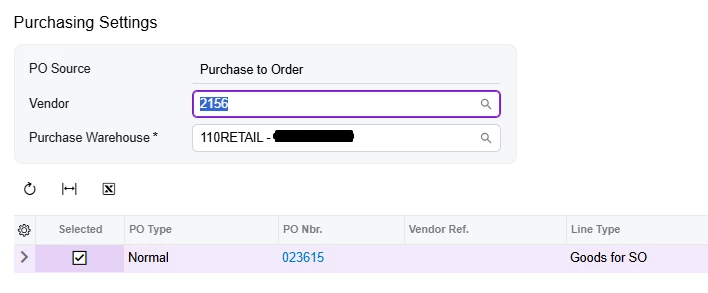
If so, then make sure the PO is in open status and the lines on the sales order are ‘Marked for PO’ and same ‘PO Source’ as the other items. Click on “PO Link” in the middle, above the grid. It should show all open POs for that vendor; check the box on the left. Then click ‘Save’ at bottom right of box (not in screenshot)


Hope this helps.


Forum|alt.badge.img+1
  • Author
  • Freshman II
  • July 21, 2026

@alexx  I believe that feature links to an existing PO with a matching detail line by InventoryID.  It doesn’t up the quantity and doesn’t allow for adding a new line to an existing PO for that Vendor which is the most common use case for us.

Many times a PO needs to be modified to add items instead of creating a new PO.

It works when the items go to Free Stock but not when they should be tied to a Detail Line on a Field Service Order or a Sales Order.

Example:

User creates a Sales Order for 5 parts and creates and associated Purchase Order for those 5 parts.  Now they want to add a 6th part.  No way to get that 6th part on the original Purchase Order because the Inventory ID doesn’t exist on the Purchase Order and you can’t reference back to the Sales Order Detail Line from a new PO Detail Line.  Defaults to Goods for IN line type.