Answer

Include Segmented Keys into Inquiry

  • May 2, 2023
  • 6 replies
  • 246 views

Forum|alt.badge.img+1

Hi All,


I am currently working on an Inquiry for a Dashboard where I need to group by a certain Segment.

I did it once before with Inventory Subaccounts:
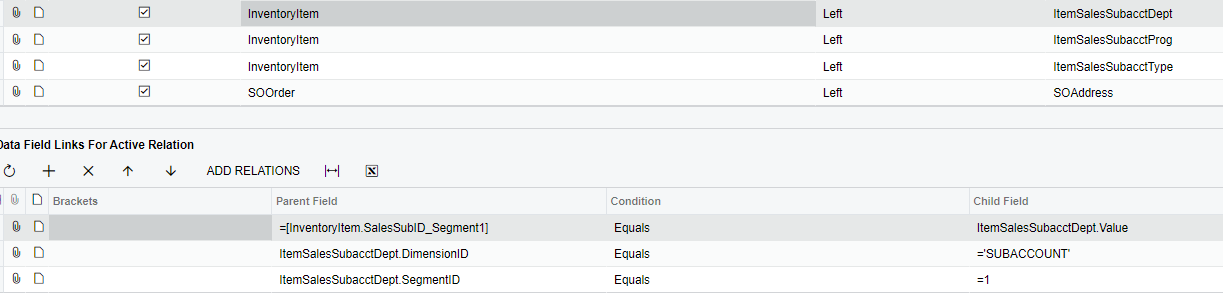


Yet, now I am working with Projects and the Contract CD Field is segmented.
I tried it this way, yet get the error that PMProject.ContractCD_Segment1 is not existing.

Does anybody know how to properly incorporate the Segmented Keys here?

 

If this helps, the Alias is referring to the CS.Segment Table

Best answer by hkabiri

@krausef77  In most cases this error means you have bad table relations. Contract Table has ContractID as the key and it should be added to relations in case the Contract table Data needs to be retrieved.

You can share your GI xml file so we can take a closer look if issue not resolved.

6 replies

Forum|alt.badge.img+1
  • Author
  • Semi-Pro II
  • May 2, 2023

Quick Update. I think I must’ve done something wrong but the new Error states this: 

The multi-part identifier "Contract.ContractCD" could not be bound. The multi-part identifier "Contract.ContractCD" could not be bound.


hkabiri
Acumatica Moderator
Forum|alt.badge.img+8
  • Acumatica Support Team
  • Answer
  • May 2, 2023

@krausef77  In most cases this error means you have bad table relations. Contract Table has ContractID as the key and it should be added to relations in case the Contract table Data needs to be retrieved.

You can share your GI xml file so we can take a closer look if issue not resolved.


iqraharrison
Captain II
Forum|alt.badge.img+8

@krausef77 one thing that i can see from your screen shots is that you used left join for your inventory subaccount segment and you are using inner for the project one.  maybe change that to left?  it will be helpful to have the file as well so if that doesn’t work, please share

thanks!


Laura03
Captain II
Forum|alt.badge.img+19
  • Captain II
  • May 23, 2023

Hello,

Are you able to include the entire ContractCD in one column of your GI, then use a calculated column “Segment 1” in another column of the GI to obtain the contract ID segment you need?  For example LEFT([Contract.ContractCD],3), and then Group by and aggregate based on the calculated field “Segment 1”?


craig2
Pro I
Forum|alt.badge.img+3
  • Pro I
  • May 23, 2023

Hi there,

It’s a small thing, but you may want to try SegmentID = ‘1’, with the quotes.  That’s what I’ve had to do when doing joins at the Segment-level.


JTang
Jr Varsity II
  • June 30, 2023


Quick Update. I think I must’ve done something wrong but the new Error states this: 

The multi-part identifier "Contract.ContractCD" could not be bound. The multi-part identifier "Contract.ContractCD" could not be bound.

When we do table joins the CD generally is a substitute key for the ID of the DAC, therefore it should be ContractID_Segment1 if it exists that is. If it doesn’t exist, then I would just use Substring function to calculate it. 

Here’s an example if the we want to start from position 0 (starting position) with a length of 3. That should resolve your issue. 

=Substring([PMProject.ContractCD],0,3)