Question

Grid Columns missing in modern UI

  • August 31, 2026
  • 9 replies
  • 67 views

Forum|alt.badge.img

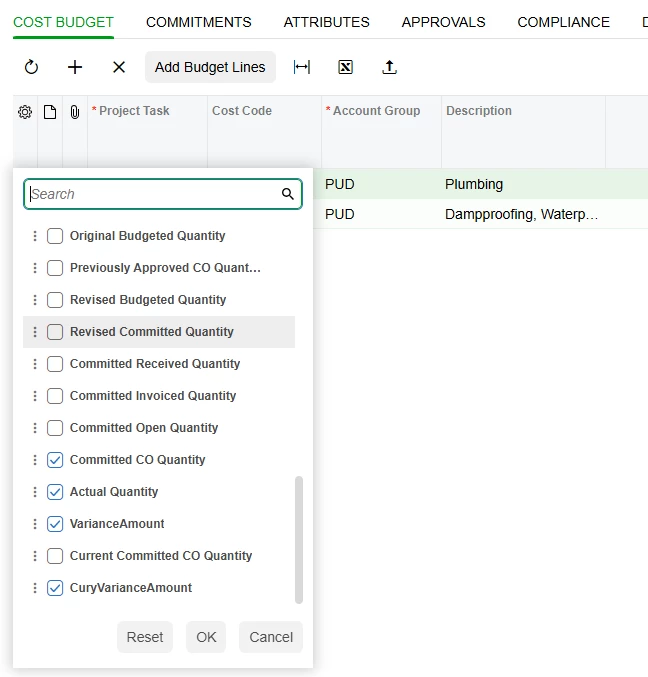
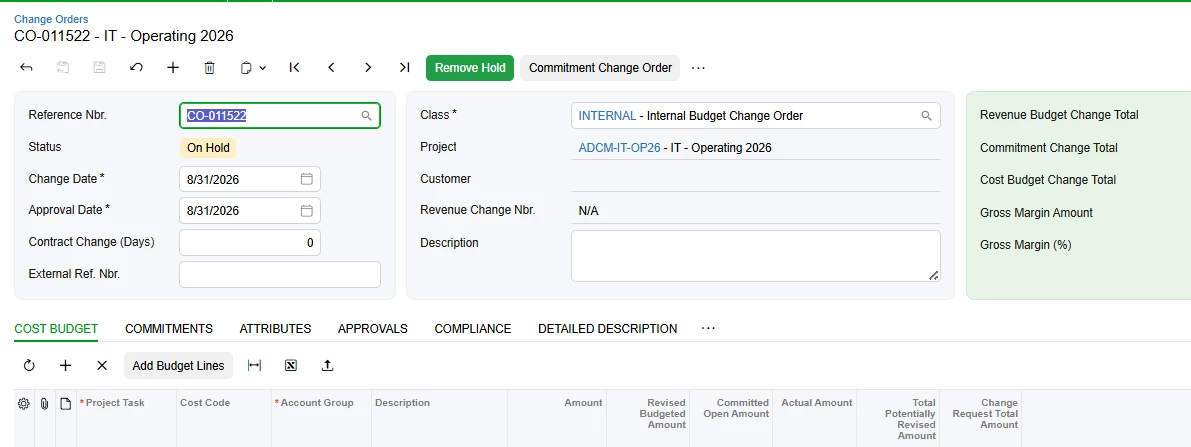
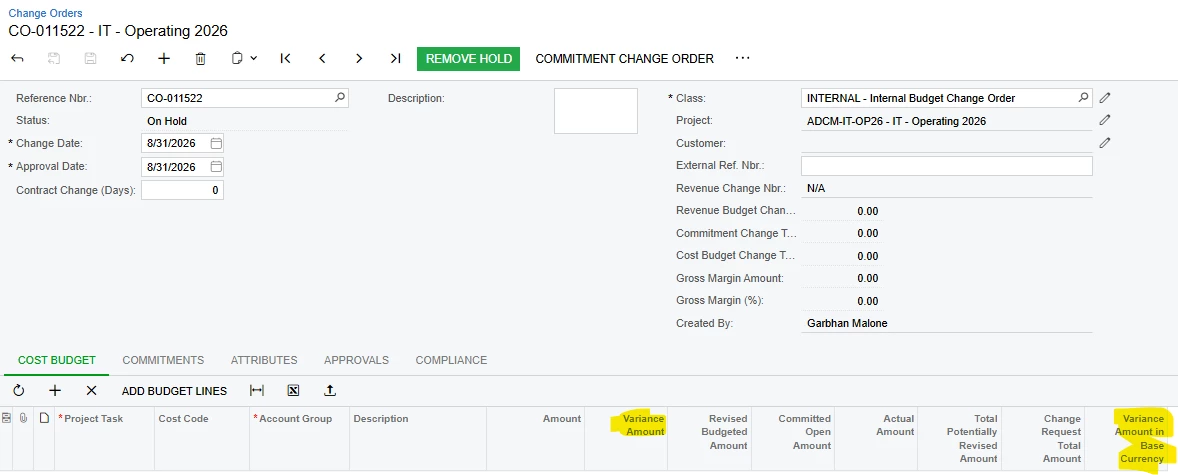
Variance Amount columns for example only display in Classic UI

9 replies

nickcerri32
Captain II
Forum|alt.badge.img+7
  • Captain II
  • September 1, 2026

@Garbhanm4 - so, I checked a few of my customers who use change orders and couldn’t find any variance fields.  Nor could I find any variance fields here Change Orders.  Are these fields custom that were developed specifically for the Classic UI?


smilner3
Varsity III
Forum|alt.badge.img+1
  • Varsity III
  • September 1, 2026

@nickcerri32 is right that it isn't stock. I checked the 2026 R1 files and the Cost Budget grid on PM308000 declares 32 columns on the classic page, none of them variance, and the Modern UI view class for that grid has none either.

The fields themselves aren't custom though. Variance Amount and Variance Amount in Base Currency are stock fields on the project budget DAC, and that DAC is already joined into the Cost Budget grid's data view. It's where your Revised Budgeted, Committed Open and Actual columns come from. They're also stock columns on the Cost Budget tab of Projects (PM301000) in the Modern UI.

Which means someone probably put them on your classic Change Orders grid with a customization, in the Screen Editor, against the ASPX. Modern UI doesn't read the ASPX, so the columns don't survive the switch. Open Customization Projects (SM204505) and look for a published project containing PM308000.

To fix it, redo the change on the modern side. Screens > PM308000 > Modern UI Editor > Add Field, pick the Cost Budget data view and the two variance fields, Save to Extension, publish. The grid binds the whole view, so no HTML edit is needed. Publish it in a test tenant off a snapshot before production, and don't leave it too long. 2026 R1 is the last release that supports Classic UI.


Forum|alt.badge.img
  • Author
  • Freshman I
  • September 1, 2026

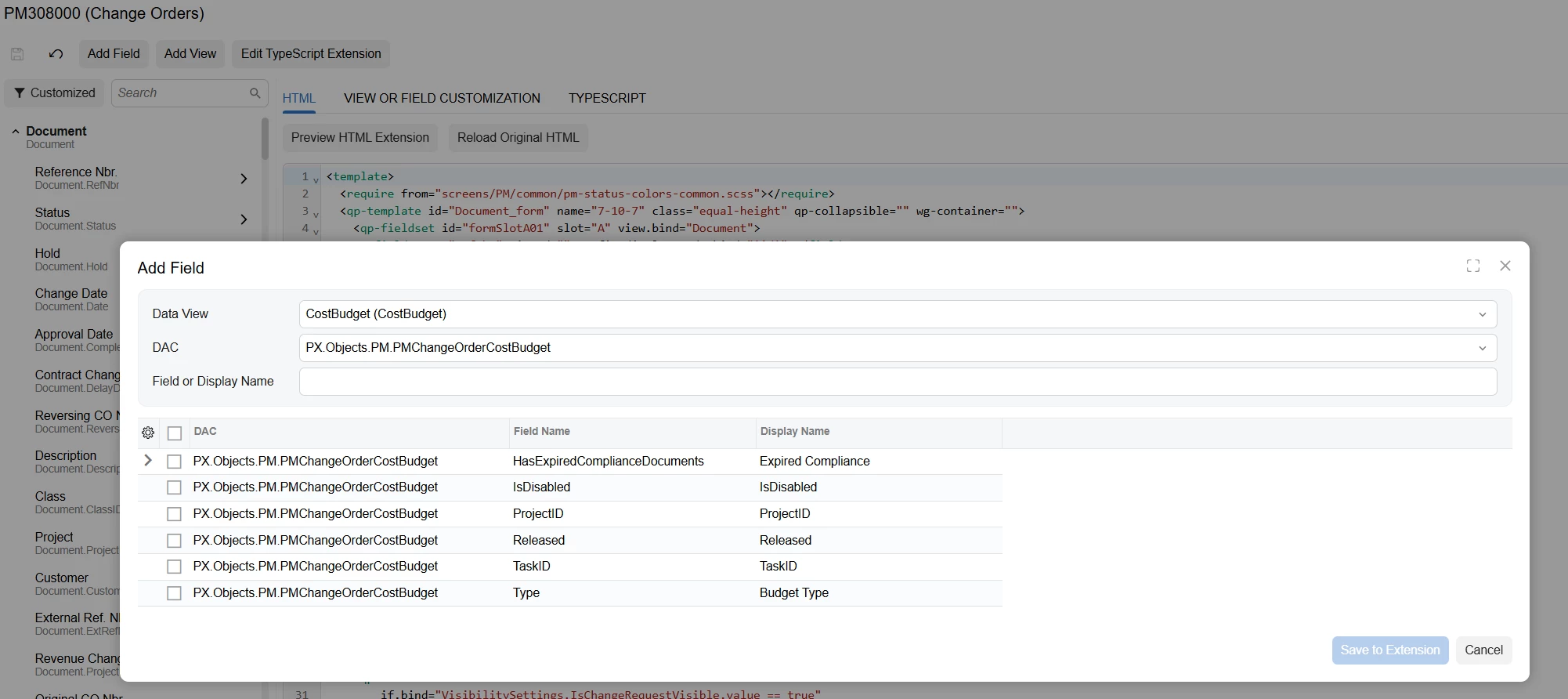
It does not allow the option to add in this field when doing those steps - only the below fields display to choose from


smilner3
Varsity III
Forum|alt.badge.img+1
  • Varsity III
  • September 1, 2026

@Garbhanm4 Change the DAC dropdown. 

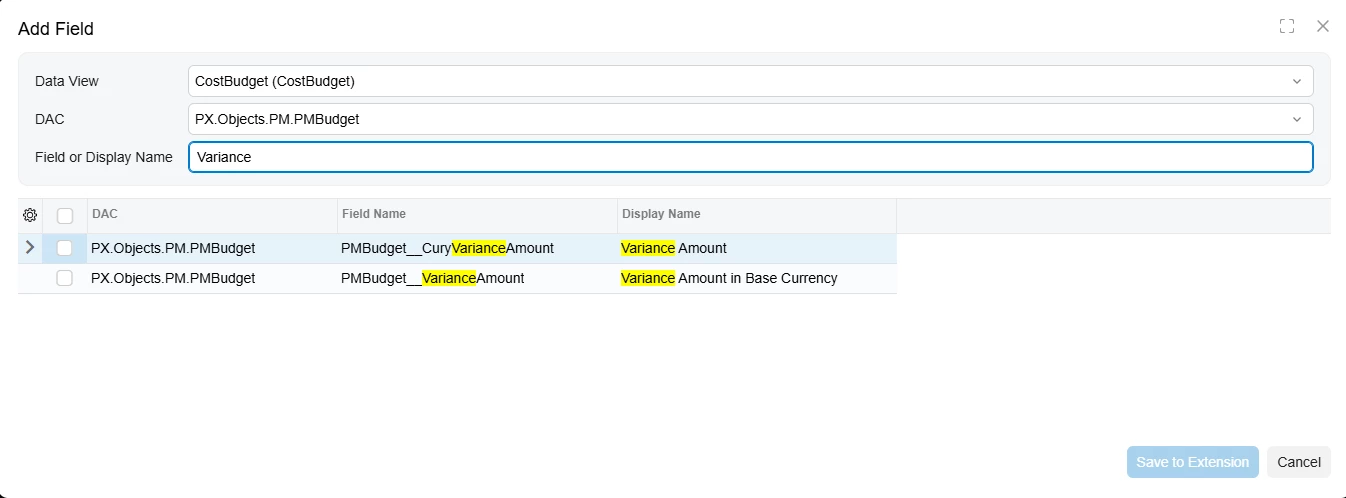
The dialog defaults the DAC to PX.Objects.PM.PMChangeOrderCostBudget, and the variance fields aren't on that DAC. They're on PMBudget, which is left joined into the same CostBudget view. Open the DAC dropdown and you'll see two entries. Pick PX.Objects.PM.PMBudget, then type Variance into the Field or Display Name box.

That gives you PMBudget__CuryVarianceAmount ("Variance Amount") and PMBudget__VarianceAmount ("Variance Amount in Base Currency"). Tick both, Save to Extension, publish. I ran it on 2026 R1 just now and both came up.

They will hold values, not sit empty. Both are calculated in the DAC from the budget's revised, actual and committed open amounts, and the join already returns all three. Publish to a test tenant off a snapshot before you do it in production.


Forum|alt.badge.img
  • Author
  • Freshman I
  • September 1, 2026


When selected it does not seem to go to the Grid


smilner3
Varsity III
Forum|alt.badge.img+1
  • Varsity III
  • September 1, 2026

@Garbhanm4 Two things. I ran the whole path on 2026 R1 to be sure of both.

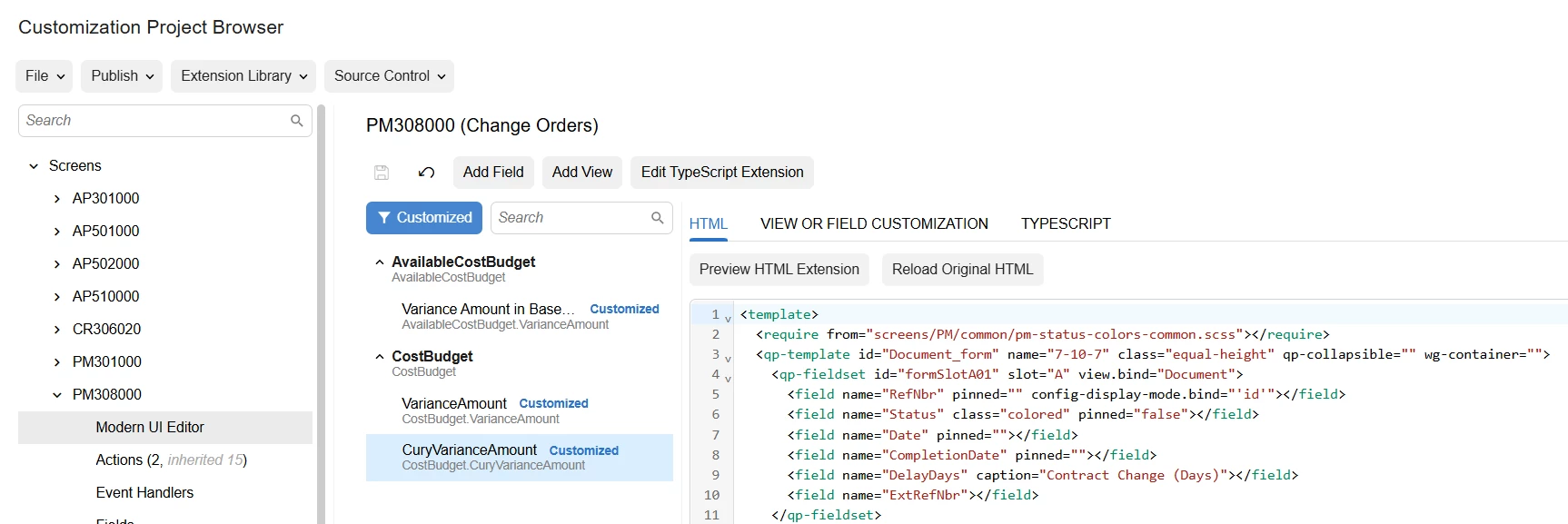
First, the names in your tree are wrong. Yours read CostBudget.VarianceAmount and CostBudget.CuryVarianceAmount. They need to be CostBudget.PMBudget__CuryVarianceAmount and CostBudget.PMBudget__VarianceAmount. The fields live on PMBudget, which is left joined into that view, and joined fields carry a double underscore. Unprefixed they bind to nothing, which is exactly why yours show as raw names with no display name and no column.

To get the right ones, in Add Field set Data View to CostBudget, then change the DAC dropdown from PX.Objects.PM.PMChangeOrderCostBudget to PX.Objects.PM.PMBudget. Type Variance and both come up.

Second, and this is the part that caught me out too. After Save to Extension you have to click Save on the Modern UI Editor toolbar. Skip it and the tree still says Customized, but nothing lands in Modern UI Files and the publish does nothing at all. Confirm Modern UI Files lists a file before you publish.

Do both and the columns render at the right end of the grid with values.


Forum|alt.badge.img
  • Author
  • Freshman I
  • September 1, 2026

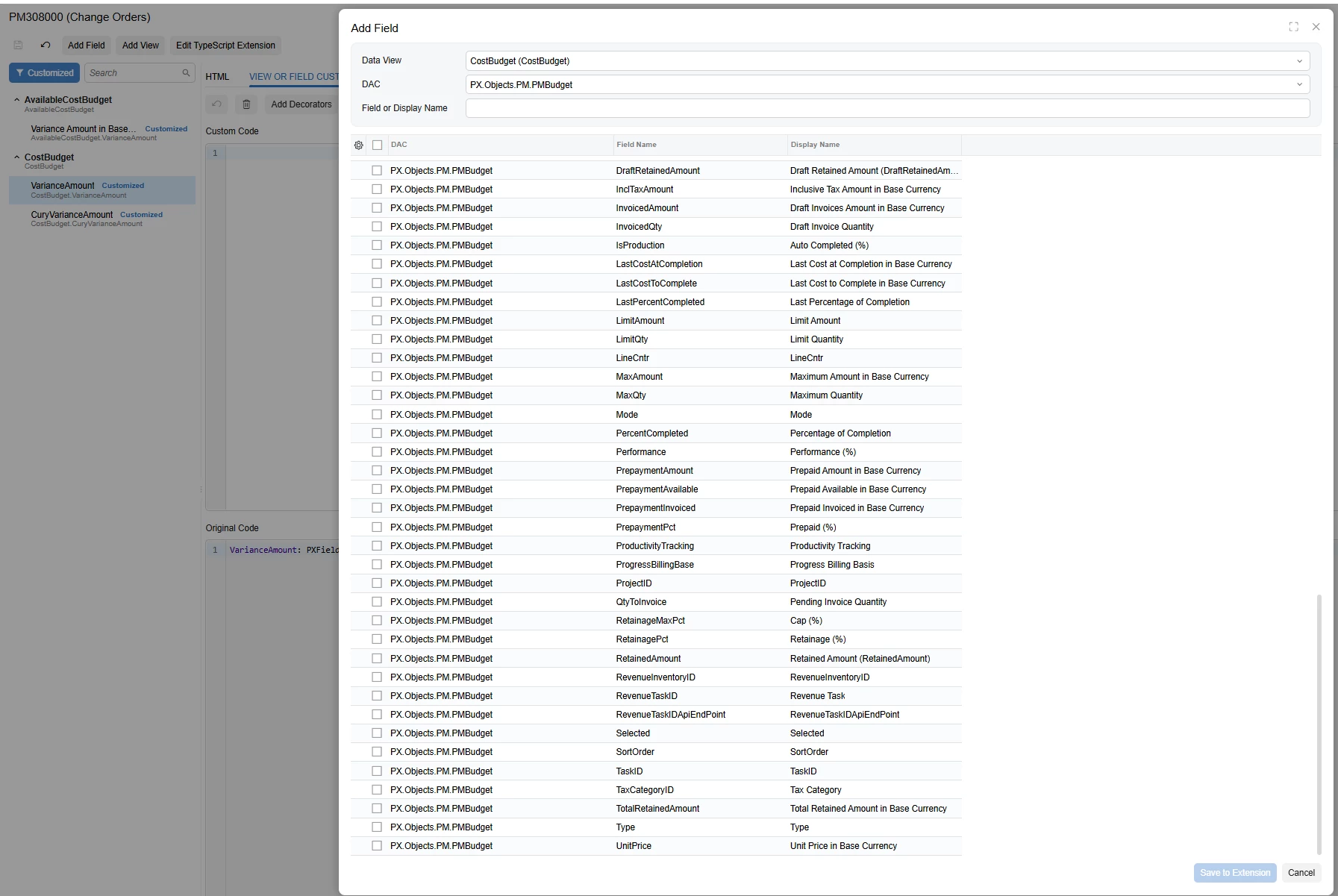
The issue is no field for variance is showing in the PMBudget


smilner3
Varsity III
Forum|alt.badge.img+1
  • Varsity III
  • September 1, 2026

@Garbhanm4 What build are you on? It's at the bottom of the sign-in screen.

Attached is the same dialog on 2026 R1, build 26.101.0225. Same Data View, same DAC, and both rows are there: PMBudget__CuryVarianceAmount and PMBudget__VarianceAmount.

Look at the Field Name column. Mine prefixes with PMBudget__ because PMBudget is left joined into that view. Yours shows bare names like DraftRetainedAmount and InvoicedAmount, and no Variance rows at all. That difference is the thing worth chasing.

I did check whether the dialog hides fields you've already added. It doesn't. I added both, saved the extension, reopened the dialog, and they were still listed. So that isn't what's hiding them from you.

An unprefixed generator would also explain your tree reading CostBudget.VarianceAmount rather than CostBudget.PMBudget__VarianceAmount, and why those columns come through with no display name and no data behind them.

Post your build and I'll try to reproduce it on that version.


Forum|alt.badge.img
  • Author
  • Freshman I
  • September 1, 2026

Build 25.200.0248.9 +


Thanks for your help!