Hi everyone,
I’m looking for some community feedback on a challenge I’ve been encountering. I’ve tried to get this working 2–3 times without success.I’ve been trying to set up an Automation Schedule for the Run Project Billing (PM503000) screen to automatically bill certain Time & Material (T&M) projects — and to be honest, I find the process a bit tricky.
Issues I'm facing:
-
Either too many projects are being billed (not just the ones I intend to include),
-
Or the schedule runs, but nothing happens — no projects get billed at all.
I’m aiming to target specific projects only, and ideally, I’d like to achieve this without any customization or Business Events (at least not as a first step).
Here’s how I currently understand the logic:
-
The selection of projects for billing seems to be driven by the Billing Cycle set on each project.
-
If a project has a cycle set to On Demand, it appears to be considered a manual billing project.
-
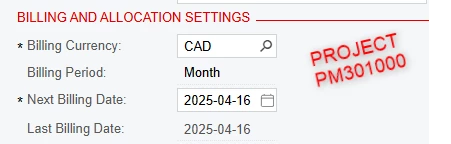
When set to On Demand, the Next Billing Date is cleared on the project and also in the Run Project Billing screen.
-
If we set something cyclic like Montly it appears to be considered a automatical billing project and a Next Billing Date is setted, or can be forced.
-
-
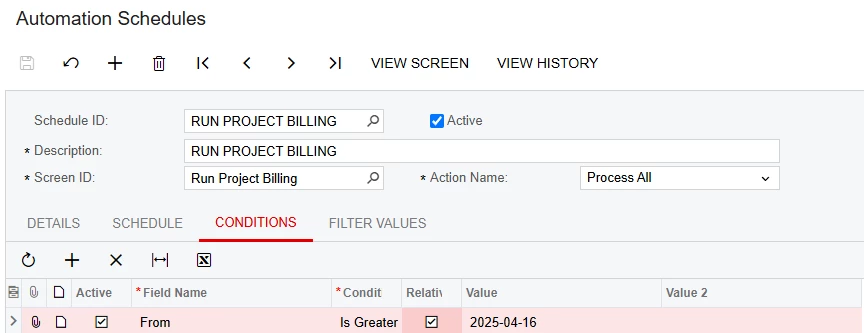
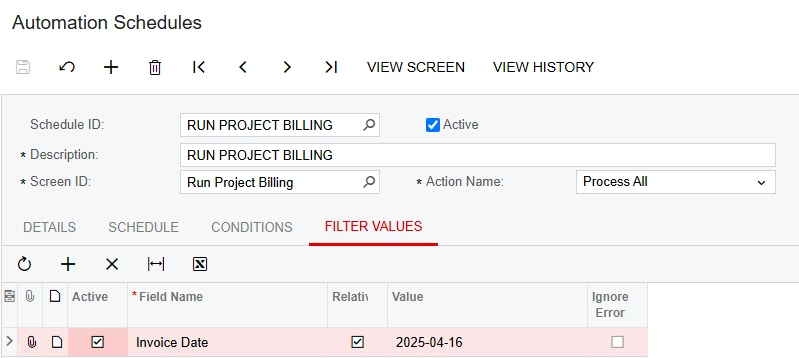
In the Automation Schedule, I’ve configured it to run daily.
-
Assuming the Invoice Date parameter on the header PM503000 is, for example, 2025-04-16,
-
And my T&M projects (not On Demand) have billing dates starting from that same date,
-
Then those projects should be picked up by the schedule.
-
Once billed, I expect the From Date of each project to advance to the next billing period, so projects aren’t picked up again the next day unnecessarily.
Does this logic sound correct?
Targeting Specific Projects ideas :
-
The natural idea would be to add conditions in the schedule such as:
Project = Project1 OR Project = Project2But unfortunately, the "OR" operator isn’t supported in Automation Schedule conditions.
-
I also considered using a Sharing Filter, but Run Project Billing doesn’t support shared filters, neither in the screen nor in the schedule.
My goal is to work within the system’s standard features before jumping into custom logic with a Business Event. This feels like a basic need — just billing a specific list of T&M projects automatically — so I’d love to know if others have found a reliable approach.
Any ideas, experiences, or advice would be greatly appreciated!
Thanks
Raphael