Answer

Upload Button on AP Cheks and Payments

  • August 22, 2022
  • 4 replies
  • 170 views

Jeff96
Captain II
Forum|alt.badge.img+4

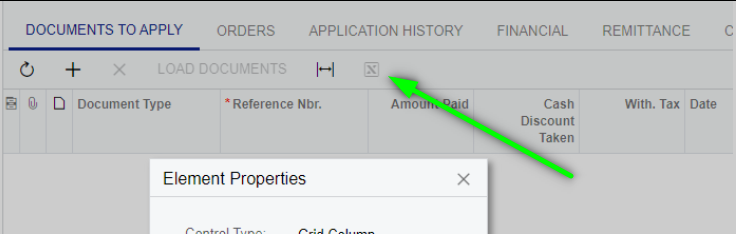
I would like to add an upload button to be able to upload an excel file with the lines an AP payment should be applied. 


What do I need to do in the customizations? 

Best answer by Dioris Aguilar
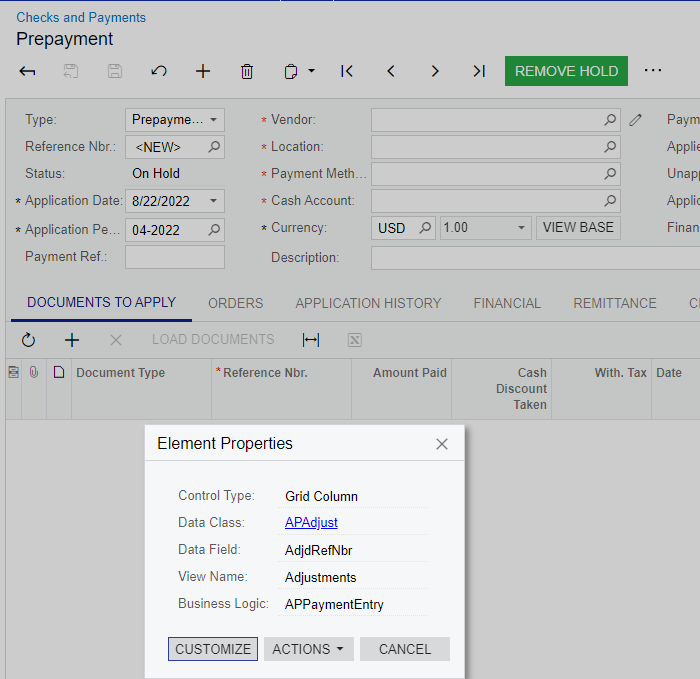
@Jeff96 Try creating a graph extension for the class that defines the view where you want to add the Upload button. I guess it is the Documents to Apply tab where the Adjustments view is the one:
 

In this case, the Adjustments view is defined inside the MultiCurrency graph extension, so, try something like this to override it by adding the PXImport attribute on top of it:
 

public class MultiCurrencyExtension : PXGraphExtension<MultiCurrency,APPaymentEntry>
{
[PXImport(typeof(APPayment))]
[PXViewName(Messages.APAdjust)]
[PXCopyPasteHiddenView]
public PXSelectJoin<APAdjust,
LeftJoin<APInvoice, On<APInvoice.docType, Equal<APAdjust.adjdDocType>,
And<APInvoice.refNbr, Equal<APAdjust.adjdRefNbr>>>,
LeftJoin<APTran, On<APInvoice.paymentsByLinesAllowed, Equal<True>,
And<APTran.tranType, Equal<APAdjust.adjdDocType>,
And<APTran.refNbr, Equal<APAdjust.adjdRefNbr>,
And<APTran.lineNbr, Equal<APAdjust.adjdLineNbr>>>>>>>,
Where<APAdjust.adjgDocType, Equal<Current<APPayment.docType>>,
And<APAdjust.adjgRefNbr, Equal<Current<APPayment.refNbr>>,
And<APAdjust.released, NotEqual<True>>>>> Adjustments;
}


4 replies

Dioris Aguilar
Jr Varsity I
Forum|alt.badge.img+2
  • Jr Varsity I
  • Answer
  • August 22, 2022

@Jeff96 Try creating a graph extension for the class that defines the view where you want to add the Upload button. I guess it is the Documents to Apply tab where the Adjustments view is the one:
 

In this case, the Adjustments view is defined inside the MultiCurrency graph extension, so, try something like this to override it by adding the PXImport attribute on top of it:
 

public class MultiCurrencyExtension : PXGraphExtension<MultiCurrency,APPaymentEntry>
{
[PXImport(typeof(APPayment))]
[PXViewName(Messages.APAdjust)]
[PXCopyPasteHiddenView]
public PXSelectJoin<APAdjust,
LeftJoin<APInvoice, On<APInvoice.docType, Equal<APAdjust.adjdDocType>,
And<APInvoice.refNbr, Equal<APAdjust.adjdRefNbr>>>,
LeftJoin<APTran, On<APInvoice.paymentsByLinesAllowed, Equal<True>,
And<APTran.tranType, Equal<APAdjust.adjdDocType>,
And<APTran.refNbr, Equal<APAdjust.adjdRefNbr>,
And<APTran.lineNbr, Equal<APAdjust.adjdLineNbr>>>>>>>,
Where<APAdjust.adjgDocType, Equal<Current<APPayment.docType>>,
And<APAdjust.adjgRefNbr, Equal<Current<APPayment.refNbr>>,
And<APAdjust.released, NotEqual<True>>>>> Adjustments;
}


DConcannon
Varsity II
Forum|alt.badge.img+2
  • Varsity II
  • August 23, 2022

@Jeff96 Can you help a non-programmer understand how your customization will differ from the existing Excel button?


Jeff96
Captain II
Forum|alt.badge.img+4
  • Author
  • Captain II
  • August 23, 2022

@Jeff96Can you help a non-programmer understand how your customization will differ from the existing Excel button?


I’m also not a programmer… There is currently no excel upload button, only a download button.


DConcannon
Varsity II
Forum|alt.badge.img+2
  • Varsity II
  • August 23, 2022

doh, I confused buttons.