Answer

System Email Requirements: Office 365 Account type

  • June 8, 2023
  • 10 replies
  • 2032 views

Forum|alt.badge.img

I had a client today ask me directly what the requirements are for a system email account. They had initially setup a group email list, not a true mailbox and I knew that was likely not acceptable. There are several tiers for the actual mailbox with differing prices. There is an email kiosk account that is most affordable, and limits the inbox size to 2GB. Is the size of that mailbox any sort of Acumatica requirement, or is this just dependent on how much email the users expect to have coming through? The costs involved are relatively minor but I wanted to be prepared when I follow up.

Best answer by Missy Main

Hello,

A system email account record inside Acumatica requires:
an SMTP address (an email address)
a password associated with that email address
a license applied to the email account in O365 that allows for email processing 

The size requirement is up to the person and how much email they plan on receiving into that inbox without deleting or archiving. One can always delete or archive old messages in O365 to free up space as well. 

The following KB document also explains how to configure an email account as a “Modern Authentication” email account, where the comments on this KB explain that some users have even been able to set up “shared” email accounts using Modern Auth, as long as some specific requirements are fulfilled, definitely check out this KB and corresponding comment thread!

https://community.acumatica.com/installation-and-configuration-14/how-to-set-up-exchange-online-office-365-and-azure-online-accounts-using-modern-authentication-oauth-2-0-4638

10 replies

Forum|alt.badge.img+3
  • Acumatica Support Team
  • Answer
  • June 8, 2023

Hello,

A system email account record inside Acumatica requires:
an SMTP address (an email address)
a password associated with that email address
a license applied to the email account in O365 that allows for email processing 

The size requirement is up to the person and how much email they plan on receiving into that inbox without deleting or archiving. One can always delete or archive old messages in O365 to free up space as well. 

The following KB document also explains how to configure an email account as a “Modern Authentication” email account, where the comments on this KB explain that some users have even been able to set up “shared” email accounts using Modern Auth, as long as some specific requirements are fulfilled, definitely check out this KB and corresponding comment thread!

https://community.acumatica.com/installation-and-configuration-14/how-to-set-up-exchange-online-office-365-and-azure-online-accounts-using-modern-authentication-oauth-2-0-4638



benb1977
Freshman II
Forum|alt.badge.img
  • Freshman II
  • August 9, 2024

Hi there,

We are currently having difficulty implementing Exchange Online system email accounts with a shared mailbox. We have checked and double-checked Client ID, Tenant ID, Client Secret, account name, permissions for the app on Azure, and we can see successful login attempts in the Azure portal. The problem seems to be when it is coming back to Acumatica.

Well, when I say “Acumatica”, I mean our Australian-ised version called MYOB Acumatica. I have consulted several different sources on fixing it with no joy yet. One possibility left is the “specific requirements” that you talk about in reference to the linked KB article. I don’t yet have access to the Knowledge Base though - we and MYOB in Australia are trying to sort that out.

Is it possible that you could reproduce that article in this thread somehow? Screenshots?

Thanks,

Ben.


WillH
Varsity III
Forum|alt.badge.img+3
  • Varsity III
  • May 1, 2025

Hi ​@benb1977  - 

Sorry this message is such a delayed reply to an old thread.  I wanted to make sure my research was logged where any future readers might spot it.

Unfortunately to my knowledge “Shared Mailboxes” (Unlicensed mailboxes) can’t be directly accessed by Acumatica as of version 24r2 (24.2 in MYOB terms).

As I understand it, the reasons are:

  1. You need to be able to log directly into the mailbox as it’s own Microsoft account for Acumatica to send emails from that mailbox.
  2. You are unable to log in to shared mailboxes directly unless that mailbox is specifically licensed.

I’ve seen multiple references to people managing to have this work on these forums, but I’ve not found a confirmed way to get a shared mailbox to send in Acumatica in the current versions. (I’ve done some reasonably extensive testing.)

The underlying technology requires some changes, and I believe is currently being developed, but the last estimate i saw mentioned 2026 as estimated release timeline:


Nice though, a reply from ​@Missy Main  pointed me at the new feature in 25r1 which allows for multiple email accounts to link to a single External application:
https://help.acumatica.com/(W(76))/Help?ScreenId=ShowWiki&pageid=9cde291f-bea6-4b15-979b-290a9ccc6e46

And the personal email feature makes it easier for individual users to update the auth tokens for their email accounts as of 23r2: https://acumatica.wistia.com/medias/5mb8wth5ml


Forum|alt.badge.img
  • Varsity II
  • June 4, 2025

Thanks for the link for 25r1 and the link on the updates for 2026.  I’ll be interested to see those features when we upgrade. 


On the system account setup for 24r1 in our test system, it wasn’t immediately obvious (or stated), that you have to login as the system email account user and not your own account user address.  Maybe that’s implied.  The documentation indicates “sign in to your email account”, not “sign in to the account specified on the screen”.  In my current ERP system, it’s not necessary to login using the system account; my personal account credentials are used to refresh the token needed for communication with the MS Graph API, but the system account (no-reply account) is used to send all emails.  In Acumatica, if you sign in with your personal email, you receive a success message, but the test email send fails, indicating that there’s an authorization failure with no access to the configured account.  Since my O365 account has full access to the Azure app and the sending email account and there were no logged failures in the Azure portal, I initially thought there was some configuration issue with the Azure app.    Once I decided to try logging-in using the system email account password, it worked fine.  Hopefully that helps someone else.


  • Freshman II
  • June 17, 2025

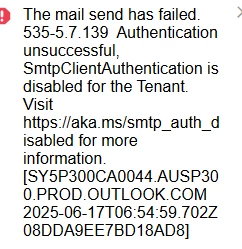
I am signing in with the system email account and have verified it both ways, text and authenticator app. But I am still getting the same error when I click test.


Forum|alt.badge.img
  • Varsity II
  • June 17, 2025

I am signing in with the system email account and have verified it both ways, text and authenticator app. But I am still getting the same error when I click test.


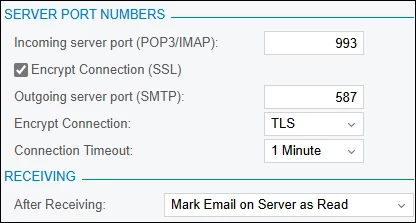
Do you have the account configured for TLS encryption? I believe that’s the error that you receive if it’s not configured.  


rfairchild58
Varsity I
Forum|alt.badge.img+1
  • Varsity I
  • June 17, 2025

For outbound email, I have always found it better to use a service like SMTP2GO or Mailgun.  


  • Freshman II
  • June 17, 2025

Thank you, I have questions for both replies:

Should I get IT to configure for TLS encryption?

Should smtp auth be enabled at all, isn’t is less secure and not recommended? I have heard of this error being rectified by enabled smtp auth. Can anyone advise is this is correct or safe?

Apologies if asking some obvious questions, have some familiarity with email setup but not fully across it. However, conscious of cybersecurity concerns and can’t see why you would go to the trouble of using a modern auth method via Azure, then enable a less secure legacy auth.


Forum|alt.badge.img
  • Varsity II
  • June 18, 2025

Thank you, I have questions for both replies:

Should I get IT to configure for TLS encryption?

Should smtp auth be enabled at all, isn’t is less secure and not recommended? I have heard of this error being rectified by enabled smtp auth. Can anyone advise is this is correct or safe?

Apologies if asking some obvious questions, have some familiarity with email setup but not fully across it. However, conscious of cybersecurity concerns and can’t see why you would go to the trouble of using a modern auth method via Azure, then enable a less secure legacy auth.

You shouldn’t need to change anything except communication settings on your system email account in Acumatica.  If you’re using Azure/O365, then the attempt is being rejected because it’s not using TLS.


  • Freshman II
  • June 25, 2025

After some further research, I believe it could be required because smtp auth is carrying the token, so the OAuth Secret needs the SMTP Auth in order to get where it needs to go. Can someone verify if this is correct or provide further clarity?