Solved

ROLE: VIEW ONLY Access on Screen/Form allows ACTIONs to process

  • October 20, 2022
  • 4 replies
  • 620 views


User Is set to View ONLY Access for Several Workspaces but still is able to Perform Actions on a Item

Use Case: 

Set ROLE Access for a Screen/Form to ‘View Only’ Ex: Purchases Orders 

from ‘Access Right by Role” 

 

It is assumed that for Purchase Orders this ROLE/USER can only VIEW PO’s but not Edit them.

By default all FIELDS and ACTIONs within the FORM are set to INHERITED. 


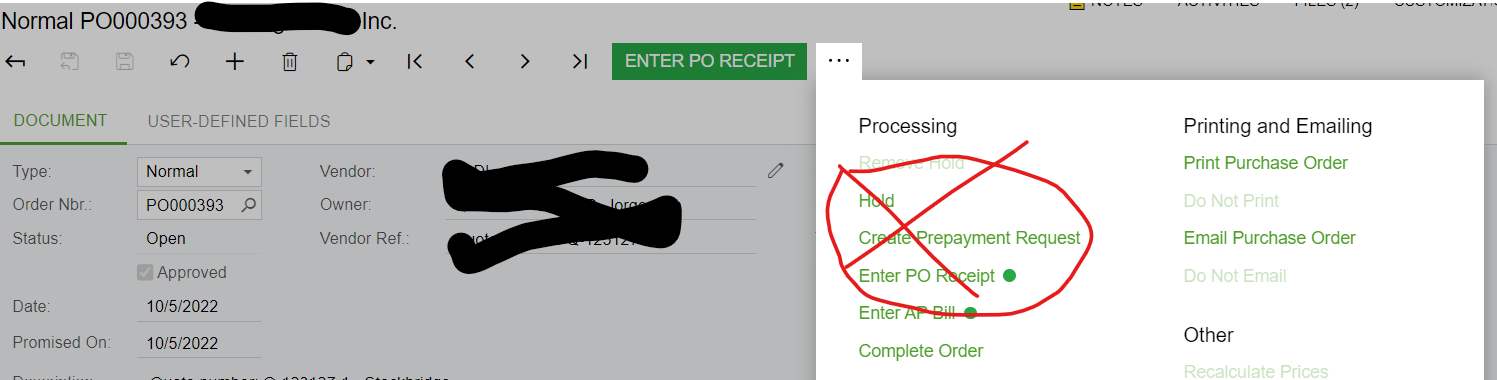
However, the ACTIONs on the PO are still Available and can be utilized: for example, an open PO can Receipted or be Put on HOLD.  Since this is VIEW ONLY access shouldn’t ACTIONS also be VIEW ONLY? And this inadvertently gives ACTIONABLE / EDIT access to user that should be VIEW ONLY.

 

This is a security Flaw and Has been caught in client Compliance AUDITs 

The only way I’ve been able to counter this is at the FORM Access Level is to REVOKE the ACTION ITEMS
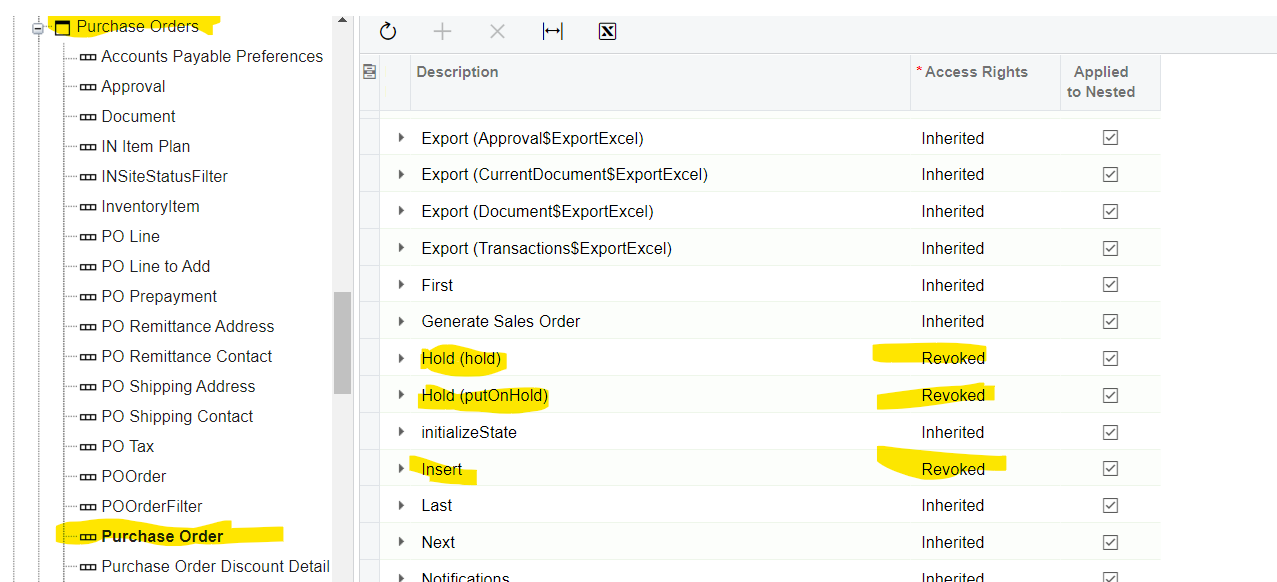
 

Is there any way around this?   Shouldn’t VIEW ONLY apply to ACTIONs as view only also? 

IS this a BUG?   Shouldn't this be fixed?   


NOTE: This applies to ALL FORMS Access across all Workspaces. 

Best answer by bobstephens42

NEW RELATED ISSUE:   By setting REVOKE on the Action Items on the ROLE that was supposed to be View Only, I caused another issue. A different user assigned to the View Only role with the Revoked Actions, also was assigned another ROLE where same screen (in this case Purchase Orders) was set to DELETE.  However, since REVOKE was “hardcoded” on one role and DELETE was Inherited on the other role, the USERs access or those Action items was REVOKEd.   Note: in the ‘Access Roles by User’ form the Action Items show as DELETE.   BUT in this case REVOKE is overriding Inherited DELETE access.   The work around was in the DELETE inherited role to HARDCODE/Force the Action items to be DELETE instead of INHERITED.  Interestingly enough I selected DELETE but they changed to EDIT when I hit save.  That hardcoded selection resolved the issue.  

4 replies

  • Author
  • Freshman III
  • Answer
  • October 25, 2022

NEW RELATED ISSUE:   By setting REVOKE on the Action Items on the ROLE that was supposed to be View Only, I caused another issue. A different user assigned to the View Only role with the Revoked Actions, also was assigned another ROLE where same screen (in this case Purchase Orders) was set to DELETE.  However, since REVOKE was “hardcoded” on one role and DELETE was Inherited on the other role, the USERs access or those Action items was REVOKEd.   Note: in the ‘Access Roles by User’ form the Action Items show as DELETE.   BUT in this case REVOKE is overriding Inherited DELETE access.   The work around was in the DELETE inherited role to HARDCODE/Force the Action items to be DELETE instead of INHERITED.  Interestingly enough I selected DELETE but they changed to EDIT when I hit save.  That hardcoded selection resolved the issue.  


  • Freshman I
  • January 14, 2026

We are on 2025R1 and are encountering the same issue in a lot of the workspace, such as Project Quotes, Opportunities, Sales Orders, Invoices and Memos, Payments and Applications. 

Is this a known issue aka bug?  Was this/is there a fix planned? 


  • Author
  • Freshman III
  • January 14, 2026

I have not seen a FIX, nor was it ever considered a bug by ACU, I think because the “Actions” can be related to other forms i.e. they are not screen specific.  Our rule of thumb is: whenever there are potentially Conflicting ROLES assigned to the same user, do not rely on the ‘Inherited’ setting in the ROLES to “figure it out”; hard set the ROLEs access. And the form Actions likewise set them specifically for View only users. NOTE: I have not tested in 2025R2 Modern UI yet.   


  • Freshman I
  • January 14, 2026

I found that even when revoking the action from a specific form, it was still actionable on another form. I have not tested the 2025R2 Modern UI yet either.