Answer

Restrict supplier bank account details

  • March 6, 2024
  • 6 replies
  • 214 views

Forum|alt.badge.img

Hi, 


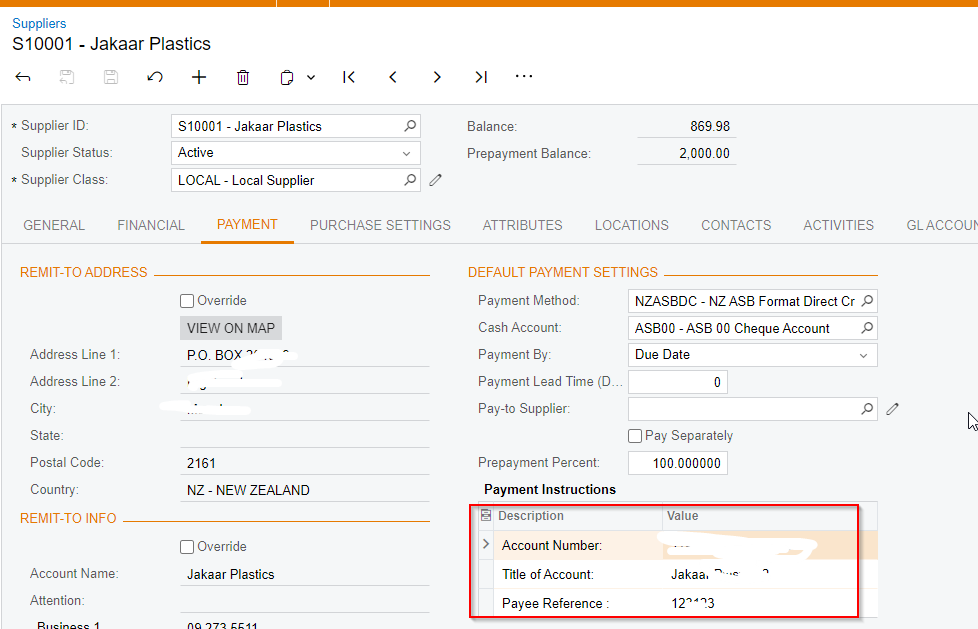
We have received a request from the client specifying that certain users should be restricted from accessing and editing supplier bank account details under the supplier master payment instructions. However, these users should still have the capability to edit other supplier details such as address and contact information.

How we can achieve this in the system ?
 

Best answer by Manikanta Dhulipudi

Hi @psoni1585 

We can achieve a certain level of control through Access Rights based on user roles.

Create a user role with view-only permissions for payment instructions.

Then, create another user and assign delete or edit permissions as required by the business.

Thank you.

6 replies

Manikanta Dhulipudi
Captain II
Forum|alt.badge.img+15

Hi @psoni1585 

We can achieve a certain level of control through Access Rights based on user roles.

Create a user role with view-only permissions for payment instructions.

Then, create another user and assign delete or edit permissions as required by the business.

Thank you.


Forum|alt.badge.img
  • Author
  • Varsity I
  • April 4, 2024

Hi @manikantad18 


Thanks for your help. it has been solved after changing access right on screen and field level.

Thanks


Hi @manikantad18 


Thanks for your help. it has been solved after changing access right on screen and field level.

Thanks


Hi ​@psoni1585 ​​​​​​can you please share with me what field was it in the access rights that you changed? I’m trying to identifying the Payment Instructions field and can not find. If you can share a screenshot that will be much appreciated! ​


rloetterle45
Freshman I
  • Freshman I
  • September 15, 2025

I am also interested ​@psoni1585 !


  • Freshman I
  • September 15, 2025

I am also interested ​@psoni1585 !

@rloetterle45 I was able to work this out and you can do the following:
 

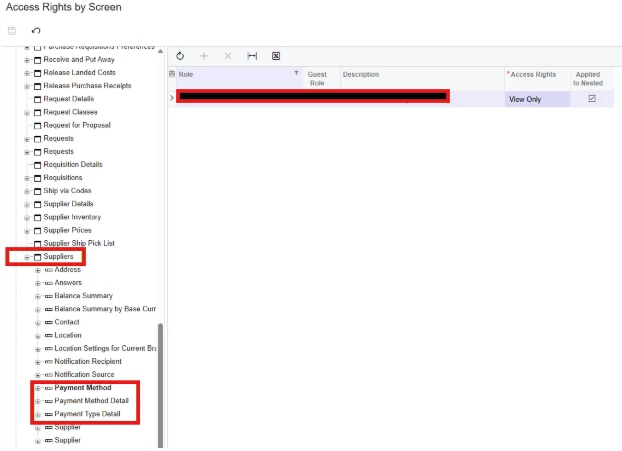
Open Access Rights by Screen, Suppliers AP303000. 

Suppliers> Payment Method; Change to View Only

Suppliers> Payment Method Detail; Change to View Only

Suppliers> Payment Type Detail; Change to View Only

Do the above if you only want the "Payment Instructions" fields to be restricted. 


If along the above, the Payment Methods fields needs to be restricted as well then do the following as well;

On Access Rights by Screen, Open Suppliers  AP303000. 


1) Suppliers>Location> Change from Inheritance to the Access Right set at High Level for Suppliers Screen for the existing role. 
For eg, for Administrator it was Delete on Supplier level, change it from Inherited to Delete. 

For eg; If it was Insert for a different role, change Inherited to Insert.


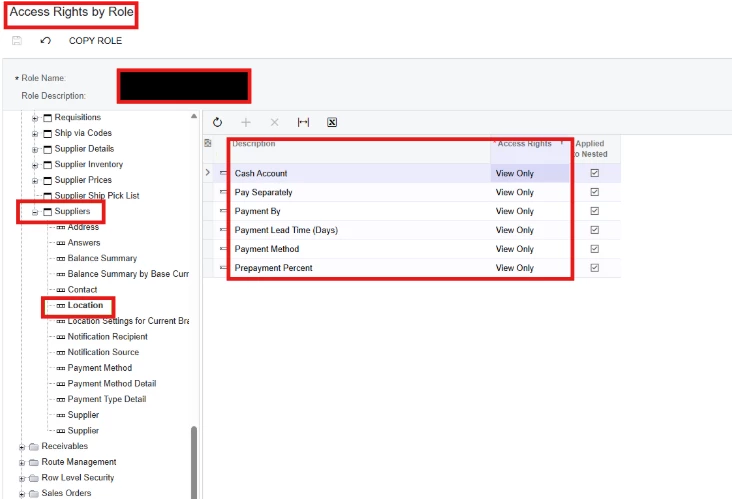
Now Open Access Rights by Role, Suppliers AP303000. 

Suppliers>Locations, and change the following fields to View Only. Can change to Revoke, if you want to restrict visibility of the fields.


rloetterle45
Freshman I
  • Freshman I
  • September 15, 2025

I was just noodling on this this afternoon and found the same nodes! Thank you ​@erpconsultant! If I revoke the Payment Type Detail node on both the Supplier & Supplier Location, the entire grid with the ACH and bank account info disappears from the screen.