

Answer

Override button not working as expected

  • May 1, 2025
  • 4 replies
  • 80 views

Hello,

I am configuring security settings for different user roles and we are limiting a role to be able to create a PO from an SO only. IE: They can not create a PO from “Create New PO” button and cannot order things to stock. They can only order a PO from an SO.

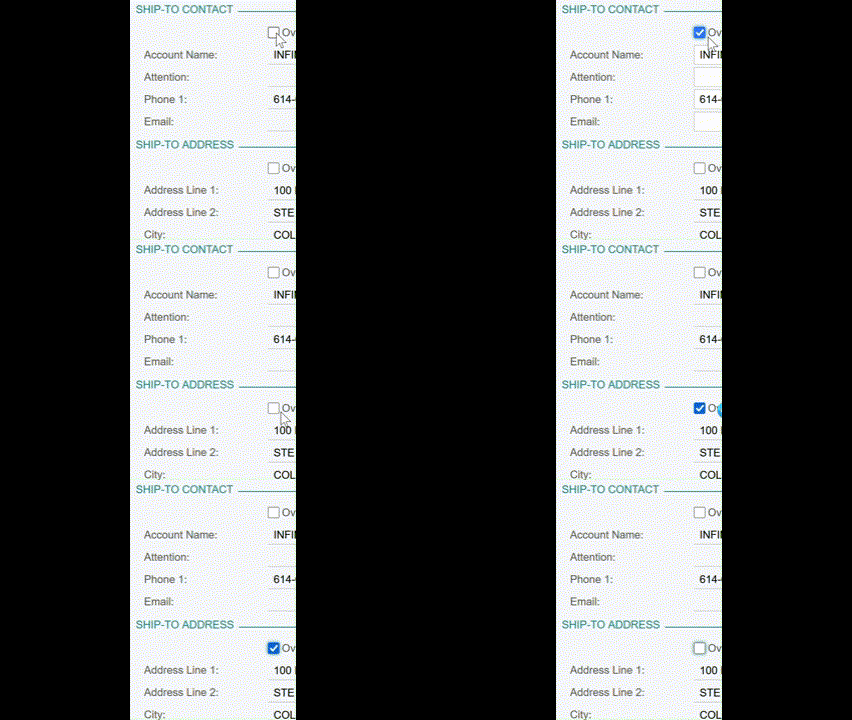
They need to be able to update the Ship-To Address and for some reason the Ship-To Contact is allowing the override but the address is not. The checkbox will allow me to check it and then it will auto deselect without opening up any of the fields to be edited. See the GIF below for what I mean.

I have tried going into the Override button directly and given the maximum security setting allowed for the button and that still does not work. I am not sure why the Contact override would work and the Address would not.


Any help is appreciated -- Thank you!!


Best answer by Awillats

Update: I was able to fix this by using the thought process behind this post.


There is some permission built into the Purchases bucket that requires Insert level for the override function. This meant that instead of starting with lower access and giving higher permissions per field I needed to give higher access and then revoke fields.

I could not identify the exact field that is required due to time constraints so I set the Purchases bucket to Insert, Purchase Orders to Insert and then took away the necessary field level permissions.

4 replies

hkabiri
Acumatica Moderator
Forum|alt.badge.img+8
  • Acumatica Support Team
  • May 1, 2025

@Awillats If the same action works for users with admin access, there is probably some access rights which allows the user to create a new address record. If this happens on SO, you need to check is same user can check override on Customer records Shipping Tab.


  • Author
  • Jr Varsity II
  • May 1, 2025

@Awillats If the same action works for users with admin access, there is probably some access rights which allows the user to create a new address record. If this happens on SO, you need to check is same user can check override on Customer records Shipping Tab.

This user role won’t be able to edit customers - view only access. We have a team of people who are designated to keep our customer/vendor records up to date and accurate rather than sales people.

The override works on the SO Addresses tab, that’s where I looked first thinking maybe I blocked it “upstream” some how.

For our customers it is possible they will give us multiple shipment locations depending on the equipment. This doesn’t necessarily mean we need a new location added for the customer, it could be a one time use address.

Examples:

  • We could have electrical components we need to ship to a panel company rather than the project site directly.
  • Items will need to be drop-shipped to site.
  • Contractor told us to ship to site but they aren’t ready yet and ask us to redirect.

  • Author
  • Jr Varsity II
  • Answer
  • May 2, 2025

Update: I was able to fix this by using the thought process behind this post.


There is some permission built into the Purchases bucket that requires Insert level for the override function. This meant that instead of starting with lower access and giving higher permissions per field I needed to give higher access and then revoke fields.

I could not identify the exact field that is required due to time constraints so I set the Purchases bucket to Insert, Purchase Orders to Insert and then took away the necessary field level permissions.


Chris Hackett
Community Manager
Forum|alt.badge.img
  • Acumatica Community Manager
  • May 2, 2025

Thank you for sharing your solution with the community ​@Awillats!


