Question

New Task emails not sending immediately

  • January 29, 2026
  • 8 replies
  • 69 views

Forum|alt.badge.img

Hello,

I have my task emails set up to send out when a user gets a new task. For some reason, the emails are only sending out once a day at 8:30am. What is the best way to get them to send out as the task is assigned?

Thank You,

Brent

8 replies

jhouser
Captain II
Forum|alt.badge.img+7
  • Captain II
  • January 29, 2026

@bbondura Emails are not processed automatically. I would suggest an automation schedule for the Send / Receive Emails screen. You could set it to run every 15 minutes or so. 


Forum|alt.badge.img

@bbondura 

Task emails in Acumatica are not sent immediately; they are queued and processed by the email engine. If emails are only sent once a day, the email processing schedule is the cause.

How to fix:

Go to Emails Pending Processing (SM204002)
Check if task emails are queued there. If yes, they are waiting for processing.

Go to Automation Schedules (SM205020)
Find the schedule for Send Email Notification.
Make sure it is active and change the interval to a short frequency (for example, every 30 minutes).

Verify System Email Account / SMTP settings
Ensure the default email account is active and SMTP credentials are valid.


mohammadnawaz51
Jr Varsity I
Forum|alt.badge.img+6

@bbondura can you check if emails are stuck in pending processing, if yes please create a scheduler to send emails immediately.


shushanna34
Freshman II
Forum|alt.badge.img
  • Freshman II
  • January 30, 2026

Hi ​@bbondura ,In addition of ​@VaheGhazaryan’s reply, I would like to ask if you are using Business Event for the email to be sent?


Forum|alt.badge.img
  • Author
  • Jr Varsity II
  • January 30, 2026

Hello all!

We currently have a schedule set up to process emails every 5 minutes during the day, and every 1 hour after the work day is over. They are not stuck and sending as they should. I had an employee create a Task yesterday, and that email never popped into the pending processing screen. 

Yes, a business event is set up for it. I followed this guide:

Streamlining Task Management: Get Acumatica Task Notifications in Your Emai

Everything appears perfect other than the timely sending of the emails.


shushanna34
Freshman II
Forum|alt.badge.img
  • Freshman II
  • January 30, 2026

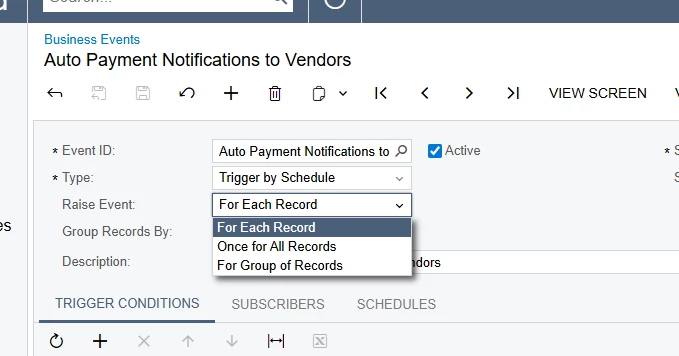
Hi ​@bbondura please check the Business Event Raise Event, if it is set to Once for all Records, no matter the scheduler’s configurations it will run just one time.

In this case you should set “For Each Record”, this might be the problem 


harutyungevorgyan
Jr Varsity I
Forum|alt.badge.img+4

Hi ​@bbondura,

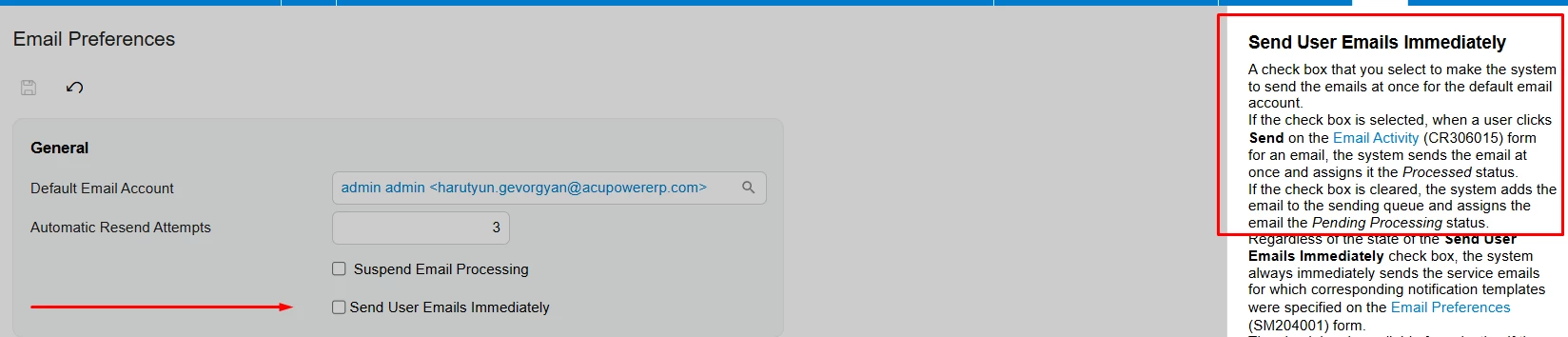
Try ticking the Send User Emails Immediately box on the Email Preferences (SM204001) screen. Let me know if that does the trick.


Forum|alt.badge.img
  • Author
  • Jr Varsity II
  • January 30, 2026

This is how I currently have it set up.

@harutyungevorgyan I made that change. I’ll see if that does the trick.