Answer

Moving a Company within a Tenant to Its Own Tenant

  • July 10, 2024
  • 3 replies
  • 98 views

Forum|alt.badge.img

I have a tenant with 3 companies; Company A , B, and C.  I want to move Company B to its own tenant.  In a SaaS environment, what would be the steps to do that?

Best answer by Laura03

Hello,

There is no easy way, no button we could push, to “peel out” one company from a tenant and place it, with all its historical transactions, in a new tenant.

What we can do is create a snapshot of the existing tenant without transactions (Settings & Profiles only), and restore the snapshot to a new tenant.

  1. In the new tenant, delete unneeded companies, branches, customers, vendors, items, employees, etc. 
  2. Migrate Open Balances from the previous tenant by entering or importing open invoices, open AP Bills, open Purchase Orders and Sales orders using migration mode.
  3. Migrate GL history by printing GL Trial Balance for the company that is moving, from the previous tenant and then import the trial balance (using GL Trial balance screen) to the new tenant.

Laura

3 replies

Laura03
Captain II
Forum|alt.badge.img+19
  • Captain II
  • Answer
  • July 10, 2024

Hello,

There is no easy way, no button we could push, to “peel out” one company from a tenant and place it, with all its historical transactions, in a new tenant.

What we can do is create a snapshot of the existing tenant without transactions (Settings & Profiles only), and restore the snapshot to a new tenant.

  1. In the new tenant, delete unneeded companies, branches, customers, vendors, items, employees, etc. 
  2. Migrate Open Balances from the previous tenant by entering or importing open invoices, open AP Bills, open Purchase Orders and Sales orders using migration mode.
  3. Migrate GL history by printing GL Trial Balance for the company that is moving, from the previous tenant and then import the trial balance (using GL Trial balance screen) to the new tenant.

Laura


Forum|alt.badge.img

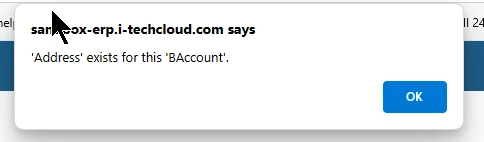
@Laura02 Can you think of a reason I get this error when trying to delete an unused company? 


Forum|alt.badge.img

Hello ​@kristybrooks83 ,

  1. I see one known issue in version 2022, corrected in 2023.
  2. Do you see more error details in Tools – Trace?
  3. Was Branch extended to Customer or Vendor? If so, does the extended Customer or Vendor have transactions? If Yes, the Branch can’t be deleted; we may only de-activate the Branch. If No, delete the Customer/Vendor then try again to delete the Branch.
  4. Do you see extra addresses on the Location tab of Business Account screen? If yes, remove them and try again to delete the Branch.

I hope one of these ideas helps you.  If not, you may rename the branch to xxxxx, to move it to the bottom of your list, and leave it Inactive status. Or you may raise a ticket with Acumatica Support.

Good luck!


Laura