

Answer

License migration to another server/deployment

  • May 20, 2025
  • 8 replies
  • 112 views

Forum|alt.badge.img+6

Hello,

       We are planning to upgrade our server from Windows Server 2016 to Windows Server 2019 and deploy Acumatica on the new server. After all tests are passed, the final step is to install the license on the new instance.

     My question is, if I delete the license on the old server instance and install the same license on the new server instance, this should be OK, right? This should not bring any issues?

Best answer by ray20

Hello,

         I verified, it is OK.  no issues.

8 replies

Forum|alt.badge.img+6
  • Author
  • Captain II
  • Answer
  • May 28, 2025

Hello,

         I verified, it is OK.  no issues.


stevec94
Freshman II
  • Freshman II
  • October 28, 2025

Hello,

       We are planning to upgrade our server from Windows Server 2016 to Windows Server 2019 and deploy Acumatica on the new server. After all tests are passed, the final step is to install the license on the new instance.

     My question is, if I delete the license on the old server instance and install the same license on the new server instance, this should be OK, right? This should not bring any issues?
 

@ray20 Did you move your SQL database as well?


Forum|alt.badge.img+6
  • Author
  • Captain II
  • October 30, 2025

@ray20 Did you move your SQL database as well?

@stevec94 Yes,we did. But that’s upto you, you can still use new server to connect old DB.


stevec94
Freshman II
  • Freshman II
  • November 18, 2025

@ray20 Did you move your SQL database as well?

@stevec94 Yes,we did. But that’s upto you, you can still use new server to connect old DB.

@ray20 Did you just move the IIS application over to the new IIS server, or did you install a fresh instance of Acumatica, and then upload a snapshot of your existing into it?


The reason I ask is that I have tried installing a matching version of Acumatica on a new IIS server, as well as restoring a full SQL backup onto a new SQL server. I can connect the Web app to the database just fine, but it comes up as a test tenant. I have been told that this is a no no as I can’t apply (move) my license from the old Acumatica instance to the new one. So how did you manage your move?


Forum|alt.badge.img+6
  • Author
  • Captain II
  • November 19, 2025

@stevec94  For this kind of thing, I suggest you seek directly help from Acuamtica support team.

From My understanding, the license is installed on IIS server, not in DB. If you have moved to another IIS server, you should delete the license in old server, and re-apply it on new server.

But since your old server might not be accessed anymore, the support team might be able to disconnect the licesne on their end, and then you can apply


stevec94
Freshman II
  • Freshman II
  • November 19, 2025

@stevec94  For this kind of thing, I suggest you seek directly help from Acuamtica support team.

From My understanding, the license is installed on IIS server, not in DB. If you have moved to another IIS server, you should delete the license in old server, and re-apply it on new server.

But since your old server might not be accessed anymore, the support team might be able to disconnect the licesne on their end, and then you can apply

@ray20 I appreciate the reply! Can you give a brief outline of the steps you took to move your Acumatica (IIS side) to your new server? I did reach out to Acumatica, and they promptly called my Acumatica Rep. They have been zero help to me up to this point. Thanks again.


Forum|alt.badge.img+6
  • Author
  • Captain II
  • November 20, 2025

@stevec94 

Every instance might have its own situation. So I could not guarantee what worked for me will also work for you. So this is for reference only:

  1. Deploy a new instance on the IIS server. (You can do some tests with configurations to a test DB.)
  2. After everything is OK, you can configure the new server to connect to the production DB.
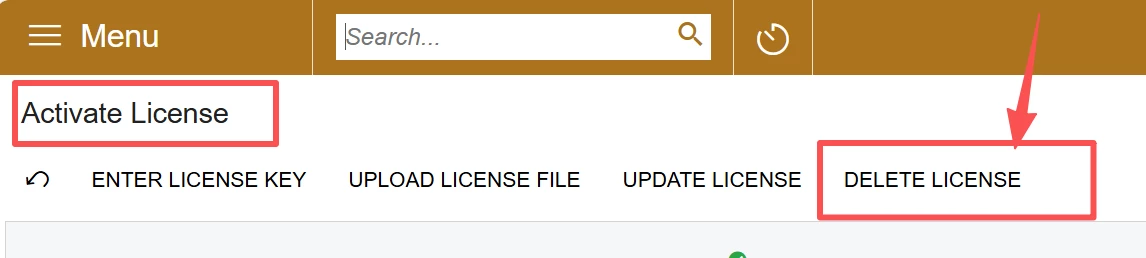
  3. Now, this is the key step: log into your old Acumatica instance on the old server, and click delete the license on the “Activate License” screen.


4,  Finally, login to new instance on the same screen, enter your license key. 


stevec94
Freshman II
  • Freshman II
  • November 20, 2025

@stevec94 

Every instance might have its own situation. So I could not guarantee what worked for me will also work for you. So this is for reference only:

  1. Deploy a new instance on the IIS server. (You can do some tests with configurations to a test DB.)
  2. After everything is OK, you can configure the new server to connect to the production DB.
  3. Now, this is the key step: log into your old Acumatica instance on the old server, and click delete the license on the “Activate License” screen.


4,  Finally, login to new instance on the same screen, enter your license key. 

@ray20 Thanks for this. I get hung up on step one. When I set up the new instance the associated tenants are all set to be “Test” tenants. I’ll keep banging on it. I appreciate you!