Answer

Is there a Timeline for 2023R1 official release?

  • February 22, 2023
  • 8 replies
  • 346 views

Mike Gifford
Jr Varsity III
Forum|alt.badge.img

I found an article pointing to February 2 release, which I dont think is accurate.  I have already installed the Previews/Betas. Just looking for the timeline on the official release.


Thanks!

Best answer by Kandy Beatty
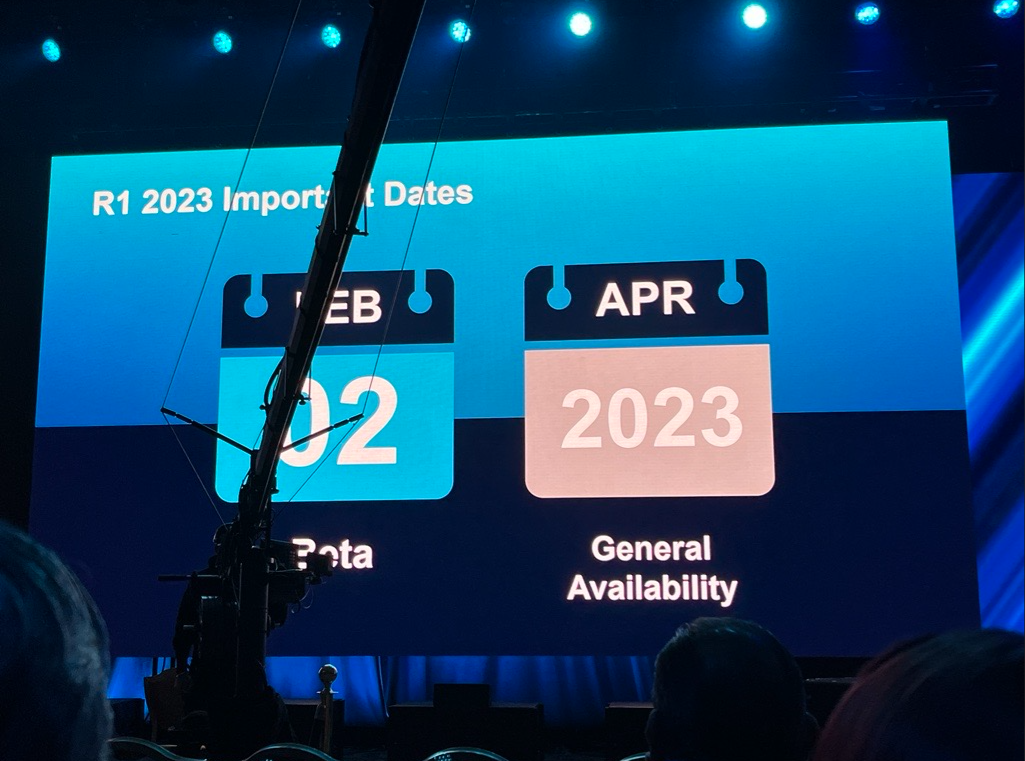
Here is the slide from the Summit. 

8 replies

Kandy Beatty
Captain II
Forum|alt.badge.img+17
  • Captain II
  • February 22, 2023

Hi @mgifford5 

According to the Keynote at the Summit, the Beta release was February 2, 2023 and the General Availability will be April 2023. 


Kandy Beatty
Captain II
Forum|alt.badge.img+17
  • Captain II
  • Answer
  • February 22, 2023

Here is the slide from the Summit. 


Mike Gifford
Jr Varsity III
Forum|alt.badge.img
  • Author
  • Jr Varsity III
  • February 22, 2023

Thanks Kandy, I wasn’t sure if the keynote/Summit mentions were “official” or not - sounds like its probably as official as it will get.


Kandy Beatty
Captain II
Forum|alt.badge.img+17
  • Captain II
  • February 22, 2023

Thanks Kandy, I wasn’t sure if the keynote/Summit mentions were “official” or not - sounds like its probably as official as it will get.

That’s usually as close as it gets unless something else comes out. 😀


hsarjapur
Varsity I
Forum|alt.badge.img
  • Varsity I
  • April 14, 2023

Just installed 2023 R1 and trying to figure out how to enable the new user interface powered by .NetCore that was shown at the Summit, I read it needs to be configured in web.config or someplace to enable new user interface on Sales order screen, any insight on this would help us to evaluate and experience the wow factor we felt at the summit. 


Mike Gifford
Jr Varsity III
Forum|alt.badge.img
  • Author
  • Jr Varsity III
  • April 14, 2023

Hi hsarjapur,


You have to enable the switching in web.config by setting up this key:

    <add key="EnableSiteMapSwitchUI" value="True" />

This will enable the UI column in the site map you would set the value to Modern for the screen you want.

It wont allow you to set this for screens that arent “enabled” yet for the new UI.

Also, keep in mind that for 23r1 it is not supported to use the new UI in production.

Thanks,


Mike


hsarjapur
Varsity I
Forum|alt.badge.img
  • Varsity I
  • April 14, 2023

Awesome Mike, exactly what I needed. This is only for testing and hope none of our clients want to jump ship and we discourage upgrading to R1 and wait till R2.


Forum|alt.badge.img

Hi hsarjapur,


You have to enable the switching in web.config by setting up this key:

    <add key="EnableSiteMapSwitchUI" value="True" />

This will enable the UI column in the site map you would set the value to Modern for the screen you want.

It wont allow you to set this for screens that arent “enabled” yet for the new UI.

Also, keep in mind that for 23r1 it is not supported to use the new UI in production.

Thanks,


Mike

Hi Mike, thanks for the info, is there a post anywhere advising when this will likely be released “officially” and supported in production?