Solved

Creating company from branch and clean up transactions / profiles

  • April 26, 2026
  • 3 replies
  • 46 views

sarahbibelhausen
Freshman II

We have been operating a single company with no branches since our go-live about 9 months ago. We are needing to create a new parent company in Acumatica which should not have any transactional data, vendor/customer profiles, etc. The company we have been operating should be a branch with all transactional data and profiles in the branch. Then we’ll add a new branch which also start “blank” with no transactions or profiles. 


When I set up a new company in our production tenant, it is automatically populating all the data into that new company. Then any branches under the company also have the same transactional and profile data. 

How do I create “clean” company and branches while keeping all our existing data in a single branch?

Best answer by Laura03

Hello ​@sarahbibelhausen ,

Branch Roles & Customer/Vendor Visibility settings will help you control which Transactions, Customers, and Vendors may be viewed by which Employees. The Chart of Accounts and module configurations will be shared across all companies, all branches.

If you have a single company with no Branches now, and you want two side-by-side balanced entities with a Parent that doesn’t transact, I recommend the following:

  • Change existing Company Type from Without Branches to With Branches that Balance.
  • Change the ID and Name of the existing Company to the new Parent’s name
  • Change the ID of the existing Branch to the name of your first/existing Company. Add a Branch Role to this company and to all existing Employees.
  • Add your new Company as a Branch, making the ID and Name = the New Related Company. Add a Branch Role to this company and to only those existing Employees that need to see it, along with new employees for the new company.
  • Enable Customer/Vendor visibility and populate this field on Financial tab of customers/vendors whose visibility is limited to one company or the other.
  • Expose Branch field, adding Branch to screen Preview Lists, for easiest identification of which Branch owns each Transaction/Document. 

Please let us know if we can help you further.  Good luck!


Laura


3 replies

nhatnghetinh
Captain II
Forum|alt.badge.img+13
  • Captain II
  • April 27, 2026

Hi ​@sarahbibelhausen 

Just to confirm - when you create a new Company in the same tenant, are you seeing that data such as:
+ Customers
+ Vendors
+ Inventory Items
+ Other master data or profiles

are automatically appearing in the new Company?

If so, this is usually caused by Shared Tables configuration, not because transactional data is being copied.

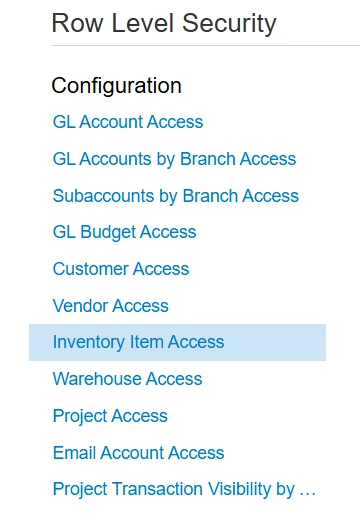
If your goal is to prevent certain users from seeing specific master data (such as Customers, Vendors, or Inventory Items), you may consider using Row Level Security.

You can go to Row Level Security and configure restrictions for the data that you do not want certain users to see, such as:

+ Customer Access
+ Vendor Access
+ Inventory Item Access
+ Warehouse Access
+ Other master data groups

This allows you to keep the data in the system while controlling which users can view or access it.


Best Regards,

NNT


Forum|alt.badge.img
  • Jr Varsity I
  • April 27, 2026

@sarahbibelhausen In Acumatica ERP, a Company is a top-level tenant container. When you create a new company inside the same tenant, the system doesn’t create a “blank shell”—it clones configuration and often transactional context depending on setup, especially if you’re using snapshots or company templates. You cannot move existing transactional data from one company into a branch of another companyBranches are subdivisions within the same company, not containers for migrating existing company-level data.


Laura03
Captain II
Forum|alt.badge.img+20
  • Captain II
  • Answer
  • April 29, 2026

Hello ​@sarahbibelhausen ,

Branch Roles & Customer/Vendor Visibility settings will help you control which Transactions, Customers, and Vendors may be viewed by which Employees. The Chart of Accounts and module configurations will be shared across all companies, all branches.

If you have a single company with no Branches now, and you want two side-by-side balanced entities with a Parent that doesn’t transact, I recommend the following:

  • Change existing Company Type from Without Branches to With Branches that Balance.
  • Change the ID and Name of the existing Company to the new Parent’s name
  • Change the ID of the existing Branch to the name of your first/existing Company. Add a Branch Role to this company and to all existing Employees.
  • Add your new Company as a Branch, making the ID and Name = the New Related Company. Add a Branch Role to this company and to only those existing Employees that need to see it, along with new employees for the new company.
  • Enable Customer/Vendor visibility and populate this field on Financial tab of customers/vendors whose visibility is limited to one company or the other.
  • Expose Branch field, adding Branch to screen Preview Lists, for easiest identification of which Branch owns each Transaction/Document. 

Please let us know if we can help you further.  Good luck!


Laura