Answer

Cannot see "visible" screens from site map

  • June 16, 2025
  • 6 replies
  • 98 views

This seems like a basic question…

In my site map, I have a number of screens that should be visible on my UI based on the defined workspace and category (and access rights by screen) but they do not show up for me and I cannot find them by a search or by entering the screen ID by itself.

Specifically (today), I am looking for “Inventory Preferences”.  Is that something that is hidden based on my subscriptions?  We use “non-stock” inventory.


Have any of you come across (or been unable to find) pages that you think you should be able to see but can’t?


Thanks

Best answer by maggiel

I figured it out.  It’s a licensing thing (found our licenses under “Activate License”.  I thought since I could see “inventory” that I had that module.  But apparently only parts of it that relate to other subscriptions.  That is likely the case for other pages as well, although we have had it with some of our GIs as well.  We are all good here. Thanks for your assistance.

6 replies

nhatnghetinh
Captain II
Forum|alt.badge.img+11
  • Captain II
  • June 17, 2025

Hi ​@maggiel 

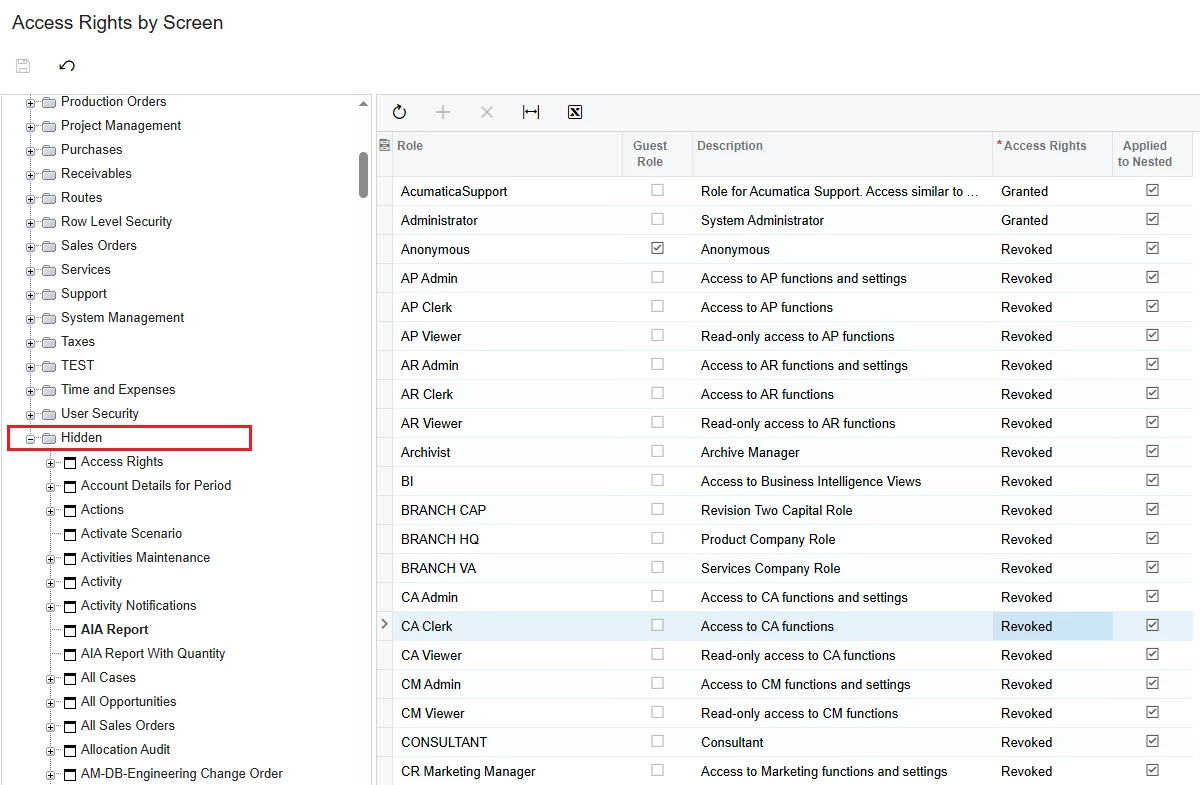
There will be some screens that are hidden even though they are on the site map. The way to display is to go to Access Rights by Screen > Hidden > Find and select the hidden screen then create Access Rights for hidden Roles.


Best Regards,

NNT


Manikanta Dhulipudi
Captain II
Forum|alt.badge.img+15

@maggiel 

Please confirm whether these are custom or standard screens.

  • If they are custom screens, kindly ensure that you have the necessary access permissions.

  • If they are standard screens and fields, try restarting the application to see if that resolves the issue."


  • Author
  • Jr Varsity I
  • June 17, 2025
  • nhatnghetinh - thank you for your reply.  It was not (also) in the hidden section of the site map.

  • Manikanta Dhulipudi - thank you for you reply.  Inventory/Inventory Preferences would be a standard screen, no?  What is involved with restarting the application?  Downtime?  Any risks for anything “breaking?”


I have double checked access rights by screen and by user that I should be able to see this particular screen but there are other ones I also cannot see that it looks like I should be able to.  Is this a question I should pose to Acumatica or my reseller?  


Thank you


Manikanta Dhulipudi
Captain II
Forum|alt.badge.img+15

@maggiel -Restarting a application will take 1 min down!


  • Author
  • Jr Varsity I
  • Answer
  • June 17, 2025

I figured it out.  It’s a licensing thing (found our licenses under “Activate License”.  I thought since I could see “inventory” that I had that module.  But apparently only parts of it that relate to other subscriptions.  That is likely the case for other pages as well, although we have had it with some of our GIs as well.  We are all good here. Thanks for your assistance.


Chris Hackett
Community Manager
Forum|alt.badge.img
  • Acumatica Community Manager
  • June 17, 2025

Thank you for sharing your solution with the community ​@maggiel!