Solved

AR301000 Access Error from Invoices and Memos GI

  • November 20, 2025
  • 8 replies
  • 63 views

Forum|alt.badge.img

Hi All,

I encountered an error when opening certain invoices from the Invoices and Memos GI.
The error message is:

"Cannot open this record for editing: The form AR301000 does not contain it."

However, these invoices open without any issue directly from the Invoices screen. The problem occurs only when opening them through the GI.

I also verified the navigation settings, and both DocType and RefNbr are correctly assigned.

Please advise if there are any known issues or if anything else needs to be checked.

Regards,
Lalith

Best answer by OshadhiJayasundara82

Hi ​@Lalith,

I noticed that we can open the credit memo from the generic search as below 


Opened the credit memo as below 


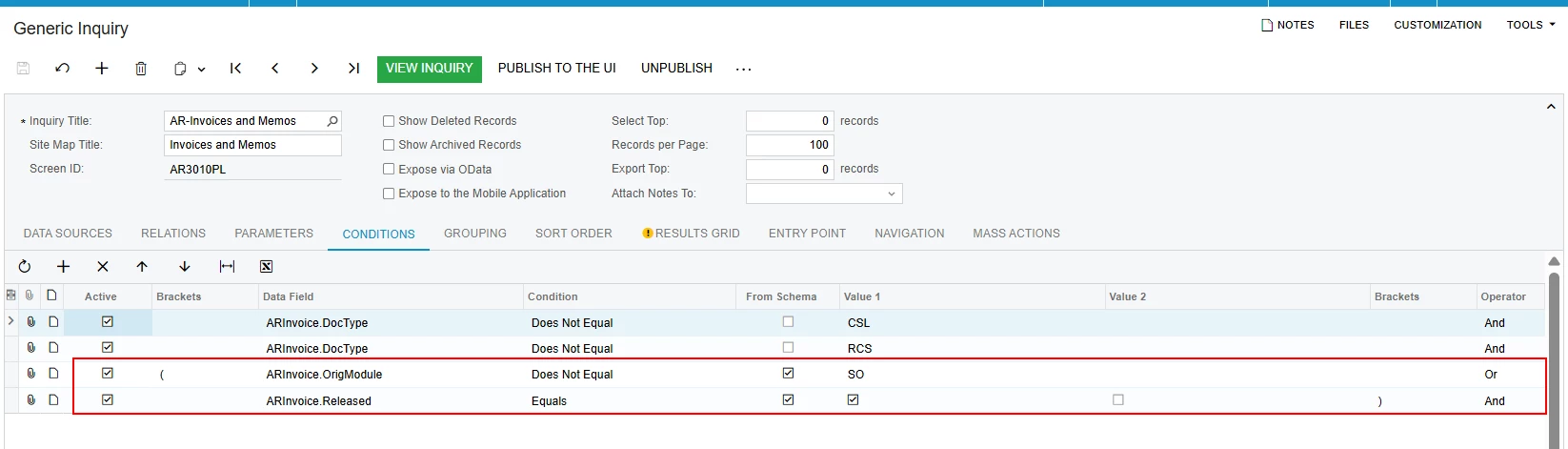
The reason why we cannot open the credit memo from the generic Inquiry (GI) is because the GI has been modified 

See below difference from the my sales demo and clients live environment 


Fixing customized generic inquiry is out of scope of product support and it's a subject to billable service. 


You can either restore the default GI and resolve the resolve the issue, or consult our services team for more assistance with fixing the customized GI 
 

The XML file for the default GI has been attached to the email, you can use it to restore the default GI 
 

Refer below article - https://help.acumatica.com/(W(1))/Help?ScreenId=ShowWiki&pageid=a9522553-3ecc-49bc-b1af-a67d1a781157


Also note that i have adjusted the severity of this case based on our SLA policy to medium severity, If there is an impact on the business that needs this case to be high severity please let us know about the impact and we will prioritize the case accordingly.

Hope this helps clarify!

8 replies

Manikanta Dhulipudi
Captain II
Forum|alt.badge.img+16

@Lalith This typicalls comes because of customization project as it has some issue with the workflow,

Did you unpublish the customizations and verified?


Forum|alt.badge.img
  • Author
  • Freshman I
  • November 20, 2025

@Manikanta Dhulipudi , Thanks for the response. Yes, I did it all. but unfortunately, at least there are no customizations that were done with the screen.


Manikanta Dhulipudi
Captain II
Forum|alt.badge.img+16

There might be an issue with your GI, Is this is a standard GI or customized GI.


Please take back up of your GI and import this?


Forum|alt.badge.img
  • Author
  • Freshman I
  • November 20, 2025

@Manikanta Dhulipudi , Then those numbers don't show in the GI. but it can be seen Invoices. Is that correct?


Manikanta Dhulipudi
Captain II
Forum|alt.badge.img+16

@Lalith What Number you are asking?

First we need to identify if this is customization issue or not.

Later check it is a Generic inquiry issue,


Forum|alt.badge.img
  • Author
  • Freshman I
  • November 20, 2025

@Manikanta Dhulipudi , In the GI, there are two conditions missed, as shown image below. After adding those two earlier, I got errors invoice numbers that didn't show in the overview.


Forum|alt.badge.img+1
  • Acumatica Employee
  • December 14, 2025

Hello ​@Lalith,

This is an error that usually occurs due to a customization or modification on the default inquiry.

If it’s caused by customization, when you unpublished the customization the error should no longer be occurring.

If it’s a modification issue, then compare this with the default inquiry to identify what may causes the issue.


OshadhiJayasundara82
Acumatica Employee
Forum|alt.badge.img

Hi ​@Lalith,

I noticed that we can open the credit memo from the generic search as below 


Opened the credit memo as below 


The reason why we cannot open the credit memo from the generic Inquiry (GI) is because the GI has been modified 

See below difference from the my sales demo and clients live environment 


Fixing customized generic inquiry is out of scope of product support and it's a subject to billable service. 


You can either restore the default GI and resolve the resolve the issue, or consult our services team for more assistance with fixing the customized GI 
 

The XML file for the default GI has been attached to the email, you can use it to restore the default GI 
 

Refer below article - https://help.acumatica.com/(W(1))/Help?ScreenId=ShowWiki&pageid=a9522553-3ecc-49bc-b1af-a67d1a781157


Also note that i have adjusted the severity of this case based on our SLA policy to medium severity, If there is an impact on the business that needs this case to be high severity please let us know about the impact and we will prioritize the case accordingly.

Hope this helps clarify!