Question

AC running very slow on local

  • October 2, 2024
  • 11 replies
  • 361 views

dpruckus
Freshman I
Forum|alt.badge.img

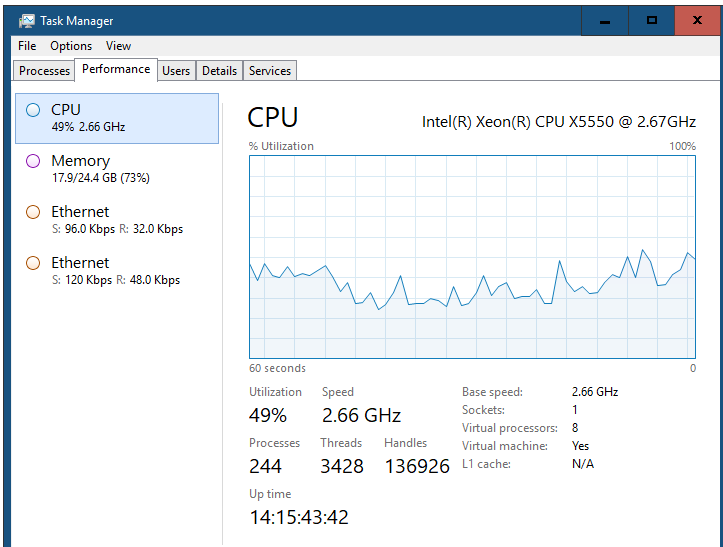
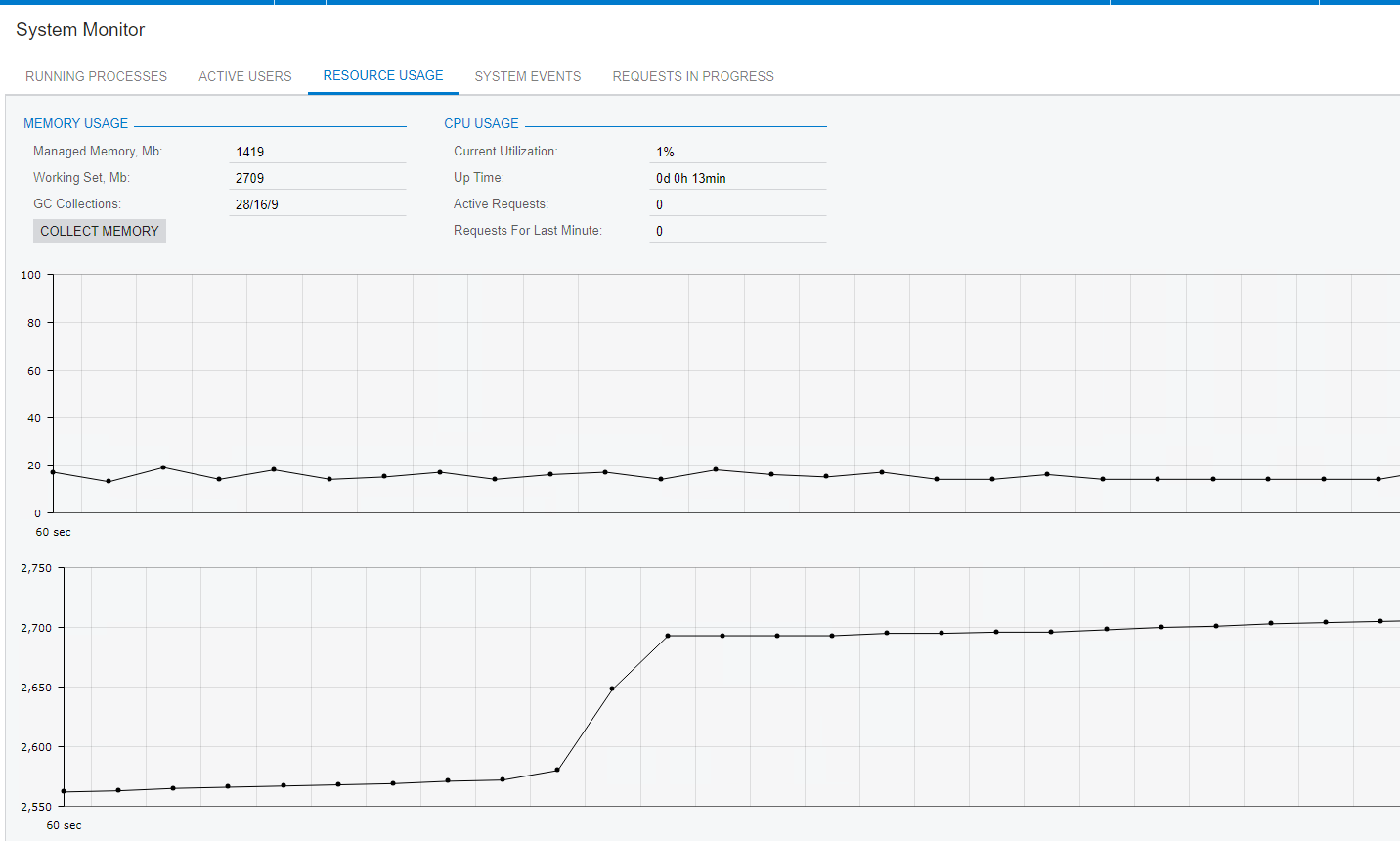
Hey guys. I have recently installed AC on the local server for testing purposes. Its loading every screen super slow. The recourses of the server are enough nad the system monitoring doesnt give any abnormalizes. Where do I start?


11 replies

nhatnghetinh
Captain II
Forum|alt.badge.img+11
  • Captain II
  • October 3, 2024

Hi @dpruckus 

In my opinion. Acumatica versions: 2023R2, 2024R1 need a powerful Server configuration. With your X5550 CPU, it seems that it is not very powerful, with this Server you can install Acumatica Version 2020 or 2021

Below is my reference Server configuration.


Best Regards,

NNT


Manikanta Dhulipudi
Captain II
Forum|alt.badge.img+15

Hi @dpruckus 

Please find the Acumatica configuration details.


Laura03
Captain II
Forum|alt.badge.img+19
  • Captain II
  • October 3, 2024

Hello, 

In addition to the excellent advice given above, I find that my local testing environment is slowest when it is new. After opening each screen , the next time it loads faster.  Screens are cached locally. Caching makes them faster for next time, but it takes up space. Make sure you have plenty of free space available on the C:\ drive.

Laura


Kandy Beatty
Captain II
Forum|alt.badge.img+17
  • Captain II
  • October 3, 2024

Hello, 

In addition to the excellent advice given above, I find that my local testing environment is slowest when it is new. After opening each screen , the next time it loads faster.  Screens are cached locally. Caching makes them faster for next time, but it takes up space. Make sure you have plenty of free space available on the C:\ drive.

Laura

I agree with @Laura02. My local version is always the slowest when new. Once you have configured it and done testing in it, it should speed up with the space you have.


dpruckus
Freshman I
Forum|alt.badge.img
  • Author
  • Freshman I
  • October 3, 2024

Hi @dpruckus 

In my opinion. Acumatica versions: 2023R2, 2024R1 need a powerful Server configuration. With your X5550 CPU, it seems that it is not very powerful, with this Server you can install Acumatica Version 2020 or 2021

Below is my reference Server configuration.


Best Regards,

NNT

Well the documentation states Memory: 16 GB RAM CPU: 2 cores; 3.5 GHz, mine is plenty of ram but only 2.19 GHz. Maybe that's the problem. However, system resources are not shown that CPU is overwhelmed. 


dpruckus
Freshman I
Forum|alt.badge.img
  • Author
  • Freshman I
  • October 4, 2024

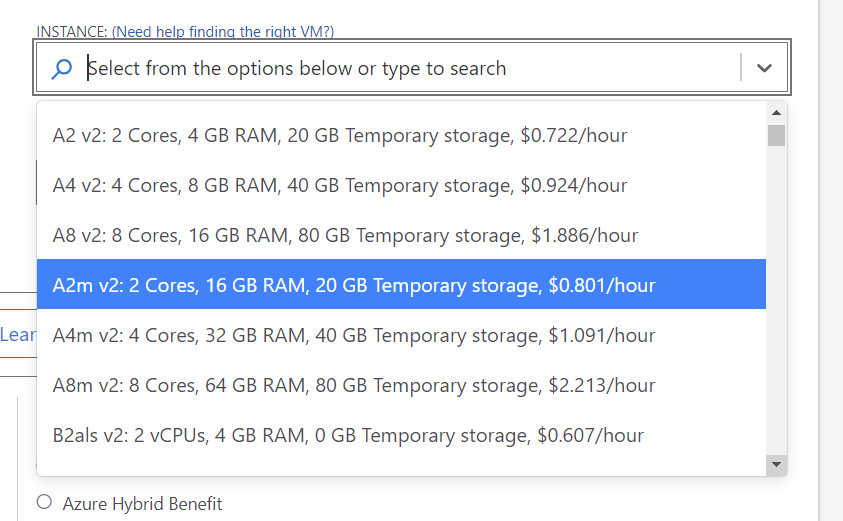
Guys, what would be the best solution for Acumatica on Azure virtual server?


Forum|alt.badge.img+8
  • Semi-Pro I
  • October 4, 2024

@dpruckus The best option depends on the Utilization of Acumatica  like expected concurrent users load on each module, expected size of the data(GB) being planned to be brought into Acumatica, integration to other applications. If this is for a large enterprise that has huge transactions, and data driven process, I would recommend 8 cores64GB, and 80 GB from the list.. Otherwise, you can get the optimized resource with at least 16GB and 20GBspace.


dpruckus
Freshman I
Forum|alt.badge.img
  • Author
  • Freshman I
  • October 4, 2024

@dpruckus The best option depends on the Utilization of Acumatica  like expected concurrent users load on each module, expected size of the data(GB) being planned to be brought into Acumatica, integration to other applications. If this is for a large enterprise that has huge transactions, and data driven process, I would recommend 8 cores64GB, and 80 GB from the list.. Otherwise, you can get the optimized resource with at least 16GB and 20GBspace.

well, its only for dev purposes, no users or transactions. 


dpruckus
Freshman I
Forum|alt.badge.img
  • Author
  • Freshman I
  • October 8, 2024

@dpruckus The best option depends on the Utilization of Acumatica  like expected concurrent users load on each module, expected size of the data(GB) being planned to be brought into Acumatica, integration to other applications. If this is for a large enterprise that has huge transactions, and data driven process, I would recommend 8 cores64GB, and 80 GB from the list.. Otherwise, you can get the optimized resource with at least 16GB and 20GBspace.


I have set up aws server with 8 vCPUs and 32GB RAM. Acumatica works still as slow as my local. Crazy..


Chris Hackett
Community Manager
Forum|alt.badge.img
  • Acumatica Community Manager
  • December 24, 2024

Hi ​@dpruckus were you able to find a solution? Thank you!


Forum|alt.badge.img
  • Jr Varsity II
  • June 6, 2025

I have the same problem.
When I start my local instance in the morning, it’s very slow. After I’ve opened a few screens, it improves and becomes usable. However, the instance becomes slow again if I don’t use it for a few hours and then come back to continue working.

It has already been mentioned here in the forum that it takes time for the cache to build up or for the system to warm up. Is there a way to manually initiate this caching or warming-up process?

I would appreciate your tips.
Best regards,
Michael