


Solved

Disabling or blocking for processing when date is outside range of selected financial period

  • November 30, 2023
  • 4 replies
  • 391 views

mdu20
Freshman I

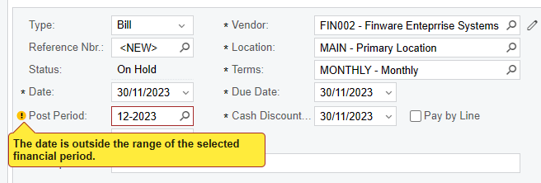
Is there a way that I can block or disable the changing of the financial period by all users. At the moment you select the date and the period automatically populate but it still allows the user to change the period. It has a warning, but we would like an error like when a period is closed or inactive. We have found some users change the financial period even if they should not. This causes a lot of issues when it comes to reporting.

 

Best answer by Laura03

Hello, 

To prohibit changing date and/or period, use security roles and access rights to make date and/or post period View Only for certain roles, in each transaction and document entry screen.

Training/Retraining employees and providing step by step instructions for how to complete date and post periods properly may also help avoid the mistakes.

Laura

4 replies

Laura03
Captain II
Forum|alt.badge.img+19
  • Captain II
  • November 30, 2023

Hello, In GL Preferences screen ,  there is an option to prohibit or allow posting to closed periods.  This option will stop people who are not in the Financial Supervisors role from posting back to a closed period. To prohibit posting to past periods by everyone, including those in the financial supervisors role, Close and then Lock prior periods.

To prohibit posting to future periods, use Financial Period Management features of GL/Finance module to control status of future periods. If future periods are Inactive status until they are absolutely needed, then posting to future periods will not be allowed.


Laura


mdu20
Freshman I
  • Author
  • Freshman I
  • November 30, 2023

@Laura02 thanks for the response but I think you did not understand my issue, or I was not clear enough. The period is open as its the current period so we cannot close it. The issue is that users can go and change the financial period after the system has defaulted to the correct period. We do not want users to have the ability to change the default period. At the moment the only option I can think of is to take away the rights to edit the field, but you must now do it per screen which will take a long time to do.


Laura03
Captain II
Forum|alt.badge.img+19
  • Captain II
  • Answer
  • December 1, 2023

Hello, 

To prohibit changing date and/or period, use security roles and access rights to make date and/or post period View Only for certain roles, in each transaction and document entry screen.

Training/Retraining employees and providing step by step instructions for how to complete date and post periods properly may also help avoid the mistakes.

Laura


mdu20
Freshman I
  • Author
  • Freshman I
  • December 4, 2023

Hello, 

To prohibit changing date and/or period, use security roles and access rights to make date and/or post period View Only for certain roles, in each transaction and document entry screen.

Training/Retraining employees and providing step by step instructions for how to complete date and post periods properly may also help avoid the mistakes.

Laura

Thanks Laura. I was looking for a way I can do it faster than going through each entry screen per role. As much as we have trained the users, some can still make the mistake.
