Celebrating a Milestone: Our First Interactive Course Badge—Now for Everyone!

  • July 2, 2025
  • 8 replies
  • 996 views

Elena Abilova
Community Manager
Forum|alt.badge.img

We’re thrilled to celebrate a major milestone in Acumatica Education—one made possible by the feedback, engagement, and passion of our customers and partners alike.

At the Partner Keynote during Acumatica Summit, we unveiled a bold new vision for Education: one that is unified, personalized, and truly engaging. As part of that journey, we introduced our first interactive course, A150 Getting Started with Acumatica ERP, showcasing an entirely new learning experience and interface. Recognizing the vitality and importance of our customers, we also shared our intention to extend Acumatica Badges—previously reserved for partners—to everyone in our broader community.

Thanks to the valuable input from learners across our ecosystem, we’ve refined and relaunched this course. Getting Started with Acumatica ERP is now the first in our growing library of interactive learning experiences that awards an Acumatica Badge—now available to all.

This moment reflects more than just a product update—it’s a step forward in how we learn and grow together. Thank you for being part of it.


Complete the course and earn your first digital badge!

Once you've finished Getting Started with Acumatica ERP, you’ll receive a unique badge to showcase your achievement — perfect for adding to your LinkedIn profile or sharing on your favorite social media platform, X or Facebook.

To share your badge, do the following:

  1. Sign in to Acumatica Portal.
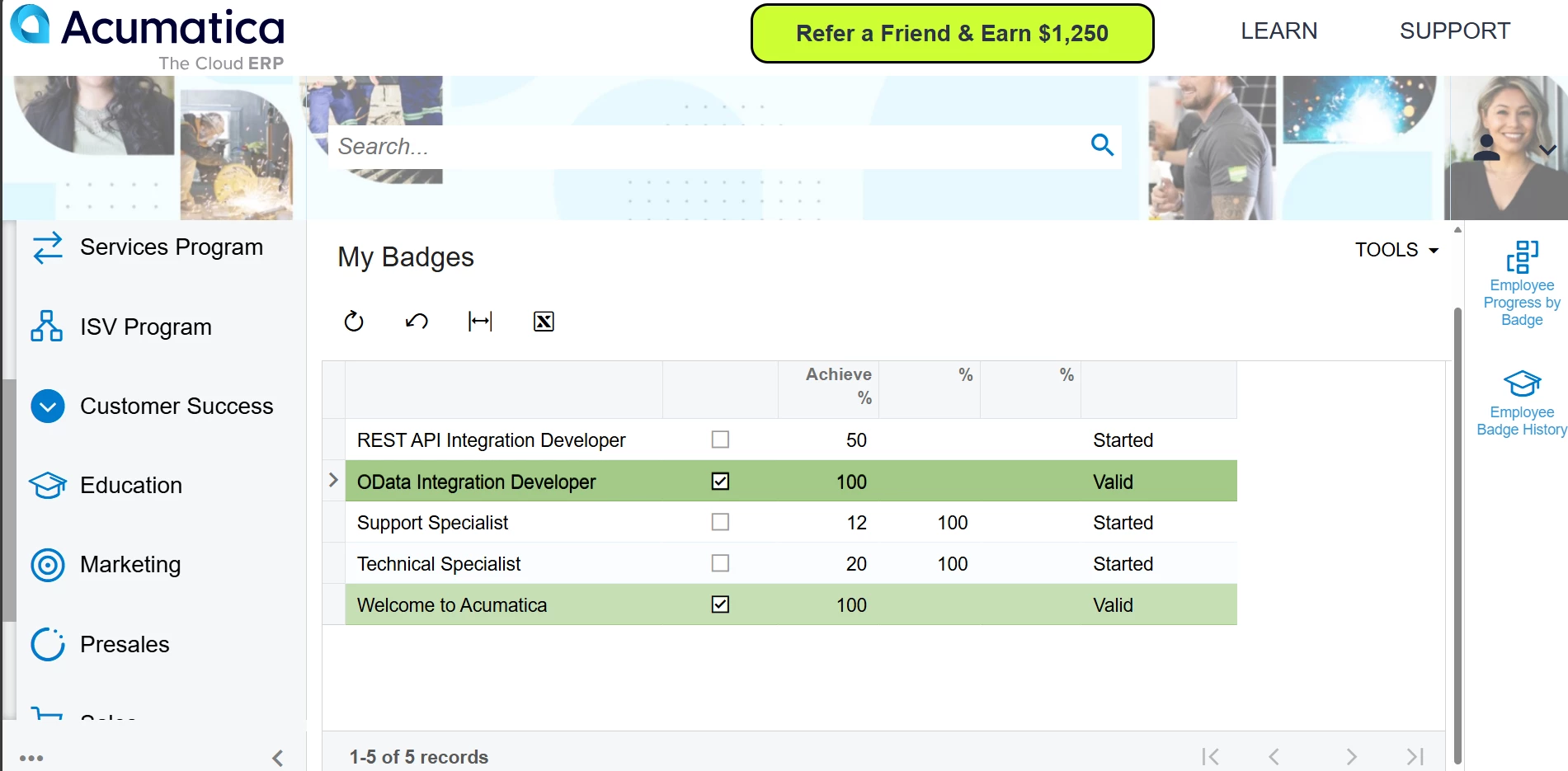
  2. Click Education and then My Badges.
  3. When the form opens, click on the badge name: Getting Started with Acumatica ERP.
  4. On the right side of the form, click Digital Badge.

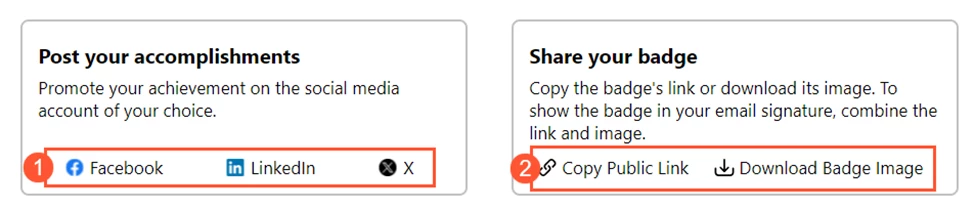
Share your badges to your professional profiles, email signatures, or social media. In the lower section of the Digital Badge tab, select the option you need: share to the selected social media (see Item 1 in the screenshot below) or download the badge image and copy the link to the badge for other sharing methods, like email, chat, or a signature (Item 2).
The Getting Started with Acumatica ERP badge is now available to our non-partner users — whether you're a customer, a freelance consultant, a university student, or simply exploring Acumatica ERP to boost your skills and drive your career.


This is just the beginning — more interactive learning is on the way!
Thank you for being part of the Acumatica ERP community. Learn & prosper! 🚀

8 replies

Hi Elena,

I am trying to download my badge image but it seems there is no “Digit Badge” - well this is for a different badge (oData Integration Developer) but I assume it should be the same way to download badge image? any help to get badge image downloaded would be greatly appreciated!

Thanks Elena!

Michael 


NataliaRozhikhina96
Acumatica Moderator
Forum|alt.badge.img

Hi ​@MichaelZhang05 ,
 

We are currently experiencing an issue where the Digital Badges tab may not be visible to some users. Our technical team is aware of the problem and is actively working on a fix.

We’ll notify you as soon as the issue is resolved. We apologize for the inconvenience and appreciate your patience.


NataliaRozhikhina96
Acumatica Moderator
Forum|alt.badge.img

Hi ​@MichaelZhang05,

We’re glad to let you know that the issue with the Digital Badges tab has finally been fixed. The tab should now be visible, and you can share your digital badges again. Please check on your end to confirm.
 

Thank you for your patience, and sorry for the long wait!


ricoybanez
Jr Varsity III
Forum|alt.badge.img+3
  • Jr Varsity III
  • September 17, 2025

I cannot see my Digital Badge.


Elena Abilova
Community Manager
Forum|alt.badge.img
  • Author
  • Education Technology Analyst
  • September 17, 2025

@ricoybanez, thank you for your message.

We have quickly reviewed your progress and haven’t found any progress on the Getting Started course. If you completed the one, please email us at training@acumatica.com with the following information:

  • Username you use for the sign in to Open Uni
  • Screenshots of the completed lessons

CC ​@DinithiLiyanage94 , ​@NataliaRozhikhina96 


  • Freshman I
  • October 22, 2025

Hi Elena

I cannot find My Badges in Education. I am not sure if I missed something.

Would you please let me know how to find it?

Thanks.


vdiaz
Acumatica Moderator
Forum|alt.badge.img+2
  • Acumatica Moderator
  • October 22, 2025
My fist Acumatica Badge

Now I want to update all my certifications so I can flaunt my badges!! 🤓


NataliaRozhikhina96
Acumatica Moderator
Forum|alt.badge.img

Hi ​@AndrewL, thanks for flagging this! We’re looking into why some users aren’t seeing badges and will need a bit of time to investigate. Appreciate your patience—we’ll share updates here as soon as we know more.