Answer

Pro Forma Invoice GI - Activities tie in

  • April 4, 2022
  • 2 replies
  • 209 views

ketiller
Jr Varsity III
Forum|alt.badge.img

Hello, 

I am creating GI for Pro Forma invoices, the main goal of the GI is to mass send out Pro Forma Invoices to customers. 

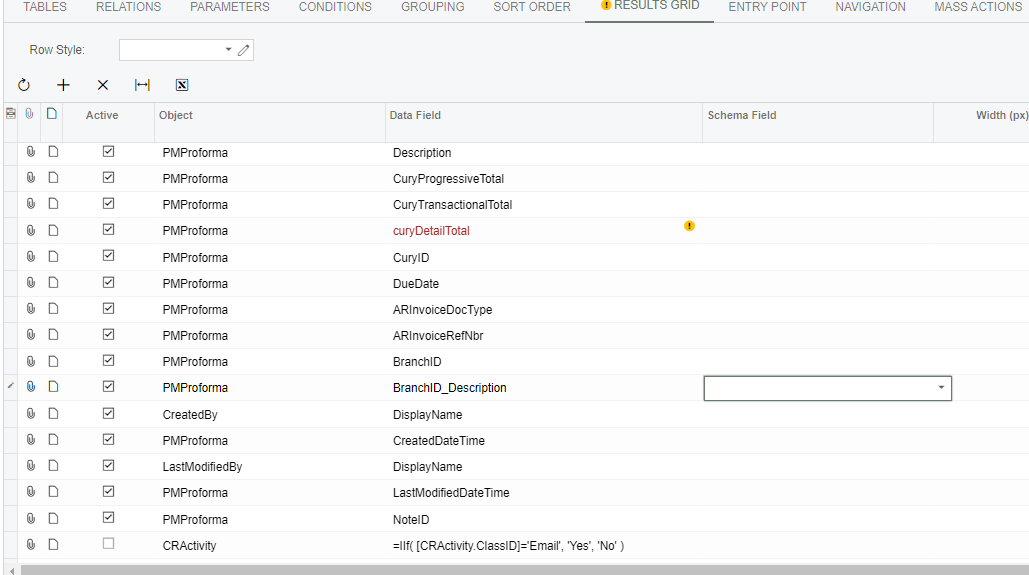
I am having trouble connecting the Activities information for the Pro Forma invoices (PM307000), see attached picture for reference.  I would like the GI’ to populate in a column if the Pro Forma has been emailed before or not. Below is a screenshot of the current results grid (last line): 
 

When I run the GI, I receive the below error:


any suggestions on how to resolve this error?


Thank you,

KT

Best answer by hkabiri

@ketiller The problem is the formula you have for CRActivity.ClassID which is stored in Database with Integer values. what you need to do is find the actual class id for Activity Type Email and use it in your formula.

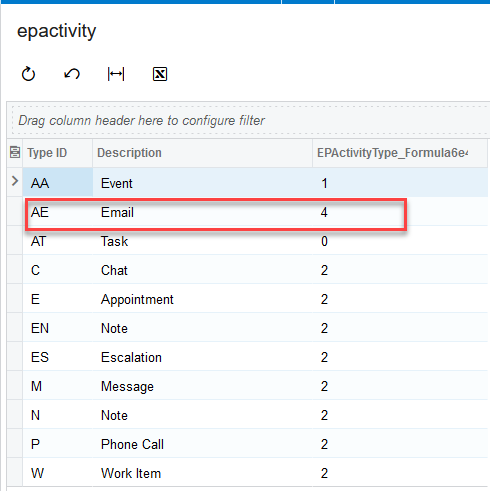
I would suggest create a GI, if you do not have access to DB, on EPActivityType Table and use formula as below screenshot which should give you the actual ClassID. In my case it was 4

And then replace into your formula for the GI .


2 replies

hkabiri
Acumatica Moderator
Forum|alt.badge.img+8
  • Acumatica Support Team
  • Answer
  • April 4, 2022

@ketiller The problem is the formula you have for CRActivity.ClassID which is stored in Database with Integer values. what you need to do is find the actual class id for Activity Type Email and use it in your formula.

I would suggest create a GI, if you do not have access to DB, on EPActivityType Table and use formula as below screenshot which should give you the actual ClassID. In my case it was 4

And then replace into your formula for the GI .


ketiller
Jr Varsity III
Forum|alt.badge.img
  • Author
  • Jr Varsity III
  • April 4, 2022

@hkabiri Thank you for the quick response and detailed tutorial. The formula worked great with the integer.


Thank you,

KT