Answer

Printing a Generic Inquiry

  • December 29, 2021
  • 4 replies
  • 288 views

Forum|alt.badge.img+5

I have published Generic Inquiry that functions as designed.  All is well except there is a request to be able to print the results.  Can you make a generic inquiry printable without first exporting to EXCEL?


Thanks!

Best answer by vkumar

Hi @ltussing03 

One has to export the GI results to be able to print.  Else, you may build a report for the GI, there is an option to ease building report from GI using Action > Export as report, which creates a rpx file for the GI.
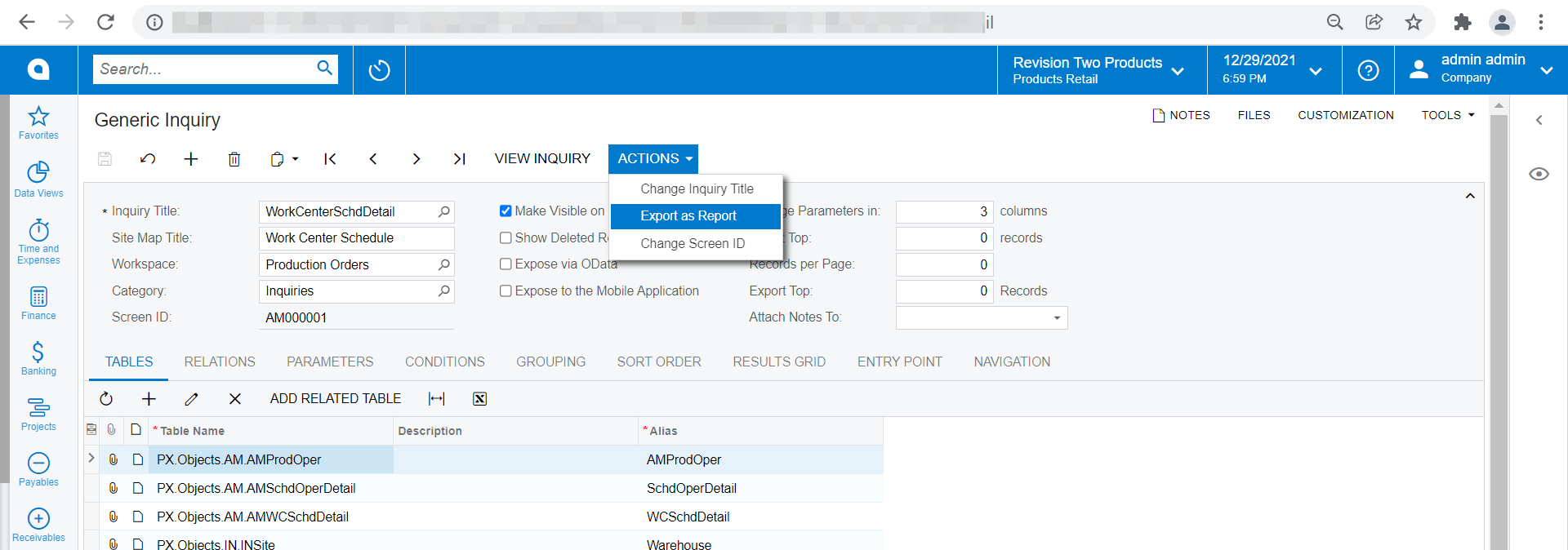
Hope this helps.

Regards,

4 replies

Forum|alt.badge.img+12
  • Acumatica Support Team
  • Answer
  • December 30, 2021

Hi @ltussing03 

One has to export the GI results to be able to print.  Else, you may build a report for the GI, there is an option to ease building report from GI using Action > Export as report, which creates a rpx file for the GI.

Hope this helps.

Regards,


Forum|alt.badge.img+5
  • Author
  • Captain II
  • December 30, 2021

Thanks!


kboyko43
Freshman I
Forum|alt.badge.img
  • Freshman I
  • January 5, 2022

hi @vkumar


are there any directions or training materials on how to export a GI as a report and convert it to a Report via Report designer?  i failed to find any material on Acumatica wiki or Acumatica university


Forum|alt.badge.img+1
  • Varsity I
  • March 28, 2023

I understand you can make a report, but then you have to have two separate menu items, one for the GI which can be sorted and filtered on the fly, and one for the report.  I think it would be a platform improvement to make all GIs printable where it can grab the currently filtered records and print it in a reasonable format (title of GI at top, current date, user, give selection window for which columns should be printed which would print ratably to their pixel size on the screen).