Answer

Is there a way to get current weekID in a Generic Inquiry?

  • December 5, 2022
  • 11 replies
  • 902 views

Forum|alt.badge.img+1

Hi All,

I want to add a condition to a generic inquiry to filter timecards created on last week. To do that I think that I would need to compare EPTimeCard.WeekID with current WeekId. Is there a way to populate Value field of GI with current WeekID ?


Thanks
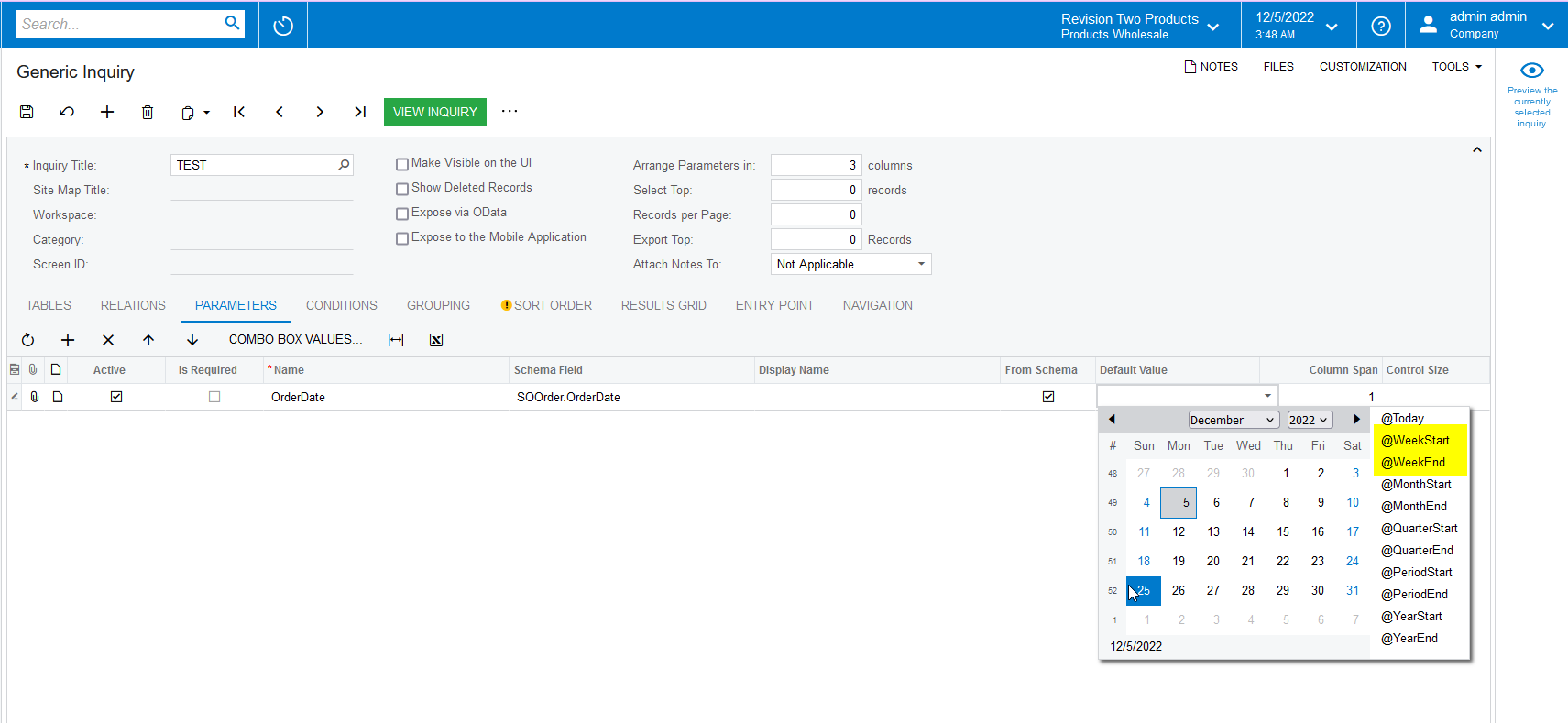
Best answer by Naveen Boga

@charithalakshan49  I don’t think we can get the WeekID value in the Generic Inquiry but can get the StartWeek OR EndWeek like below.


11 replies

Naveen Boga
Captain II
Forum|alt.badge.img+19
  • Captain II
  • Answer
  • December 5, 2022

@charithalakshan49  I don’t think we can get the WeekID value in the Generic Inquiry but can get the StartWeek OR EndWeek like below.


Forum|alt.badge.img+1

@Naveen Boga  Thank you. I will try it.


Forum|alt.badge.img
  • Jr Varsity I
  • February 4, 2023

This formula will generate a WeekID. It uses DateAdd() and DayOfWeek() to get last week’s Monday, then uses that Monday to calculate the week number.

The formula cannot be used as a default value in a GI parameter, however it CAN be used as a GI condition or the default value in a report parameter.

Excel VBA

=Year(DateAdd("d", -6 - Weekday(Date, 2), Date)) * 100 + Application.WorksheetFunction.Floor(DateDiff("d", CDate("1/1/" & Year(DateAdd("d", -6 - Weekday(Date, 2), Date))), DateAdd("d", -6 - Weekday(Date, 2), Date)) / 7) + 1

Acumatica

=Year(DateAdd(Today(),'d', -6 - DayOfWeek(Today()))) * 100 + Floor(DayOfYear(DateAdd(Today(),'d', -6 - DayOfWeek(Today()))) / 7) + 1


greglang
Varsity I
Forum|alt.badge.img+1
  • Varsity I
  • July 26, 2023

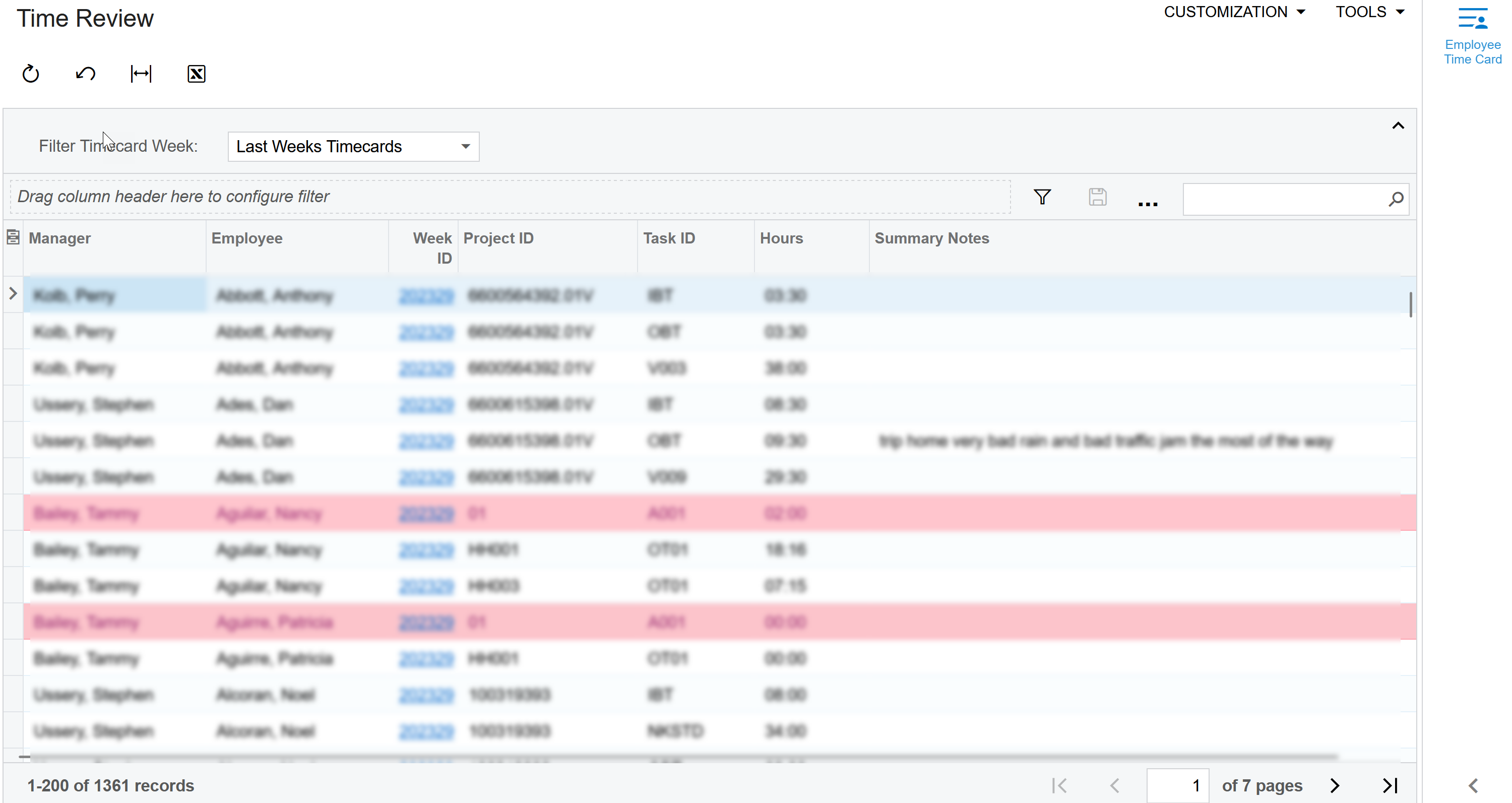
This is how I’ve done it in GI’s for This or Last weeks Timecards. 


=IIf([AllWeeks] = 'Last' , [LastWeekStart], iif([AllWeeks] = 'Current' ,[ThisWeekStart],'' ))


Forum|alt.badge.img+1

@greglang Great!. Thanks for sharing


Forum|alt.badge.img
  • Jr Varsity I
  • January 12, 2024

Here is a better way to calculate WeekID in Acumatica. The end of the year gives the wrong number using the first method.

=DateAdd(Year(DateAdd(Today(),'d',-6-DayOfWeek(Today()))) * 100 ) +
Floor(
DateDiff('d',
Round(
DayOfWeek(CDate('1/1/'+DayOfYear(DateAdd(Today(),'d',-6-DayOfWeek(Today())))))/7,0
),
DateAdd(Today(),'d',-6-DayOfWeek(Today()))
) / 7
)
+ 1


Forum|alt.badge.img
  • Jr Varsity I
  • January 12, 2024

Corrected. Your mileage may vary.

=Year(DateAdd(Today(),'d',-6-DayOfWeek(Today()))) * 100 +
Floor( DateDiff('d',
DateAdd(CDate('1/1/'+Year(DateAdd(Today(),'d',-6-DayOfWeek(Today())))),'d',7 *
Round(DayOfWeek(CDate('1/1/'+Year(DateAdd(Today(),'d',-6-DayOfWeek(Today())))))/7,0)
)
,
DateAdd(Today(),'d',-6-DayOfWeek(Today()))
) / 7 )
+ 1


Forum|alt.badge.img+1

Hi @cmetzger. Thanks for sharing!


greglang
Varsity I
Forum|alt.badge.img+1
  • Varsity I
  • June 4, 2024

@brandontfrank


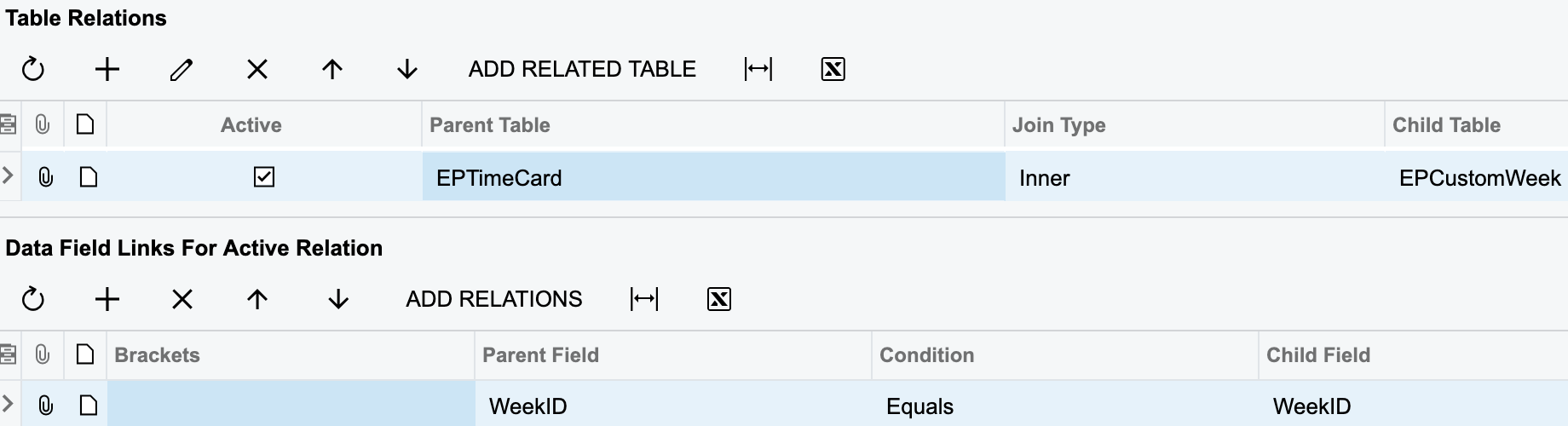
Brandon, for some reason I can’t send Screenshots in a DM so here is what I was trying to send to you.  I think the part your missing is a table with week Start.  I use the CustomWeek table.  EPCustomWeek and link it on WeekID


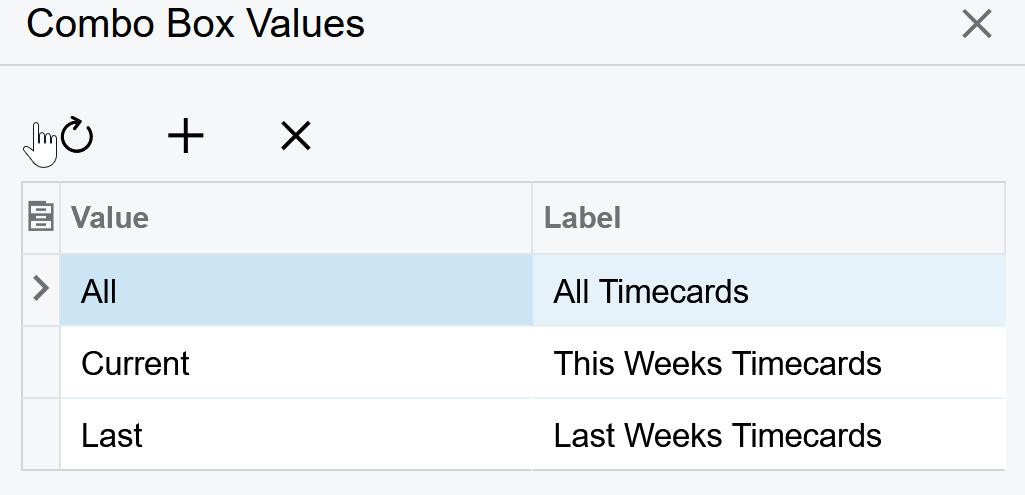
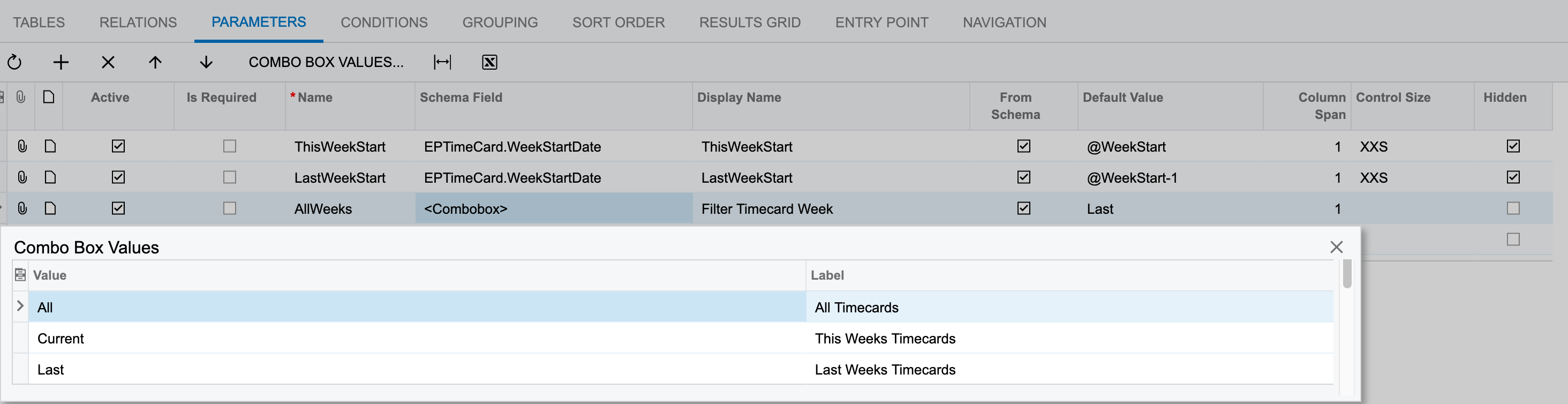
I created 2 hidden Parameters and one that is a combo box for the 3 choices I'm giving them (This week, Last week or All Timecards)


Then on the Conditions tab I tell it match the EPCustomWeek.StartDate to

the Parameter for @WeekStart if they choose the combo value of Current (This Weeks Timecards). or @WeekStart-1 if they choose the combo value Last (LastWeekStart) or if they choose All (All Timecards) it will not filter the weeks at all. 


Hope that helps, 


-Greg


Forum|alt.badge.img
  • Freshman I
  • November 19, 2024

@cmetzger I get error ‘Conversion failed when converting the varchar value '1/1/' to data type int.’ when I used your corrected formula in a GI results grid data field.  Do you experience something different?


Forum|alt.badge.img
  • Jr Varsity I
  • November 20, 2024

@john55 The GI results grid needs Cstr() around the Year() to explicitly be string + string instead of string + number.


But before you try that… I was having a hard time maintaining and adapting the formula.

I recently revisited the logic behind Excel’s ISOWEEKNUM(date), and refactored my Excel VBA to resemble Acumatica’s built-in formulas:

Public Function DayOfYear(ByVal theDate As Date) As Long
    DayOfYear = DateDiff("d", "1/1/" & Year(theDate), theDate) + 1
End Function

Public Function DayOfWeek(ByVal theDate As Date) As Long
    DayOfWeek = Weekday(theDate, 2) 'Mon is 1, Sun is 7
End Function

Public Function ThuOfWeek(ByVal theDate As Date) As Date
    ThuOfWeek= 4 - Weekday(theDate, 2) + theDate
End Function

Public Function ISOWEEKNUM_UDF(ByVal theDate As Date) As Long
    ISOWEEKNUM_UDF = Year(ThuOfWeek(theDate)) * 100 + Int((DayOfYear(ThuOfWeek(theDate)) + 6) / 7)
End Function

The Acumatica GI Results Grid tab allowed number + date:

=Year(4 - IIf(DayOfWeek(theDate) - 1 = 0, 7, DayOfWeek(theDate) - 1) + theDate) * 100 + Ceiling((DayOfYear(4 - IIf(DayOfWeek(theDate) - 1 = 0, 7, DayOfWeek(theDate) - 1) + theDate) + 6) / 7)

The GI Conditions tab required DateAdd():

=Year(DateAdd( theDate, 'd', 4 - IIf(DayOfWeek(theDate) - 1 = 0, 7, DayOfWeek(theDate) - 1) )) * 100 + Ceiling((DayOfYear(DateAdd( theDate, 'd', 4 - IIf(DayOfWeek(theDate) - 1 = 0, 7, DayOfWeek(theDate) - 1) )) + 6) / 7)

If you want the previous week, use 4 - 7 instead of just 4.

I haven’t tested the formula in Acumatica Report Designer, but I suspect that reports and GI tied to scheduled email reports will both require the “proper” date addition with DateAdd().

My test cases were new year’s between 2008-2009 and 2023-2024 versus Excel ISOWEEKNUM.