

This is a copy of my question posted in Everything Else, which I realise should have been posted here.
We are attempting to retrieve a report using the SOAP Screen API, but the report we are getting back is blank. The version of Acumatica we have is Build 20.112.0035.
I have the following code:
public void PrintReceipt(params PurchaseReceipt[] receipts)
{
    client.Logout();
    var screen = new Screen();
    try
    {
        screen.CookieContainer = new System.Net.CookieContainer();
        screen.Url = Properties.Settings.Default.AcumaticaERP_PrintReceipt_Screen;
        screen.Timeout = 10000000;
        var lResult = screen.Login(LoginDetails.name, LoginDetails.password);

        var schema = PX.Soap.Helper.GetSchema<Content>(screen);

        foreach (var r in receipts)
        {
            var ReceiptNo = r.ReceiptNbr.Value;
            Command[] commands = new Command[]
            {
                new Value { Value = "Receipt", LinkedCommand = schema.Parameters.Type },
                new Value { Value = ReceiptNo, LinkedCommand = schema.Parameters.ReceiptNbr },
                schema.ReportResults.PdfContent,
                schema.ReportResults.HtmlContent
            };
            Content[] result = screen.Submit(commands);
            if (result == null) { break; }
            foreach (var content in result)
            {
                var report = content.ReportResults;
                byte[] binaryPDF = Convert.FromBase64String(report.PdfContent.Value);
                System.IO.File.WriteAllBytes($"Receipt_{ReceiptNo}.pdf", binaryPDF);

                byte[] binaryHTML = Convert.FromBase64String(report.HtmlContent.Value);
                System.IO.File.WriteAllBytes($"Receipt_{ReceiptNo}.html", binaryHTML);
            }
        }
    }
    catch (Exception ex)
    {
        Console.WriteLine(ex.Message);
        throw;
    }
    finally
    {
        screen.Logout();
        Relogin();
    }
}
This does appear to be working properly, in so far as there are no errors and I do get a pdf back. Unfortunately the pdf has no data, only headers (same for the HTML I am also retrieving). I have attached the PDF (Receipt_000023.pdf) so you can see what I mean. The Screen is PO.64.60.00 and it shows the arguments like this:
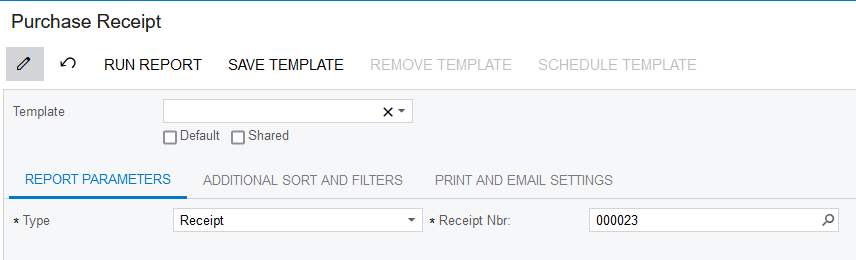
Using this screen on the website generates a correct pdf (also attached as Purchase Receipt (2021-10-11).pdf).
If anyone has any ideas as to what could be happening here, I’d love to hear them.
Thanks