Hello -
I would like to import some forecasting data into custom DAC’s using the API. I’ve worked with parent/child data before and imported via the API but I’m finding this situation difficult because the forecasting data consists of 3 levels of data. I’m not sure how to configure the graph or the API to get this working.
Here is a cut down version of the DAC’s, in the code I’ve included PXParent and PXDBDefault to link the DACs.
DAC 1 - ForecastHeader
ForecastNbr (key)
Customer
DAC 2 - ForecastLine
ForecastNbr (key)
LineNbr (key)
ProductCode
DAC 3 - ForecastSchedule
ForecastNbr (key)
LineNbr (key)
ScheduleNbr (key)
ForecastDate
ForecastQty
With this type of DAC structure I would like to submit json in the following structure.
{
    "ForecastNbr": {"value": 1},
    "Customer": {"value": "Customer001"},
    "ForecastLine":
	[
		{
			"LineNbr": {"value": "1"},
			"ProductCode": {"value": "Prod001"},
			"ForecastSchedule":
			[
				{
					"ScheduleNbr": {"value": "1"},
					"ForecastDate": {"value": "20250501"},
					"ForecastQty": {"value": "100"}
				},
				{
					"ScheduleNbr": {"value": "2"},
					"ForecastDate": {"value": "20250601"},
					"ForecastQty": {"value": "200"}
				},
				{
					"ScheduleNbr": {"value": "3"},
					"ForecastDate": {"value": "20250701"},
					"ForecastQty": {"value": "350"}
				}
			]
		},
		{
			"LineNbr": {"value": "2"},
			"ProductCode": {"value": "Prod002"},
			"ForecastSchedule":
			[
				{
					"ScheduleNbr": {"value": "1"},
					"ForecastDate": {"value": "20250501"},
					"ForecastQty": {"value": "111"}
				}
			]
		},
		{
			"LineNbr": {"value": "3"},
			"ProductCode": {"value": "Prod003"},
			"ForecastSchedule":
			[
				{
					"ScheduleNbr": {"value": "1"},
					"ForecastDate": {"value": "20250501"},
					"ForecastQty": {"value": "19"}
				},
				{
					"ScheduleNbr": {"value": "2"},
					"ForecastDate": {"value": "20250621"},
					"ForecastQty": {"value": "12"}
				}
			]
		}
    ]
}
Has anyone used the API to import this type of 3 level data?
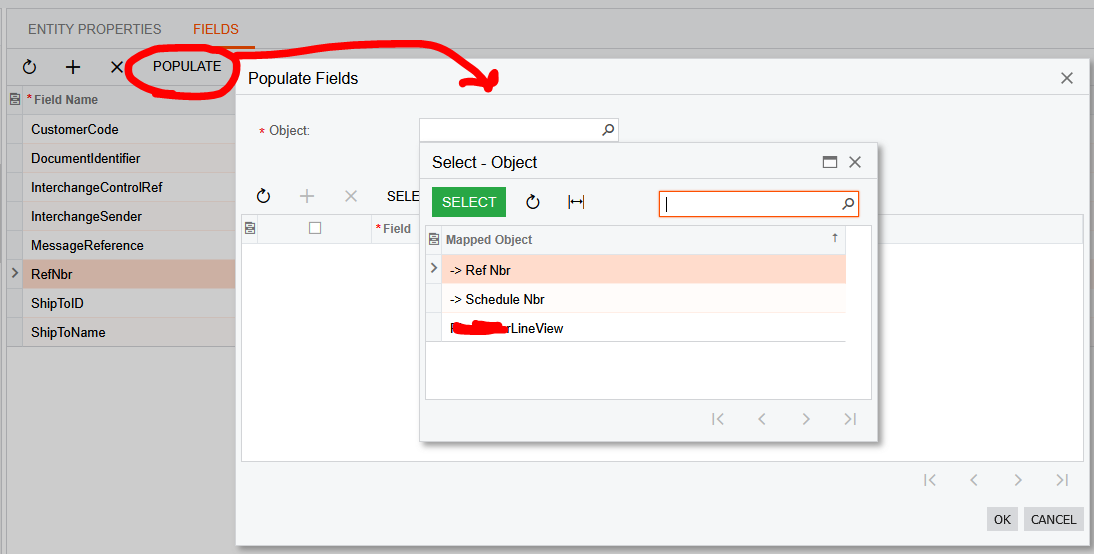
One of the issues I’m struggling with is understanding how Acumatica selects which Mapped Objects are displayed in the Populate Fields screen. In my graph I have more public views, which are defined in the same way as the view ending in LineView, but these are not shown.