Solved

Construction: Process to remove/return item issued to project

  • Aug 18, 2021 9:11 PM UTC
  • 6 replies
  • 799 views
  • Translate All

Forum|alt.badge.img

I have not been able to find a successful method for this yet.

Wrong stock item was issued to a project/cost budget. The correct item has since been issued, but trying to remove or reverse the wrong item out of the project. I can do a receipt or adjustment back into stock on the inventory side if needed, but I am unable to determine how to reverse the issue project transaction to correct the project.


Thank you,

Greg

Best answer by gbrazelton14

Thank you @johnshaddix38  - I will need to check that out in 21 R2 - I think what I finally did was a Reason Code (type Receipt, account was actually the COGS account used in the original issue) Looking forward if 21 R2 has the slicker Reverse option.


Greg

View original

6 replies

johnshaddix38
Freshman I
Forum|alt.badge.img

Following. Likewise, interested in others experience with this type of transaction and generally about the management of INVENTORY with respect to PROJECTS. 

You’re situation sounds like it will be a common situation for others. 

@gbrazelton14 - I found that you could go to the inventory Issues and click on the Batch Nbr. and the new *** (three dots menu) in 2021 R2 includes the option to “reverse” and “reclassify” which may be the answer for you. I’ve not done any testing on reversing inventory “issues” to a Project (yet).   

Translate

Forum|alt.badge.img
  • Author
  • Varsity I
  • Answer
  • Sep 28, 2021 4:56 PM UTC

Thank you @johnshaddix38  - I will need to check that out in 21 R2 - I think what I finally did was a Reason Code (type Receipt, account was actually the COGS account used in the original issue) Looking forward if 21 R2 has the slicker Reverse option.


Greg

Translate

cwilliams23
Freshman I
Forum|alt.badge.img
  • Freshman I
  • Apr 29, 2024 7:28 PM UTC

We now do a two step process to Return to Warehouse:

We do a RETURN Issue. We create a new Lot/Serial Nbr. (the old one as used at time of Issue and no longer exists) - this un-Issues the item. This keeps it on the original project. I then transfer from the project to X (our warehouse).


If you are also returning it to the vendor - I open the original PO Receipt. Select the item to return, return the item. Now it is no longer on the PO.

Translate

dgodsill97
Varsity II
Forum|alt.badge.img+6
  • Varsity II
  • Jul 29, 2024 7:13 PM UTC

Apparently, it requires an adjustment or a return issue to put the inventory back to on hand but it leaves the project allocation. So, now you have to do a transfer to move it from project allocation to non-project stock.

Translate

joshmcgrew
Jr Varsity III
Forum|alt.badge.img
  • Jr Varsity III
  • Aug 3, 2024 3:09 AM UTC

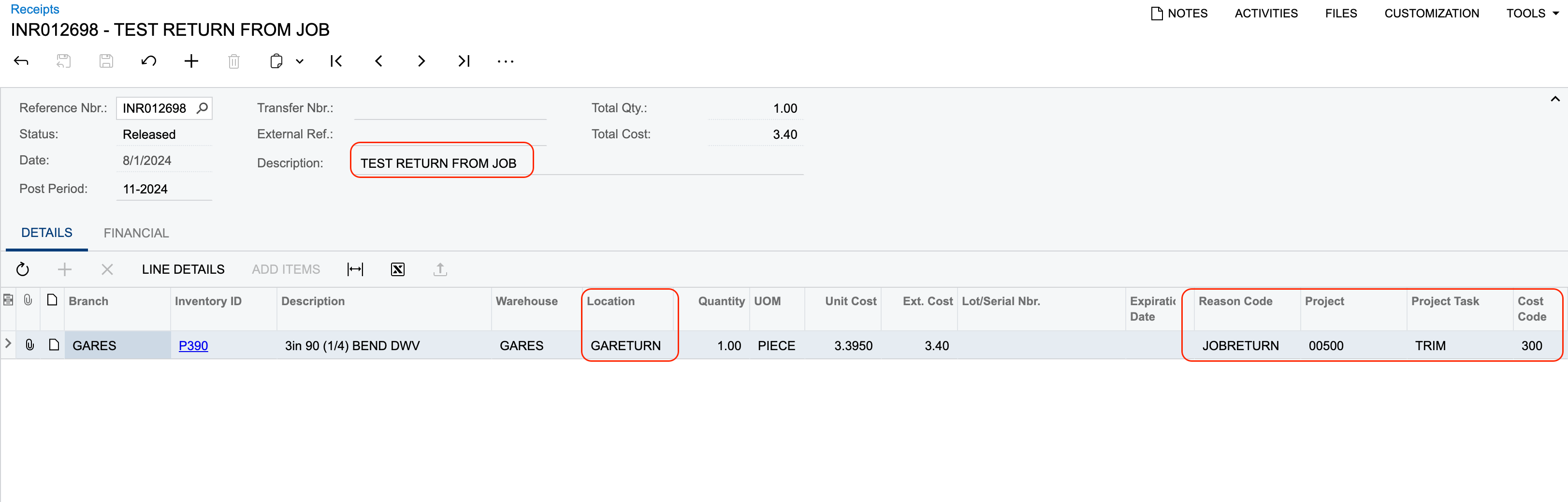
We are accomplishing this with a Inventory Receipt, and reason code specific to a Project return.The inventory comes off the project and back into the warehouse in a designated location for either transfer to stock locations or in the case of a future work order due to it being unable to be installed at the time it would be sent back out on a new shipment. We have also utilized Goformz to simplify the process and create the Receipt.


Translate

Forum|alt.badge.img
  • Freshman I
  • Sep 16, 2026 2:25 PM UTC

sometimes TOUGH to figure out what the cost should be on the RECEIPT that is done Josh...takes a little digging into the PROJECT TRANSACTIONS screen...but other than that your method is definitely the way to go.

Translate