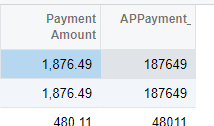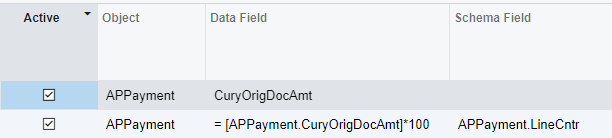


The mission with this generic inquiry is to show the payment amount value with the decimal stripped out. I’ve tried a few formulas but Acumatica seems to want to add 2 trailing 0s when I do that.
Example:

The goal is, instead of showing $8321.05, to show: 832105
In SQL I’d want to return a substring, or trim 2 characters from the right side of the string. Here are a few examples of what I’ve tried:
- Try to get the field to display as a schema field ‘payment amount’
- Try to get the field to display as schema field ‘doc description’
- Try to return from the right side of the string, -2 positions: =Right(CStr( Replace( [APPayment.CuryOrigDocAmt], '.' , '' ) ), -2)
- Try to cast the field as a decimal =Replace( CDec([APPayment.CuryOrigDocAmt]), '.' , '' )
- Try to cast the field as a string =Replace( CStr([APPayment.CuryOrigDocAmt]), '.' , '' )
Any suggestions on this? Acumatica really seems to want to add those zeroes!