

Answer

Business Event Not Firing

  • October 11, 2024
  • 3 replies
  • 113 views

I am trying to create a business for when an Invoice is added to the SO-Invoice screen (SO3030PL).  The business event will check for a few conditions related to the invoice.  If those conditions are met, the Do Not Email checkbox for that invoice should be checked.  Here is what I have so far.

The Business Event:

Trigger Conditions:
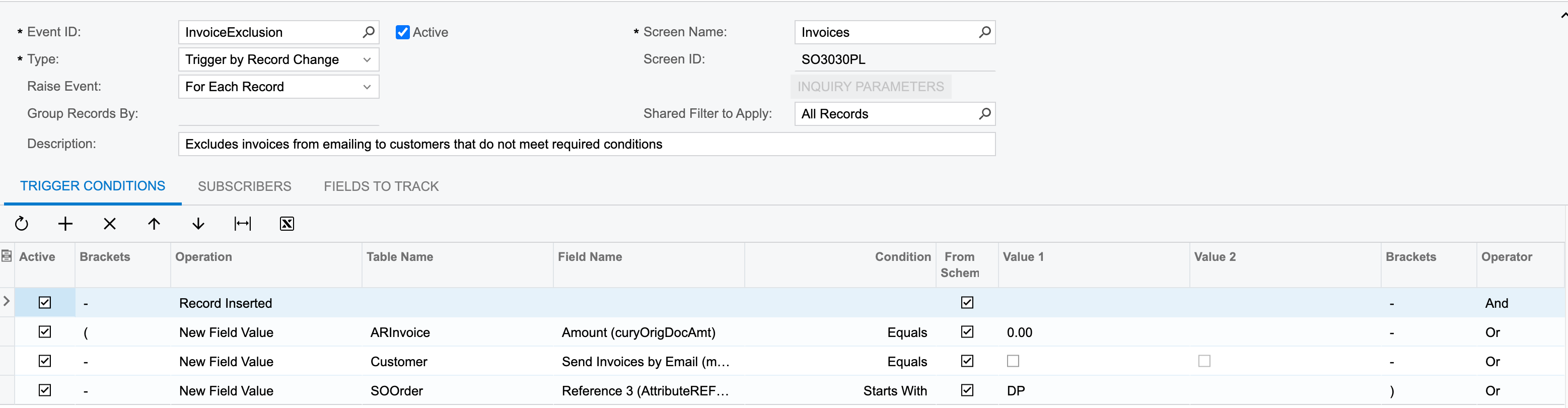
Subscribers:

Action Execution:

Keys:

Field Values:

Executed By Events:

 

Any advice you can provide as to why the invoice will not update the Do Not Email field properly would be most appreciated.  Thank you guys in advance.
Best answer by Naveen Boga

@dcupp15071 Have you checked by chance any of the conditions are failing? I’m assuming that checkbox values might sometimes NULL instead of FALSE by default. Can you please double check this?

And, have you tried with only Record Inserted condition and observed is it firing?


3 replies

Naveen Boga
Captain II
Forum|alt.badge.img+19
  • Captain II
  • Answer
  • October 15, 2024

@dcupp15071 Have you checked by chance any of the conditions are failing? I’m assuming that checkbox values might sometimes NULL instead of FALSE by default. Can you please double check this?

And, have you tried with only Record Inserted condition and observed is it firing?


Chris Hackett
Community Manager
Forum|alt.badge.img
  • Acumatica Community Manager
  • December 24, 2024

Hi ​@dcupp15071 were you able to find a solution? Thank you!


Forum|alt.badge.img+1

Hello!

Please check the below things as well

1. Make sure the global admin (user ID = admin) has access to see the data on the GI

2. check if the GI has conditions, and ensure those fields that are conditions are included in fields to track

3. Make sure all tables on the GI have their Primary Keys added to results grid tab


