

Answer

How to block stock?

  • May 19, 2023
  • 2 replies
  • 92 views

What’s the best way to block or place a certain quantity of an item on hold in Acumatica?  This would be useful if you have missing inventory and want to have that amount not show as available for production while you look for/investigate it prior to returning back to available or writing it off.

Best answer by John Masi

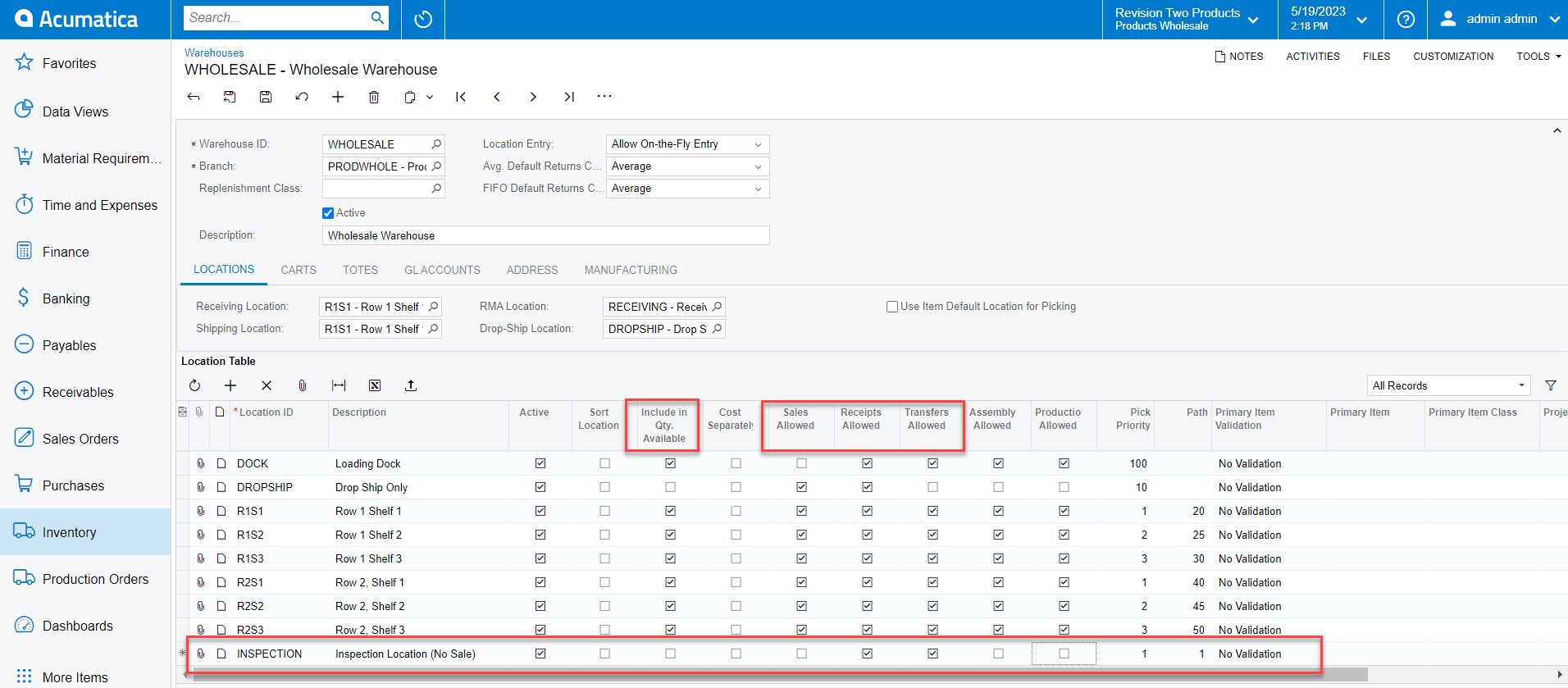
@jrsmith This is typically handled by transferring the inventory to a Non-Sellable location. Depending on your use case you can:

Uncheck:
Include in Qty Available

Sales Allowed


Leave checked:

Allow Receipts

Allow Transfers

I hope this helps.

-John
 

2 replies

John Masi
Jr Varsity I
Forum|alt.badge.img
  • Jr Varsity I
  • Answer
  • May 19, 2023

@jrsmith This is typically handled by transferring the inventory to a Non-Sellable location. Depending on your use case you can:

Uncheck:
Include in Qty Available

Sales Allowed


Leave checked:

Allow Receipts

Allow Transfers

I hope this helps.

-John



Forum|alt.badge.img+1
  • Jr Varsity III
  • May 20, 2023

You could also create a location called Missing or Verify Inventory with Include in Qty Available, Sales Allowed, Production Allowed, and Kit Allowed unchecked.  Transfer the item in question to the Missing or Verify Inventory location until it’s found.  You will probably want to verify the quantities in other locations are accurate.