

Answer

Custom Contact Selector Error

  • January 27, 2025
  • 2 replies
  • 38 views

On the customer screen (AR301000), we are trying to add some extra contact fields for the customer. We just need to have a selector where we choose the contact, but we keep getting an error message about the selector not having a callback event. 

Selector field on Screen
Error message When selecting field

After research, the ‘ctl00$phG$tab$t0$s0_s1_f2$’ just corresponds to where the field is located on the screen. The field is a UDF added on from the Customization Projects->Data Access section.
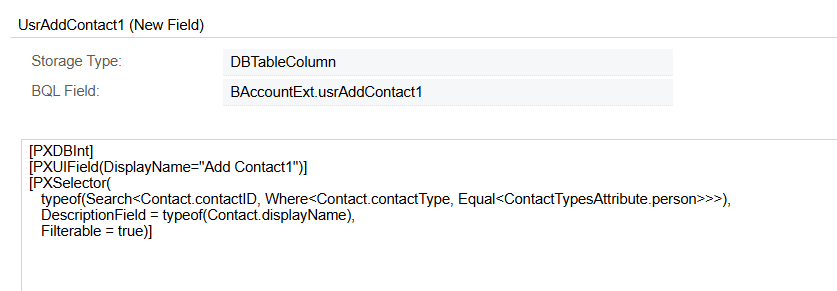

Field Attributes
Field ASPX

I have been looking for a while and cannot find how to make/implement a ICallbackEventHandler or why the target cannot be found. Any assistance would be appreciated.

Best answer by jeremiahjohnson

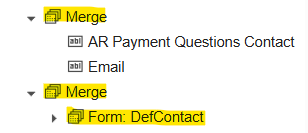
We resolved the issue. We had the selectors under another form that had a different data source in the screen, so once we moved the form, the selector no longer had issues. 

Previously, we had the merge with the Form above the merge with our Contact selector. Moving them around fixed the error.

2 replies

  • Author
  • Jr Varsity I
  • Answer
  • January 27, 2025

We resolved the issue. We had the selectors under another form that had a different data source in the screen, so once we moved the form, the selector no longer had issues. 

Previously, we had the merge with the Form above the merge with our Contact selector. Moving them around fixed the error.


Chris Hackett
Community Manager
Forum|alt.badge.img
  • Acumatica Community Manager
  • January 28, 2025

Thank you for sharing your solution with the community ​@jeremiahjohnson!
