Answer

What is practice to update BOM material lines using an import scenario?

  • September 4, 2024
  • 3 replies
  • 138 views

lauraj46
Captain II
Forum|alt.badge.img+8

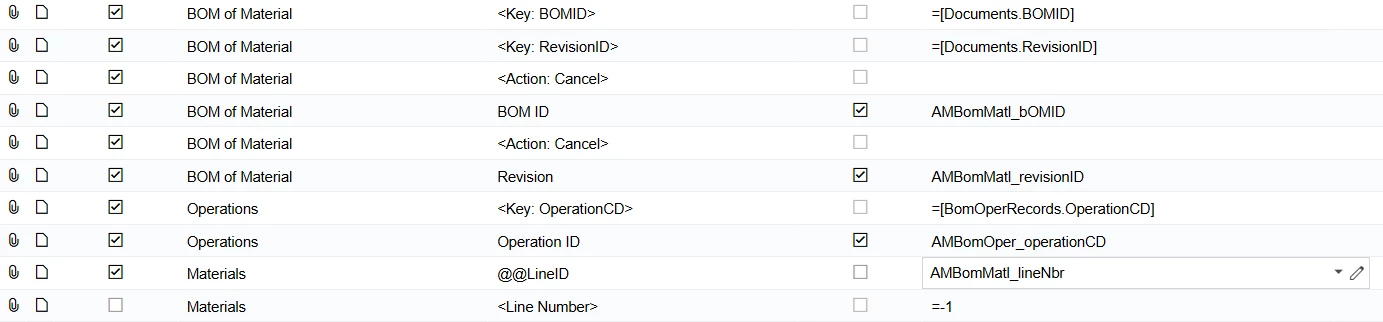
The goal is to update the qty required or other fields on the material lines of an existing BOM using an import scenario.

I am aware of using the @InventoryID as a lookup, but in our scenario  there may be multiple material lines for the same inventory id on a single operation.  These are typically non-stock items that are called out with different descriptions.  

The other option I’m aware of is to lookup by line number, but we have run into issues with this too. When a BOM is edited there are sometimes gaps in the AMBomMatl.lineNbr field, whereas the <Line Number> lookup is always looking at sequential lines.  This may result in the wrong line being updated, or an error if the line number doesn’t exist.  Is there a way to retrieve the sequential line number in a GI, so that we can be sure we are editing the correct line?
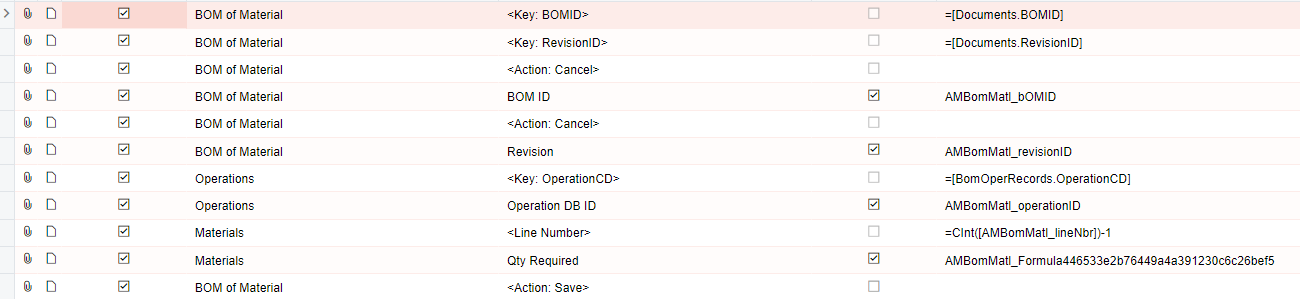
Any thoughts  @dennisgodsill36 or other import scenario gurus out there?

Thanks in advance!

Laura

Best answer by tracyn81

I was able to figure this one out by removing the space between @@Inventory ID. This allowed me to mass update BOM materials. 


3 replies

  • Freshman II
  • August 21, 2025

@lauraj46 Were you able to figure this one out? 


  • Freshman II
  • Answer
  • August 21, 2025

I was able to figure this one out by removing the space between @@Inventory ID. This allowed me to mass update BOM materials. 


lauraj46
Captain II
Forum|alt.badge.img+8
  • Author
  • Captain II
  • August 21, 2025

Hi ​@tracyn81 ,

Glad you figured this out.  Alternatively, if you have the same inventory id repeated on an operation, you can use @@LineID to look up by line number.

Laura