Answer

Service Bill Rates

  • October 8, 2021
  • 3 replies
  • 171 views

greglang
Varsity I
Forum|alt.badge.img+1

Does anyone know a way to have more than one bill rate for a Service within the same customer?  My issue is we have a customer we will be charging travel time but the rate is lower in the South vs the rest of the country.  Currently we are using 1 SvcOrder Type for all the work and I would like to keep it that way if I can but can’t think of another way to fix my issue. 

The work are tied to projects based on the region and our billing is through the AR.


Thanks in advance if anyone has ideas,.

Best answer by amajors

  1. Create a separate customer and tie the two together with the AR303000 Billing Tab Parent Account Field. Then you can use the Sales Price Worksheet to set the rates per customer.

or 

  1. Use a different Service/Travel Line.

or 

  1. Set the price of the line for the local. Create a Discount Codes for Customer and Item. Then you can setup the Discount to be negative over a certain amount. The only drawback would be if the invoice is still setup as default from Acumatica it would show the negative number on it.

3 replies

Forum|alt.badge.img+2
  • Semi-Pro I
  • Answer
  • October 8, 2021
  1. Create a separate customer and tie the two together with the AR303000 Billing Tab Parent Account Field. Then you can use the Sales Price Worksheet to set the rates per customer.

or 

  1. Use a different Service/Travel Line.

or 

  1. Set the price of the line for the local. Create a Discount Codes for Customer and Item. Then you can setup the Discount to be negative over a certain amount. The only drawback would be if the invoice is still setup as default from Acumatica it would show the negative number on it.

greglang
Varsity I
Forum|alt.badge.img+1
  • Author
  • Varsity I
  • October 8, 2021
  1. Create a separate customer and tie the two together with the AR303000 Billing Tab Parent Account Field. Then you can use the Sales Price Worksheet to set the rates per customer.

or 

  1. Use a different Service/Travel Line.

or 

  1. Set the price of the line for the local. Create a Discount Codes for Customer and Item. Then you can setup the Discount to be negative over a certain amount. The only drawback would be if the invoice is still setup as default from Acumatica it would show the negative number on it.


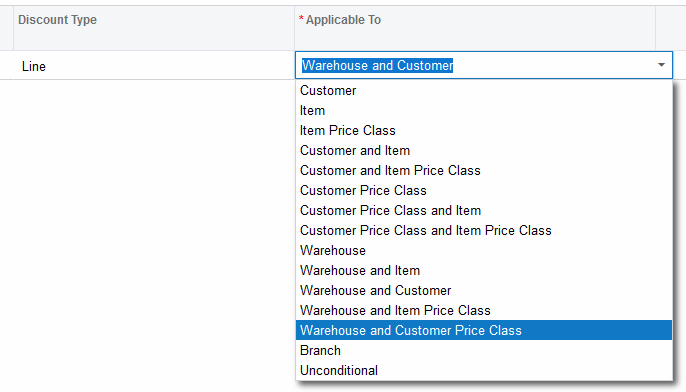
Thanks for the quick reply the first two options I had thought of and are not ideal but I have been trying to figure out your suggestion from the 3rd choice.  I had to turn on Discounts to get it going but I still cant figure out what you mean by “Set the price of the line for the location”  I’m not sure where I would do that. 

My goal is to have work on project 1001003 to bill travel per hour at 65.40 vs 66.30 per hour which is the rate for the other regions.

See my options below on form AR209000. 


Forum|alt.badge.img+2
  • Semi-Pro I
  • October 9, 2021

I meant, set the price for that customer in the sales pricing screen. Sales Price Worksheet.