Answer

Time Approvals

  • October 30, 2020
  • 4 replies
  • 321 views

Forum|alt.badge.img

In the Time Activities Approvals Screen, can you approve time for more than one employee at a time?

Best answer by BenjaminCrisman

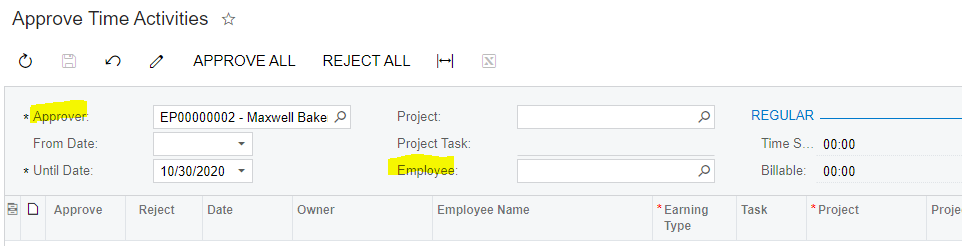
Hi @jvinski71 Using the Approve Time Activities screen you are able to approve multiple employee’s activities at a time, as long as the Approver is the same and you leave the Employee field empty:

Selecting ‘Approve’ will process the approval for each selected record

4 replies

Olesia Alpeeva
Community Manager
Forum|alt.badge.img
  • Acumatica Support Team
  • October 30, 2020

Yes, Approve Time Activities screen (EP507010) allows approving time for more than one employee at a time. The limitation  here is that the approver who has to approve all these activities must be the same.


BenjaminCrisman
Acumatica Employee
Forum|alt.badge.img+4
  • Acumatica Support Team
  • Answer
  • October 30, 2020

Hi @jvinski71 Using the Approve Time Activities screen you are able to approve multiple employee’s activities at a time, as long as the Approver is the same and you leave the Employee field empty:

Selecting ‘Approve’ will process the approval for each selected record


cmoreland
Semi-Pro III
Forum|alt.badge.img
  • Semi-Pro III
  • April 15, 2021

OK - how do you group employees by approver? 


Forum|alt.badge.img+1
  • Jr Varsity I
  • March 5, 2024

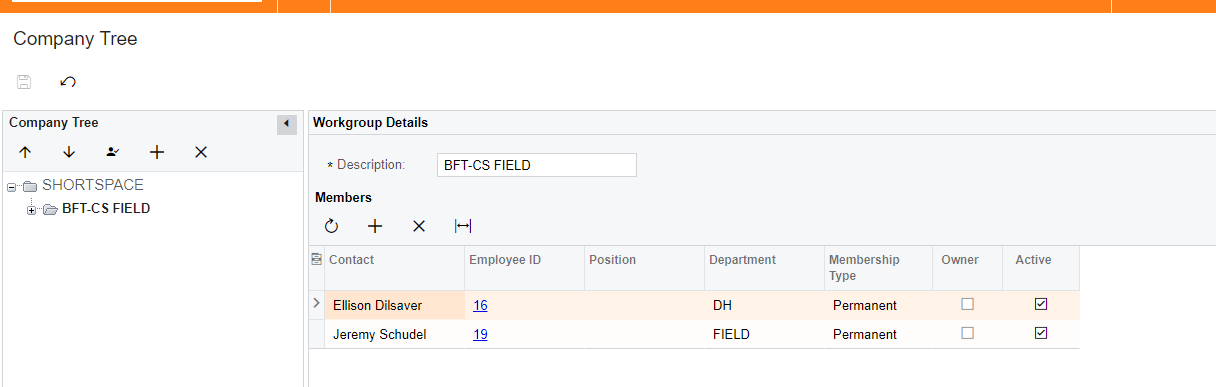
You will need to build Company Tree. Company Tree is in Configuration Workspace.

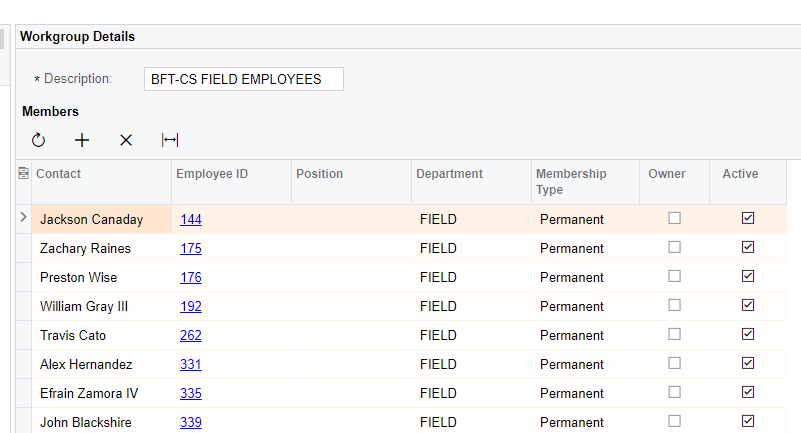
See example below:

Screen shot one represents the employees, which will need to be created and associated with users, that are the approvers.


Screen Shot 2 is the list of employees whose time activity they can approve.