Any idea on how to remove items from the “Create Purchase Orders” Screen?
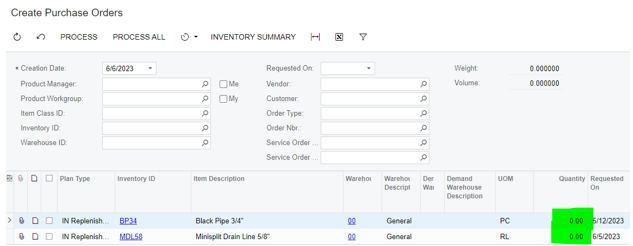
I have 2 items that showed up from inventory replenishment, but for some reason the quantity is 0.00. as you can see here:
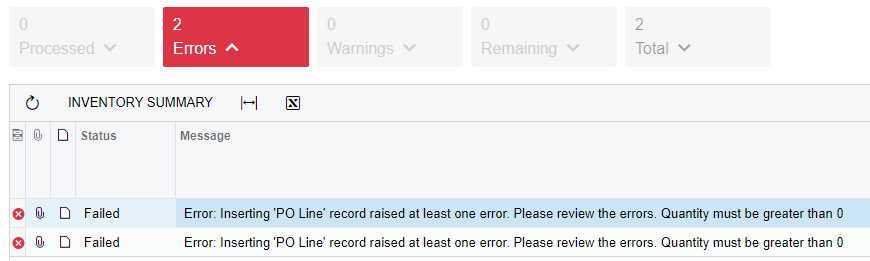
It will not allow me to create a purchase orders to clear it out, because the amount is 0.
It will also not allow me to change the number to anything greater than 0.
I completely cleared the replenishment settings, but that still didn’t work. Any ideas?
Best answer by bzelinski
Hi @rwhetsell77. Nobody chimed in here, but our VAR was able to help me. Here was the solution that worked in the situation that I listed above.:
“Going to “Prepare Replenishment”, select warehouse 00, remove the Me checkbox, remove the Only Suggested Items and select the 2 items. Make sure the Qty to Process is zero and click Process. They are now removed from the Create Purchase Order screen.” - From Laura with Aktion Associates
Hi @rwhetsell77. Nobody chimed in here, but our VAR was able to help me. Here was the solution that worked in the situation that I listed above.:
“Going to “Prepare Replenishment”, select warehouse 00, remove the Me checkbox, remove the Only Suggested Items and select the 2 items. Make sure the Qty to Process is zero and click Process. They are now removed from the Create Purchase Order screen.” - From Laura with Aktion Associates
Hi @rwhetsell77. Nobody chimed in here, but our VAR was able to help me. Here was the solution that worked in the situation that I listed above.:
“Going to “Prepare Replenishment”, select warehouse 00, remove the Me checkbox, remove the Only Suggested Items and select the 2 items. Make sure the Qty to Process is zero and click Process. They are now removed from the Create Purchase Order screen.” - From Laura with Aktion Associates
Thanks for sharing that! If only a few items that makes sense, but if a lot of items then it’s just as easy to create then delete the PO.
Hi @rwhetsell77. Nobody chimed in here, but our VAR was able to help me. Here was the solution that worked in the situation that I listed above.:
“Going to “Prepare Replenishment”, select warehouse 00, remove the Me checkbox, remove the Only Suggested Items and select the 2 items. Make sure the Qty to Process is zero and click Process. They are now removed from the Create Purchase Order screen.” - From Laura with Aktion Associates
Thanks for sharing that! If only a few items that makes sense, but if a lot of items then it’s just as easy to create then delete the PO.
Thanks, Robert. It’s been a while, but if I remember correctly, it would not allow us to create a purchase order with a quantity of 0.00. That was the challenging part.