Question

How to setting SPLIT logic for shipment

  • July 21, 2021
  • 3 replies
  • 690 views

Forum|alt.badge.img+1

Hi all,

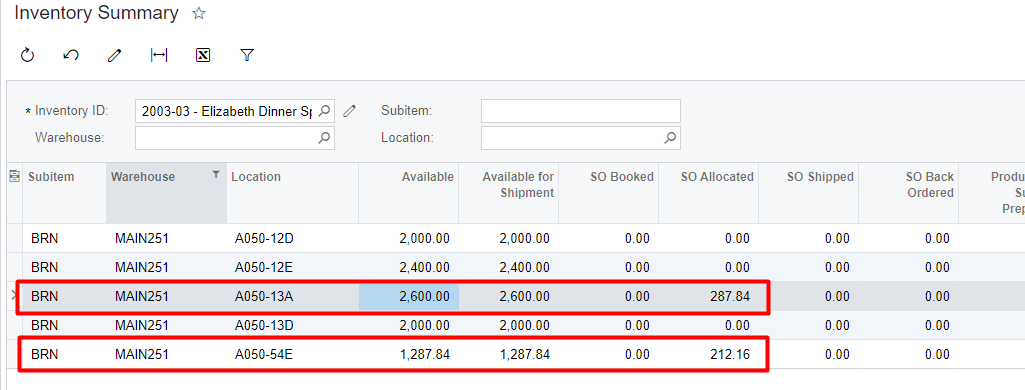
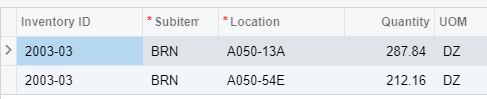
I meet a situation that Acumatica automatically split one order line to two in the shipment. Actually I have enough inventory at A050-13A. I don’t want to split the item. I want to empty the location one by one. Another problem is Acumatica split item on decimal. Can I change any setting to control it?


3 replies

kristianharianja
Semi-Pro I
Forum|alt.badge.img+3

If the system finds multiple locations that have the item, the system selects the location with the highest pick priority (column Pick Priority in Warehouse Location). In this column, 1 indicates the highest priority, 2 the next highest, and so forth to the lowest priority; 0 means that the pick priority is not defined.

It looks like your item is lot/serial tracked which might have FIFO as issue method, so the remaining qty in location A050-13A were received later than the ones in the second location. Also, some quantity in location A050-13A might have been allocated by other transactions so you can no longer allocate it. 


Forum|alt.badge.img+1
  • Author
  • Semi-Pro II
  • July 22, 2021

@kristianharianja  This is what I confused. I can understand pick priority and FIFO. But for both location I have enough inventory in stock.  


The location setting is below.  I’m not use default location for picking and item’s default issue from is empty. 


kristianharianja
Semi-Pro I
Forum|alt.badge.img+3

Interesting, I would open a case to support and it would be great if you post here the resolution provided.