




Yes, I’m having the same problem I had here:
I have the simplest processing screen and I cannot get the delegate to fire.
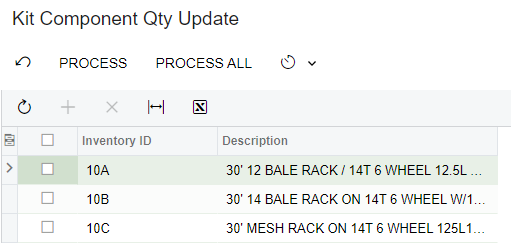
If you select an item and click Process, it DOES SOMETHING, but the delegate does not fire.
When I select the first item in the list and click PROCESS, the screen changes and shows just the item I selected:
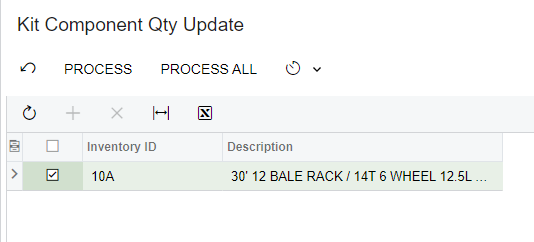
I used a PXProjection and added a selected checkbox to the INKitSpecHdr table
using PX.Data;
using PX.Objects.IN;
using System;

namespace Cummings
{
	[Serializable]
	[PXCacheName("INKitSpecHdrProjection")]
	[PXProjection(typeof(Select<INKitSpecHdr>), Persistent = true)]
	public class INKitSpecHdrProjection : IBqlTable
	{
		#region Selected
		[PXBool]
		[PXDefault(false, PersistingCheck = PXPersistingCheck.Nothing)]
		[PXUIField(DisplayName = "Selected")]
		public virtual bool? Selected { get; set; }
		public abstract class selected : PX.Data.BQL.BqlBool.Field<selected> { }
		#endregion

		#region KitInventoryID
		[PXDBInt(BqlField = typeof(INKitSpecHdr.kitInventoryID))]
		[PXUIField(DisplayName = "Inventory ID", Enabled = false)]
		public virtual int? KitInventoryID { get; set; }
		public abstract class kitInventoryID : PX.Data.BQL.BqlString.Field<kitInventoryID> { }
		#endregion
	}
}
It seems to work fine in pulling the correct Kit items onto the Grid.
This is the Graph:
using System;
using System.Collections.Generic;
using PX.Data;
using PX.Objects.IN;

namespace Cummings
{
	public class ICSKitCompQtyAvailProcessor : PXGraph<ICSKitCompQtyAvailProcessor>
	{
		public PXCancel<Filter> Cancel;
		public PXFilter<Filter> FilterView;

		public PXFilteredProcessingJoin<INKitSpecHdrProjection, Filter,
						InnerJoin<InventoryItem, On<InventoryItem.inventoryID, Equal<INKitSpecHdrProjection.kitInventoryID>>>,
					   Where<InventoryItem.itemType, Equal<Current<Filter.itemType>>>,
					   OrderBy<Asc<InventoryItem.inventoryCD>>> ItemsToUpdateView;

		public ICSKitCompQtyAvailProcessor()
		{
			ItemsToUpdateView.SetProcessDelegate(
				delegate (List<INKitSpecHdrProjection> list)
				{
					ProcessKits(list);
				});
		}

		public static void ProcessKits(List<INKitSpecHdrProjection> kits)
		{
			//do the work here
			string joe = "Joe";
		}

		[Serializable]
		[PXHidden]
		public class Filter : IBqlTable
		{
			#region ItemType
			[PXString()]
			[PXDefault("N")]
			public virtual string ItemType { get; set; }
			public abstract class itemType : PX.Data.BQL.BqlString.Field<itemType> { }
			#endregion
		}
	}
}
I really just want to pull a list of ALL non stock Kit items onto the grid. I needed a Filter to make this work as a PXFilteredProcessing screen so my filter is just the string “N” to limit the InventoryItem table to non-stock items. The join from InventoryItem to the INKitSpecHdr restricts the results to Kit Items.
I put a breakpoint on string joe = “Joe”; but it is never hit.
Why is it that the simplest things I am doing always end up to be the hardest. I am using the same methodology as I’ve always used.
I reset the Cache and restarted the web server.
What did I miss????

