

Answer

LocationExtAddress has not been found in the list of auto-initialized caches

  • February 1, 2023
  • 3 replies
  • 190 views

Forum|alt.badge.img

Getting the below error in one of the customizations. Code Snippet below

Error: The entry form (ID: AR303000, title: Customers) cannot be automated. 
Failed to subscribe the event PX.Objects.AR.XXXExt::LocationExtAddress_CBranchID_CacheAttached in the graph PX.Objects.AR.CustomerMaint. 
The method signature looks like an event handler, but the cache LocationExtAddress has not been found in the list of auto-initialized caches. 
Remove unused event handlers from the code.


 public class XXXExt : PXGraphExtension<CustomerMaint.LocationDetailsExt, CustomerMaint.DefLocationExt, CustomerMaint.DefContactAddressExt,CustomerMaint>
    {

[Branch(null, IsDetail = false, DisplayName = "Shipping Branch", BqlField = typeof(CRLocation.cBranchID), IsEnabledWhenOneBranchIsAccessible = true)]
        protected virtual void LocationDetailsExt_CBranchID_CacheAttached(PXCache sender) { }

}
Best answer by Naveen Boga

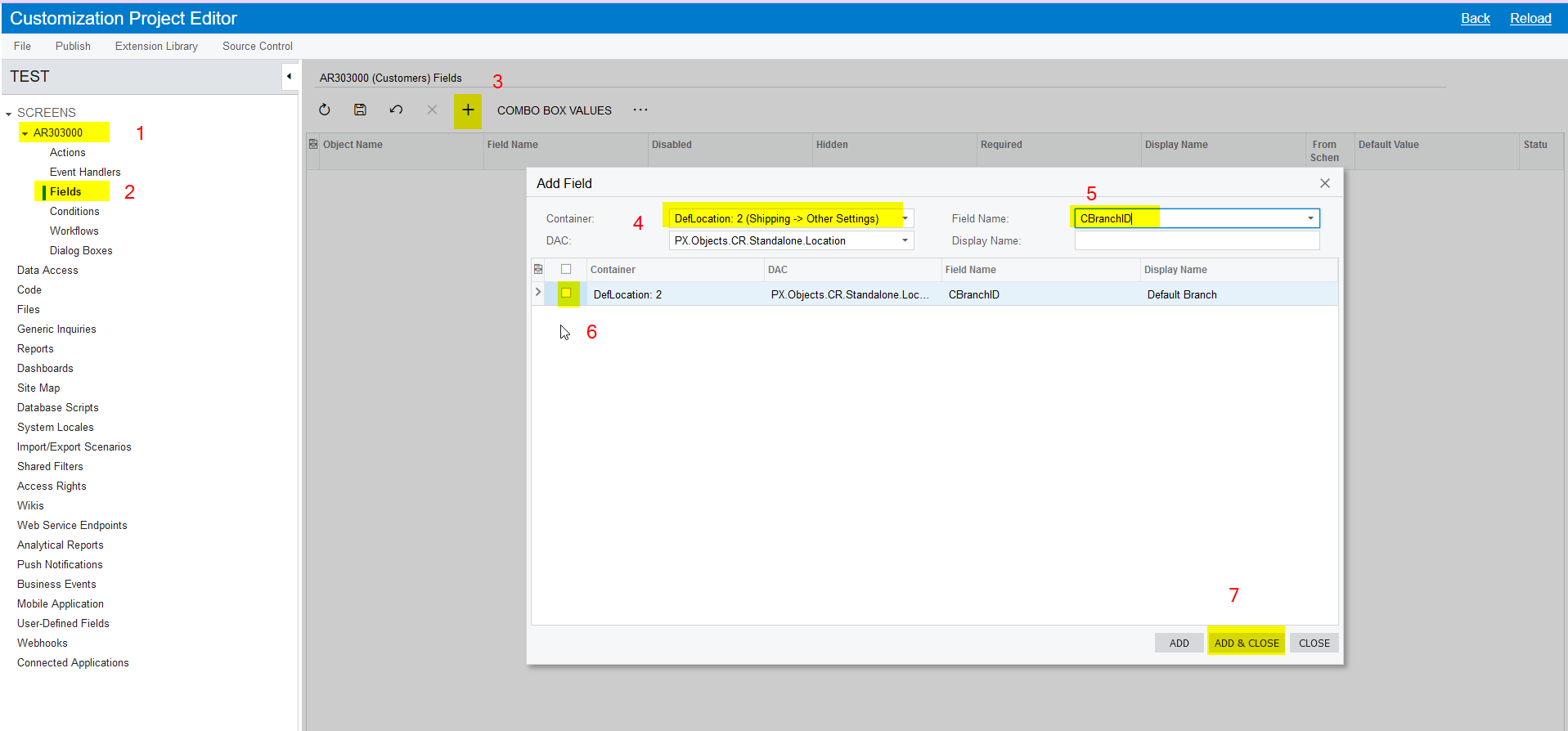
@vibindas  Jini code should work but we can also do this without code level customization i.e. Changing the Display Name for the Default Branch to Shipping Branch


Please find the steps below.

  1. Open the Customization Package
  2. In the Customization Package Editor - Select the Customers screen (AR303000)
  3. Expand the screen
  4. Select the Fields section
  5. Choose the field i.e. CBranch
  6. Change the DisplayName
  7. Publish the package

Please find the screenshot for reference.


3 replies

jinin
Pro I
Forum|alt.badge.img+11
  • Pro I
  • February 1, 2023

Hi @vibindas ,

Can you try like below,

public class CustomerMaint_Extension : PXGraphExtension<CustomerMaint>
  {
    
    [PXDBInt()]
    [PXUIField(DisplayName = "Shipping Branch")]
    protected virtual void Location_CBranchID_CacheAttached(PXCache cache)
    {
    
    }
        
  }


Naveen Boga
Captain II
Forum|alt.badge.img+19
  • Captain II
  • Answer
  • February 1, 2023

@vibindas  Jini code should work but we can also do this without code level customization i.e. Changing the Display Name for the Default Branch to Shipping Branch


Please find the steps below.

  1. Open the Customization Package
  2. In the Customization Package Editor - Select the Customers screen (AR303000)
  3. Expand the screen
  4. Select the Fields section
  5. Choose the field i.e. CBranch
  6. Change the DisplayName
  7. Publish the package

Please find the screenshot for reference.


Forum|alt.badge.img
  • Author
  • February 1, 2023

thanks all, issue resolved....


