

Solved

How to stop showing negative initial value in Auto Increment Identity Field

  • September 26, 2023
  • 3 replies
  • 201 views
  • Translate All

Forum|alt.badge.img+1

Hi all,

I have defined a key field in my newly created DAC as follows

#region RefNbr
 [PXDBIdentity(IsKey = true)]
 [PXUIField(DisplayName = "Ref Nbr")]
 public virtual int? RefNbr{ get; set; }
 public abstract class refNbr: PX.Data.BQL.BqlInt.Field<refNbr> { }
#endregion


This is how I defined it in DB Script

RefNbr INT NOT NULL AUTO_INCREMENT UNIQUE,


In my Screen it shows Like this initially before record is saved. But After it is saved it shows the actual RefNbr like (1,2,3….)
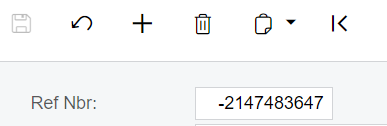
 

How can I stop showing this as a negative value. Can I show that as <New> instead of this negative value before saving the record.


Thanks

Best answer by darylbowman

In most Acumatica screens, you won’t see the primary key field. You will instead see the substitute key. BAccount.AcctCD instead of BAccount.BAccountID, for instance.

This is another option.


An overload of additional info here.

View original

3 replies

Forum|alt.badge.img+8
  • Captain II
  • September 26, 2023

 You might try something like this:

protected virtual void _(Events.FieldSelecting<DAC, DAC.theField> e)
{
DAC row = e.Row;
if (row is null) return;

if (row.TheField == null)
{
e.ReturnValue = "<NEW>";
}
else
{
e.ReturnValue = row.TheField;
}

}
Translate

darylbowman
Captain II
Forum|alt.badge.img+17

In most Acumatica screens, you won’t see the primary key field. You will instead see the substitute key. BAccount.AcctCD instead of BAccount.BAccountID, for instance.

This is another option.


An overload of additional info here.

Translate

Forum|alt.badge.img+1

@Django @darylbowman  Thank you so much for your responses. Showing <New> was not succeeded,  I had to go with substitute key option.


Translate

