

Answer

How to add a Customer Selector Field at Line level on from the Invoice Screen

  • June 13, 2022
  • 6 replies
  • 724 views

Forum|alt.badge.img

Hello! I would like to add a selector field on the Invoice line where a user can select any customer they need to. For example from Receivable,  Invoice and Memo Screen, I would like to select my customer from my header then have the flexibility of selecting various customers at from the lines. Link each line to a to a unique customer. This is just a statistical field BTW.

Best answer by Naveen Boga

Hi @ViweM  We need to have small customization to do this. Here is the code for reference.

Also. attached screenshot and customization package for reference. You can deploy this package to your instance and verify.

Customization: Line level Customer ID has defaulted to the Header Customer ID, and if required we can the Line level Customer ID
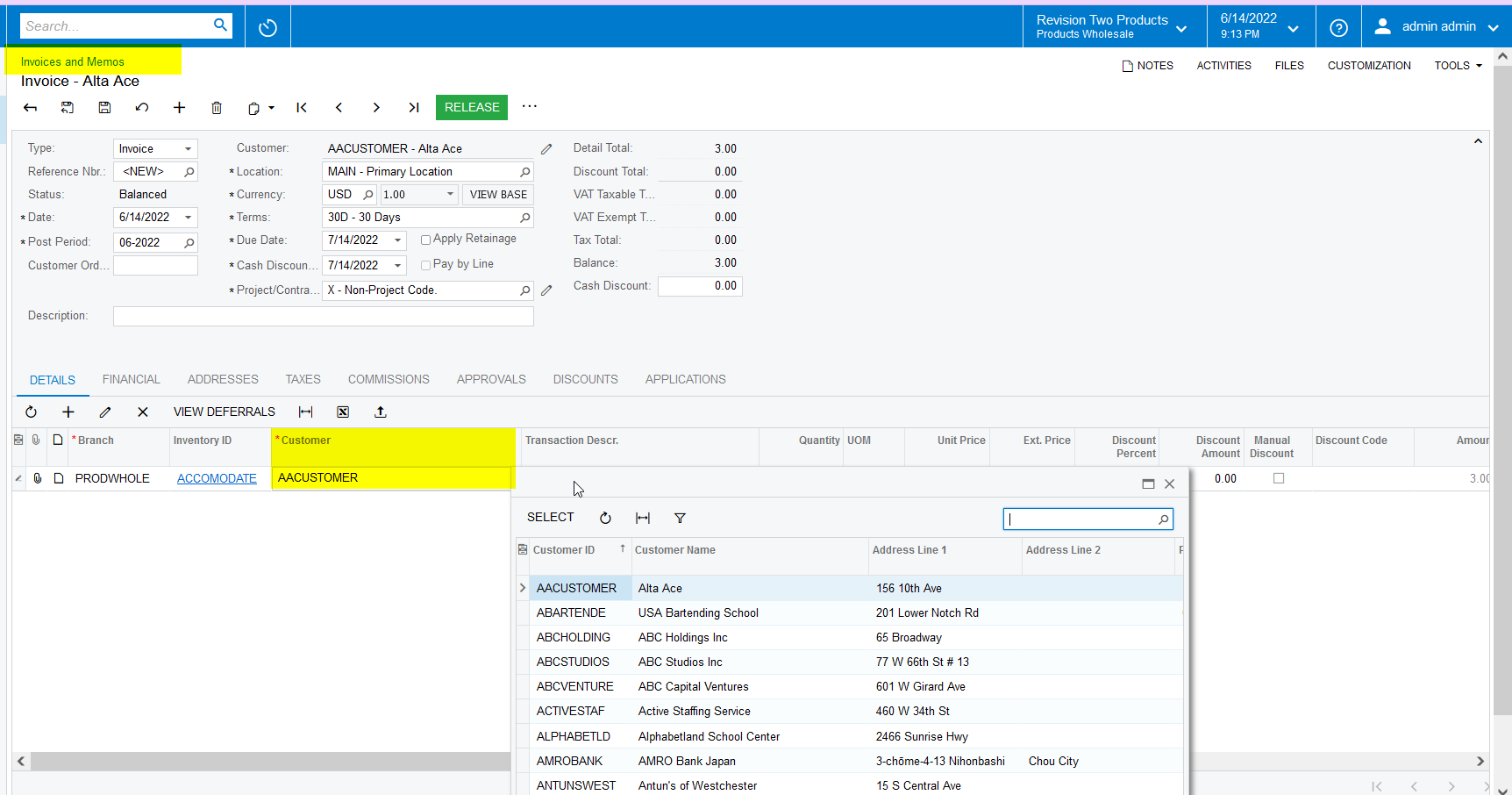


DAC field

 public class ARTranExt : PXCacheExtension<ARTran>
{
[PXUIField(DisplayName = "Customer ID")]
[PXDefault(typeof(ARInvoice.customerID))]
[CustomerActive]
public int? UsrCustomerID { get; set; }
public abstract class usrCustomerID : PX.Data.BQL.BqlInt.Field<usrCustomerID> { }

}

 

6 replies

Naveen Boga
Captain II
Forum|alt.badge.img+19
  • Captain II
  • Answer
  • June 15, 2022

Hi @ViweM  We need to have small customization to do this. Here is the code for reference.

Also. attached screenshot and customization package for reference. You can deploy this package to your instance and verify.

Customization: Line level Customer ID has defaulted to the Header Customer ID, and if required we can the Line level Customer ID


DAC field

 public class ARTranExt : PXCacheExtension<ARTran>
{
[PXUIField(DisplayName = "Customer ID")]
[PXDefault(typeof(ARInvoice.customerID))]
[CustomerActive]
public int? UsrCustomerID { get; set; }
public abstract class usrCustomerID : PX.Data.BQL.BqlInt.Field<usrCustomerID> { }

}


Forum|alt.badge.img
  • Author
  • Freshman II
  • June 15, 2022

The customization package worked perfectly, thanks a @Naveen


Naveen Boga
Captain II
Forum|alt.badge.img+19
  • Captain II
  • June 15, 2022

Most welcome @ViweM 


Forum|alt.badge.img
  • Author
  • Freshman II
  • June 15, 2022

Hi Naveen

I seem to have an issue, I tried adding a new custom column on the screen on the same customization package but I’m getting a conflict error. I even tried to add it through a separate customization package but I get the same error, I’m adding the new through the front end.

this is the error : 

Conflict control ID:phG_tab_Items#0_grid_Levels#0 from page ~/pages/ar/ar301000.aspx

Forum|alt.badge.img
  • Author
  • Freshman II
  • June 15, 2022

I actually changed levels of customization projects and it worked😊 no need to worry


Naveen Boga
Captain II
Forum|alt.badge.img+19
  • Captain II
  • June 15, 2022

Yeah. Thanks for the update. :)
