Answer

Custom Processing Screen Dead End--Need help with "Hello World" Template

  • May 6, 2022
  • 3 replies
  • 581 views

We have an existing customization on a Processing Screen tied to a custom Button (T240 went sideways here and never got around to discussing an actual Process button hook), and it works perfectly.

Attempting to move the custom code to the Process button isn’t working-.

In an attempt to troubleshoot, we want to start with a brand new template and see the Process button in action--can’t get this to work.  The new customization can inherit the code fairly easily, but we need a functioning Process button on a Processing screen.

Any hints (or sample code) for a “default template” for a Processing Screen?

Best answer by Naveen Boga

Hi @danoj  Please find the template of the custom processing screen code. hope this helps!


public class BulkSOProcess : PXGraph<BulkSOProcess>
{
public PXCancel<MyFilterDAC> Cancel;
public PXFilter<MyFilterDAC> Filter;
public PXSelect<LogDAC> SSaaSLogView;

[PXFilterable]
public PXFilteredProcessing<SOOrder, MyFilterDAC> MyProcessView;


#region Constructor

public BulkSOProcess()
{
MyProcessView.SetProcessCaption(MyConstants.Process);
MyProcessView.SetProcessAllCaption(MyConstants.ProcessAll);
MyFilterDAC currentFilter = this.Filter.Current;
MyProcessView.SetProcessDelegate(
delegate (List<SOOrder> list)
{
GetOrders(list, currentFilter);
});
}
#endregion

public static void GetOrders(List<SOOrder> list, MyFilterDAC currentFilter)
{
BulkSOSSaaSProcess graph = PXGraph.CreateInstance<BulkSOSSaaSProcess>();
graph.ProcessOrders(list, currentFilter);
}

public virtual void ProcessOrders(List<SOOrder> list, MyFilterDAC currentFilter)
{
if (list.Count <= 0) return;

if (currentFilter != null)
{
foreach (SOOrder currentOrder in list)
{
try
{
//logic here
PXProcessing<SOOrder>.SetInfo(list.IndexOf(currentOrder), "Record successfully processed");
}
catch(Exception ex)
{
//log the details if required
PXProcessing<SOOrder>.SetError(list.IndexOf(currentOrder), ex.Message);
}
}

}
}
}

#region FilterClass
[Serializable()]
[PXCacheName("MyFilterDAC")]
public partial class MyFilterDAC : IBqlTable
{
#region FromDate

[PXDate()]
[PXDefault(typeof(AccessInfo.businessDate), PersistingCheck = PXPersistingCheck.Nothing)]
[PXUIField(DisplayName = "From Date (Order)")]
public virtual DateTime? FromDate { get; set; }
public abstract class fromDate : IBqlField { }

#endregion

#region TODate

[PXDate()]
[PXDefault(typeof(AccessInfo.businessDate), PersistingCheck = PXPersistingCheck.Nothing)]
[PXUIField(DisplayName = "To Date (Order)")]
public virtual DateTime? TODate { get; set; }
public abstract class tODate : IBqlField { }

#endregion


}

#endregion


3 replies

Naveen Boga
Captain II
Forum|alt.badge.img+19
  • Captain II
  • Answer
  • May 6, 2022

Hi @danoj  Please find the template of the custom processing screen code. hope this helps!


public class BulkSOProcess : PXGraph<BulkSOProcess>
{
public PXCancel<MyFilterDAC> Cancel;
public PXFilter<MyFilterDAC> Filter;
public PXSelect<LogDAC> SSaaSLogView;

[PXFilterable]
public PXFilteredProcessing<SOOrder, MyFilterDAC> MyProcessView;


#region Constructor

public BulkSOProcess()
{
MyProcessView.SetProcessCaption(MyConstants.Process);
MyProcessView.SetProcessAllCaption(MyConstants.ProcessAll);
MyFilterDAC currentFilter = this.Filter.Current;
MyProcessView.SetProcessDelegate(
delegate (List<SOOrder> list)
{
GetOrders(list, currentFilter);
});
}
#endregion

public static void GetOrders(List<SOOrder> list, MyFilterDAC currentFilter)
{
BulkSOSSaaSProcess graph = PXGraph.CreateInstance<BulkSOSSaaSProcess>();
graph.ProcessOrders(list, currentFilter);
}

public virtual void ProcessOrders(List<SOOrder> list, MyFilterDAC currentFilter)
{
if (list.Count <= 0) return;

if (currentFilter != null)
{
foreach (SOOrder currentOrder in list)
{
try
{
//logic here
PXProcessing<SOOrder>.SetInfo(list.IndexOf(currentOrder), "Record successfully processed");
}
catch(Exception ex)
{
//log the details if required
PXProcessing<SOOrder>.SetError(list.IndexOf(currentOrder), ex.Message);
}
}

}
}
}

#region FilterClass
[Serializable()]
[PXCacheName("MyFilterDAC")]
public partial class MyFilterDAC : IBqlTable
{
#region FromDate

[PXDate()]
[PXDefault(typeof(AccessInfo.businessDate), PersistingCheck = PXPersistingCheck.Nothing)]
[PXUIField(DisplayName = "From Date (Order)")]
public virtual DateTime? FromDate { get; set; }
public abstract class fromDate : IBqlField { }

#endregion

#region TODate

[PXDate()]
[PXDefault(typeof(AccessInfo.businessDate), PersistingCheck = PXPersistingCheck.Nothing)]
[PXUIField(DisplayName = "To Date (Order)")]
public virtual DateTime? TODate { get; set; }
public abstract class tODate : IBqlField { }

#endregion


}

#endregion


  • Author
  • Freshman I
  • May 6, 2022
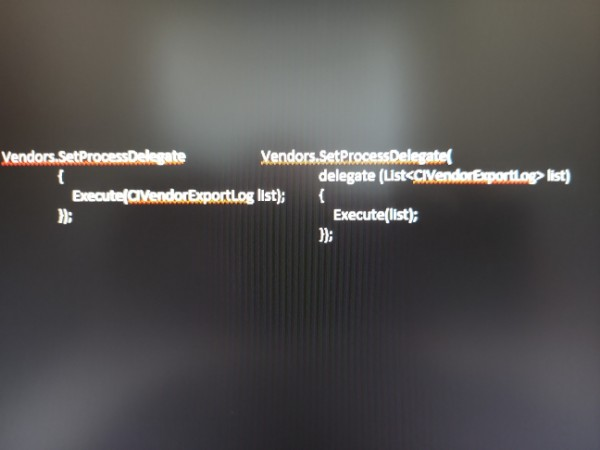
Found it!  Code on the left is the old style.  Code on the right is what fixed it


  • Author
  • Freshman I
  • May 6, 2022

Thanks for the sample code.  By comparing the code sample with what we had, we could see that the delegate methodology update was missed.

Working great now...