Solved

Change Display name

  • Mar 28, 2023 9:11 AM UTC
  • 8 replies
  • 819 views
  • Translate All

Hi All,

Would like to change the Display Name of a Field inside the EP305000 Screen.
In the Screen → Details Tab → Grid: Activities → Description. 

Below is the field which was added,


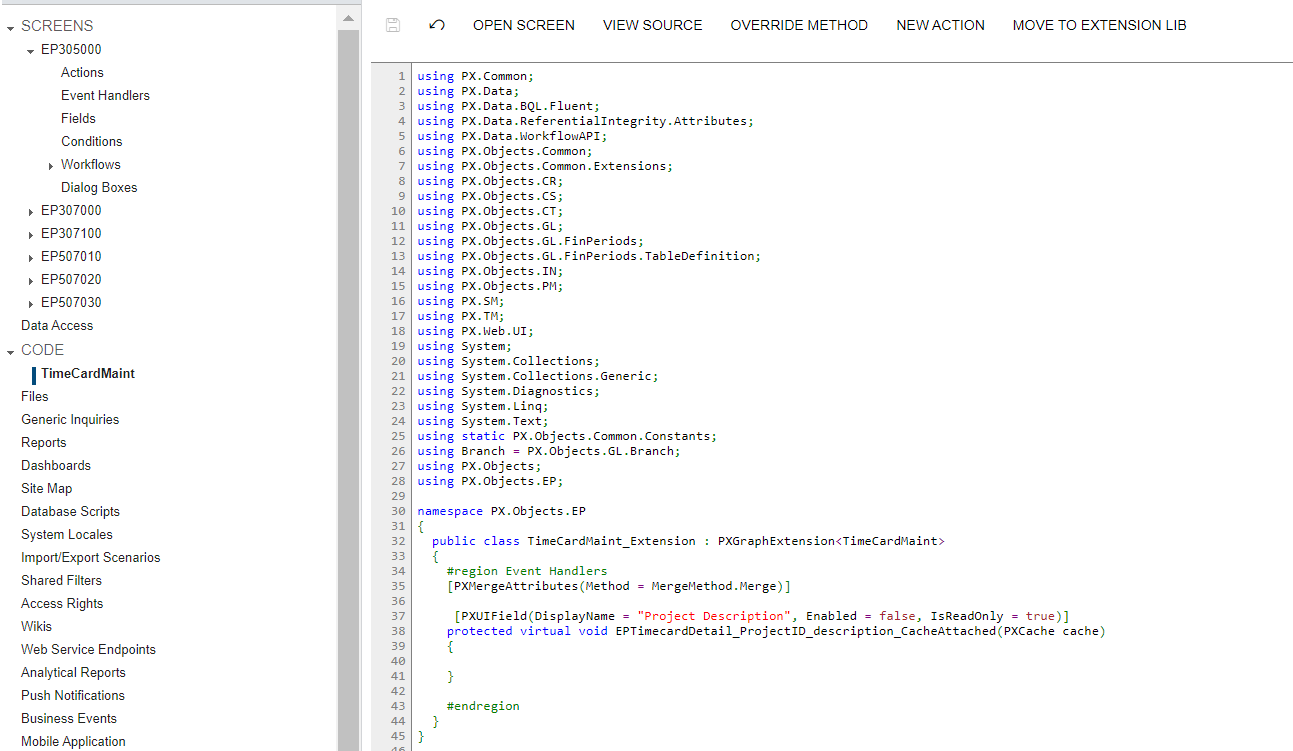
Tried the below format,

https://community.acumatica.com/develop-customizations-288/change-displayname-from-underlying-field-5331


like this by clicking OverRide on Screen Level, but its not working. Please correct me if I’m doing wrong?

 

Best answer by Naveen Boga

Hi, @mice  ProjectID_Description is not related to the EPTimeCardDetail table/DAC.

This field dynamic field coming from Projects screen, when you select the Project ID, will show the project description but is actually not related to EPTimeCardDetail table, hence we could not able to rename this field.

View original

8 replies

Naveen Boga
Captain II
Forum|alt.badge.img+20
  • Captain II
  • Mar 28, 2023 9:20 AM UTC

@mice  Please refer to the below link.


In the below article, please refer to th Change the Display Name of the field section


https://www.acumatica.com/blog/using-acumaticas-low-code-no-code/


Translate

  • Author
  • Freshman I
  • Mar 28, 2023 11:03 AM UTC


@Naveen Boga the field which I selected is not showing in any of the dropdown list below


Translate

RohitRattan88
Acumatica Moderator
Forum|alt.badge.img+5
  • Acumatica Moderator
  • Mar 28, 2023 7:26 PM UTC

@mice  as @Naveen Boga suggested follow the guide to change the display name.

To find the properties of a field, use Customize > Inspect Element OR Ctrl + Alt > Select field.

Looks like field you are trying to customize belongs to the Summary Container:


Translate

RohitRattan88
Acumatica Moderator
Forum|alt.badge.img+5
  • Acumatica Moderator
  • Mar 28, 2023 7:30 PM UTC

sorry, was looking at the wrong tab.

here is it on details tab:


Translate

  • Author
  • Freshman I
  • Mar 29, 2023 5:18 AM UTC

@RohitRattan88, thanks for your response but I want to change the display name of description to “Project Description” not ProjectID.


The one which I required is not showing anywhere in the below list,


Translate

Naveen Boga
Captain II
Forum|alt.badge.img+20
  • Captain II
  • Answer
  • Mar 29, 2023 7:08 AM UTC

Hi, @mice  ProjectID_Description is not related to the EPTimeCardDetail table/DAC.

This field dynamic field coming from Projects screen, when you select the Project ID, will show the project description but is actually not related to EPTimeCardDetail table, hence we could not able to rename this field.

Translate

  • Author
  • Freshman I
  • Mar 29, 2023 8:06 AM UTC

Yes, Understand Thank you @Naveen Boga.

Translate

  • Freshman II
  • Apr 6, 2023 10:38 AM UTC

Hi All,

Would like to change the Display Name of a Field inside the EP305000 Screen.
In the Screen → Details Tab → Grid: Activities → Description. 

Below is the field which was added,


Tried the below format,

https://community.acumatica.com/develop-customizations-288/change-displayname-from-underlying-field-5331

like this by clicking OverRide on Screen Level, but its not working. Please correct me if I’m doing wrong?


Thanks For it Really Helpful.

Translate