Hello everyone,
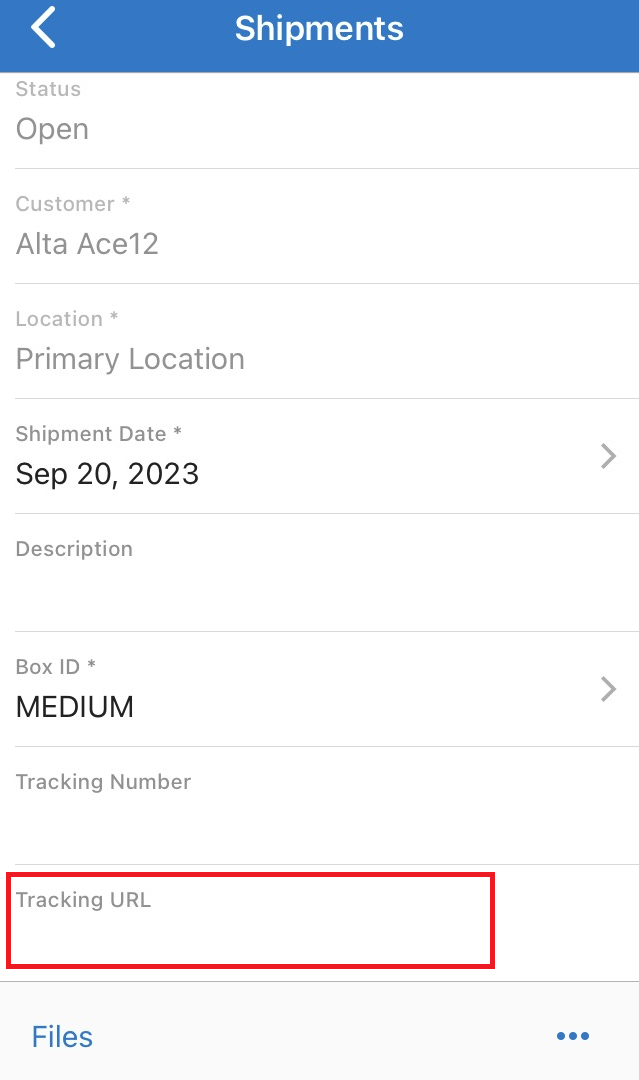
I added the Shipments screen to the mobile app. There are only a few fields that we need in the mobile app. All of the fields show up in the app except Tracking URL. Here is the code:
add screen SO302000 {
  add container "ShipmentSummary" {
    add field "ShipmentNbr"
    add field "Status"
    add field "Customer"
    add field "Location"
    add field "ShipmentDate"
    add field "Description"
    add field "Packages#BoxID" {
      special = AllowEdit
    }
    add field "Packages#TrackingNumber"
    add field "Packages#Carrier"
    add field "Packages#TrackingUrl"
    add recordAction "Save" {
      behavior = Save
    }
    add recordAction "Cancel" {
      behavior = Cancel
    }
    add recordAction "ConfirmShipmentAction"
    attachments {
    }
  }
}
Again, all fields show up except Tracking URL. I also tried changing the name to TrackURL and that didn’t work either. Any ideas?