Question

Incoming documents units of measure

  • Oct 25, 2024 11:46 AM UTC
  • 3 replies
  • 162 views
  • Translate All

We are using incoming documents to process vendor invoices. Our vendors are billing us in a unit of measure that is different from the purchasing unit of measure on the purchase order.  The conversion exists on the items and what we are being invoiced is also the base unit of measure. 

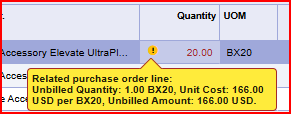
It does not appear that the purchase order is fully reconciling against the invoice, the quantity is still showing unbilled but the amount is 0.00.  The purchase order remains in completed status and not closed.

How does this functionally work and does the system run any nightly updates to correct this?
3 replies

  • Author
  • Freshman I
  • Nov 6, 2024 4:07 PM UTC

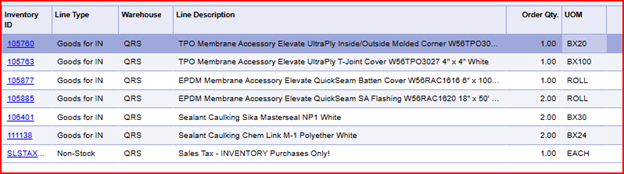
Purchase Order, showing the purchasing unit of measure used to order. 

  • Line 1  (1) BX20
  • Line 2 (1) BX100
  • Line 5 (2) BX30
  • Line 6 (2) BX24


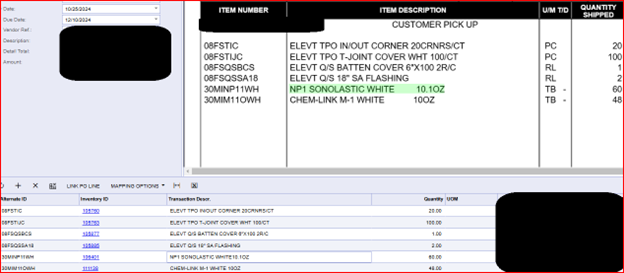
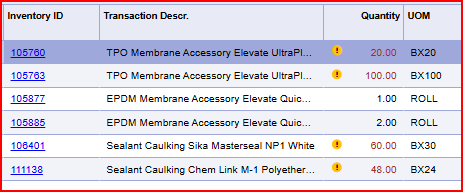
Incoming Documents, vendor is invoicing in the base unit is measure and we are leaving the UOM blank.

  • Line 1 (1) BX20, Invoiced 20 PC
  • Line 2 (1) BX100, Invoiced 100 PC
  • Line 5 (2) BX30, Invoiced 60 TB
  • Line 6 (2) BX24, Invoiced 48 TB

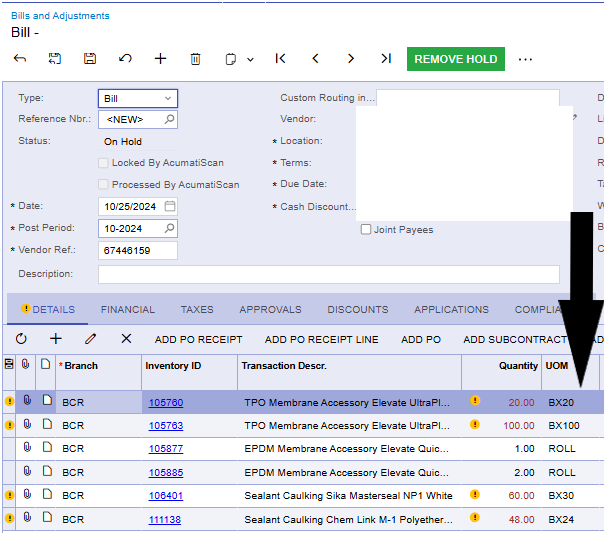
Bills and Adjustments: The unit of measure that is auto applied on this screen is the purchasing unit of measure and is now showing error warnings.  You cannot change the UOM on this screen.

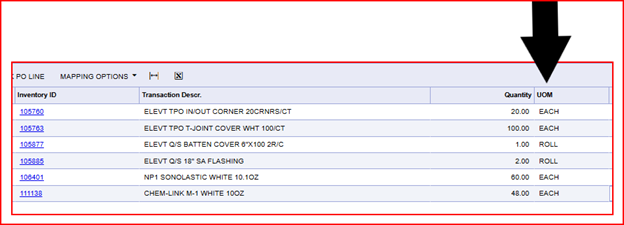
In an attempt to still process I go back to the Incoming Documents screen and call out the specific units on measure on the invoice

However on the Bills and Adjustments screen that still does not help.  Keeps using PUOM...


Translate

Chris Hackett
Community Manager
Forum|alt.badge.img
  • Acumatica Community Manager
  • Jan 22, 2025 12:13 AM UTC

Hi ​@ceannoglesby were you able to find a solution? Thank you!

Translate

  • Author
  • Freshman I
  • Jan 22, 2025 4:10 PM UTC

No, we have not found a solution.

Translate